@mudifan: once your device is in Good cloud you can share it to the mentioned support account for troubleshooting.
I just found an support email and raised the issue some hours ago, still no feedback?!
It‘s night in China. You should wait for at least 24h before starting heavy breathing. 
1 Like
Any news or solution ?
No, some ideas but still not working.
I.e. using the same IMEI as the phone where the SIM is working
Now I sure that this must be a fundamental problem. I tried 3 different SIM with 3 different carrier and all have the same connection problems. All 3 are connecting without any problem in different mobile phones.
Reset and new installation of the firmware makes no difference.
I am very disappointet about that.
This error message is maybe important:
“cat: can’t open ‘/proc/gl-hw-info/sim’: No such file or directory”
Any thoughts on this?
How can I reinstall the modem driver?
Can you grab a log according to the above document and send it to our technical support team or this email [email protected] ? Thanks
Did it go anywhere? Glinet are you doing anything about this problem ? It’s not an isolated problem it affects other devices with a modem. This problem has been around since the release of mudi v1.
No. They took a look on qlog (hope so), but the outcome was, this is a signal and antenna problem… But no, the signal is excellent.
Unbelievable
1 Like
it’s unbelievable, but honestly it doesn’t surprise me too much. Advice bad signal, non-functioning sim, wrong apn settings, change of imei we’ve heard it all, but it doesn’t explain the fact that we put the sim in another router in the same place and it works. We have been dealing with this simply since Mudi v1( we have over 120 units) and over the years this problem just hasn’t moved ANYWHERE. We were kind of hoping that with Mudi v2 this problem would go away. We already have 10 units of Mudi v2. We have already experienced one sim no registered. Fortunately, this time it was enough to restart the modem and the problem was solved, but with v2 we are starting to solve other problems, mainly with wifi and repeater and performance 
I have to apologize to support, they were right. I opened the thing and checked the cables. At first glance, everything was fine, but at one point, hidden under an strip, the plug was apparently not clicked in properly. The plugs are really tricky, I already know them from the Mac.
What can I say, believe it or not, it works.
Mea Culpa!
What I keep asking myself is why were all the signals displayed as excellent? It would never came in mind to me to open the device and check the antenna cables… Anyway, I am happy now
2 Likes
Anyway this is a problem we need to investigate.
1 Like
When the SIM card is not registered, does the signal display 3 to 4 bars? Sorry, it’s been a few days and I kind of forgot.
1 Like
Hi,
It shows no bar. But it was not connected to the
Antenna. The funny thing is that the dashboard shows excellent connection.
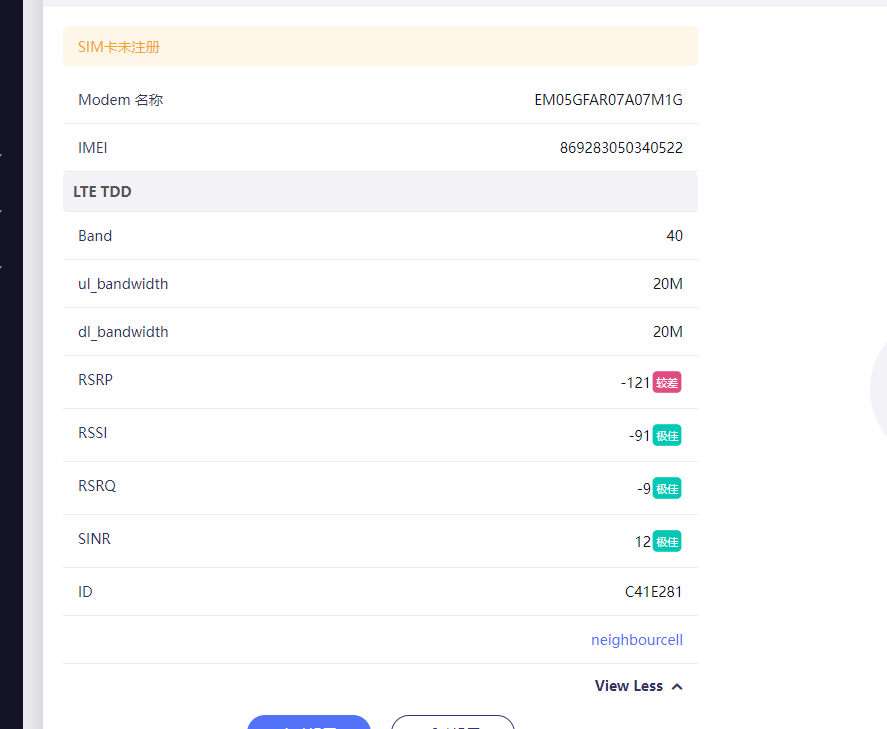
Yes, everything was green and excellent, sometimes fair
1 Like