I’ve got both a strange and unique situation here and I know it. I also know that my comfort level with OpenWRT CLI is fairly basic. Here we go:
I have three GLI devices in the network. A Flint2 at my home in Spain. A Brume2 as an exit node in the US, and a Beryl AX as a travel router. I use Tailscale to connect all of the three. My home ISP has for some reason decided that all of the services associated with GLI are piracy-related and has blocked them - it’s a whole thing. Suffice it to say, this block breaks lots of things. I can’t update the firmware or any of the packages while connected to my ISP. The devices also show as offline in the GoodCloud interface. When traveling, I usually use Tailscale and set my home router as the exit node - it’s quick, easy and all my traffic is protected while I’m on the road conneciting to unfamiliar routers, etc. The Brume is on a low bandwidth connection, so it’s really there as a last resort or in case I need to appear to be on a residential connection in the US.
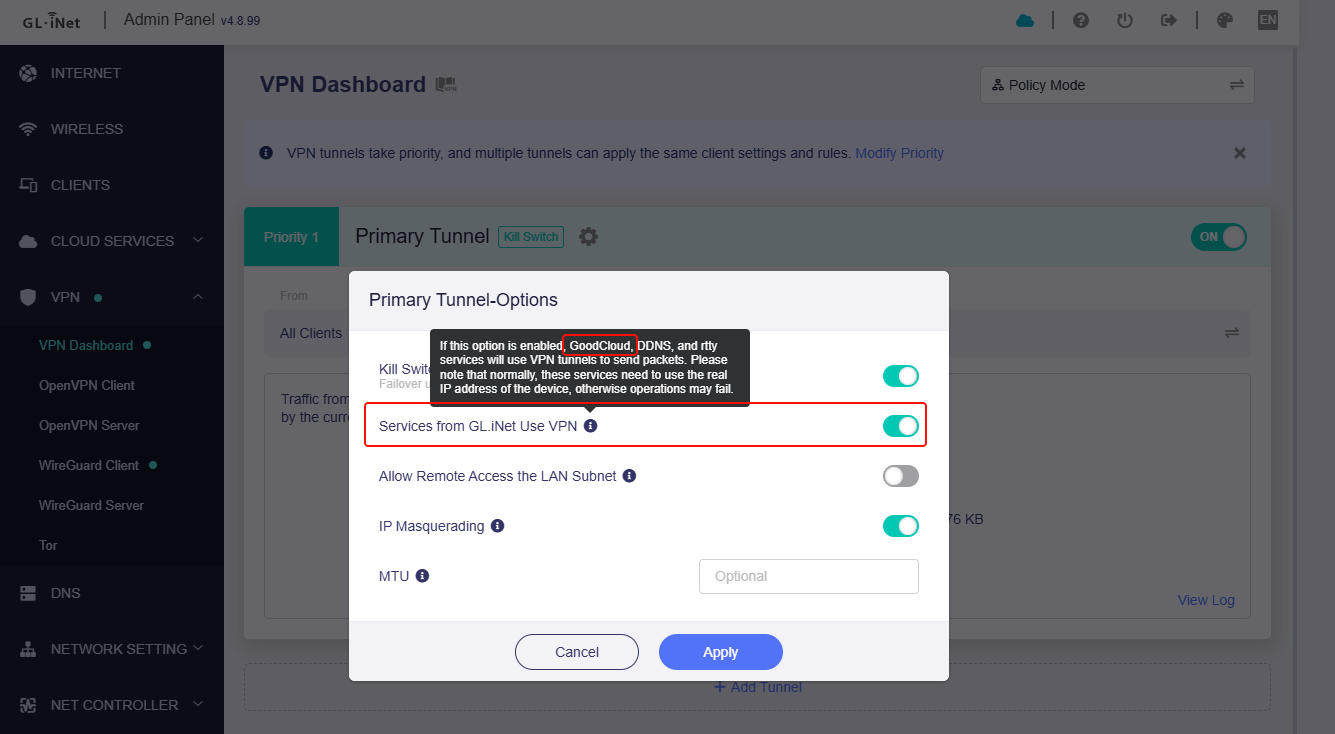
Now that the background is out of the way - Is there a way for me to just send the GLI service connections through a commercial VPN? I’ve got PIA but I really don’t want to deal with sending EVERYTHING through it. I really want to be able to update services without having to resort to connecting the router to my phone hotspot and be able to manage via GoodCloud.
If say you don't want all clients to go to VPN, you can switch policy mode in VPN Dashboard and Specified Devices to select an offline client at will.
In this way, will only GoodCloud uses VPN, and other clients will not use VPN.
Hi Bruce! Thanks for the help. It’s a very silly reason but the gist of it is that one of the sports networks was granted broad powers by the Spanish courts to prevent the unauthorized streaming of football games. My ISP is DIGI and it’s not really their fault as they are required to cooperate according to the court order. You can read a little more here: Update on Spain and LALIGA blocks of the internet
I will give that a try and see how it works.
EDIT: I’m currently traveling, so I’m going to wait until I’m back home in a few days in case something goes sideways with the VPN connection. Sometimes it takes several tries to get everything to connect - again owing to LALIGA. They also sometimes block VPNs for the same reasons.
Yes, Bruce. You’re 100% correct - however, that does not seem to matter to the entity responsible and currently, the courts have sided with the entity.
After experimenting, I have a very interesting situation here. Whenever I am connected to my home ISP, all Goodcloud services remain blocked and I’m unable to update the repository list for applications - regardless of whether the router is connected to PIA VPN in Policy Mode or Global Mode. The situation is the same if I set a Tailscale Custom Exit Node to the Brume node that is visible on GoodCloud. However, as soon as I connect to my phone hotspot via the repeater mode, everything is available.
When I have the VPN or Tailscale connected, my public IP matches (via whatismyip.com) the one assigned by the VPN. I do know that my ISP uses CGNAT but I’m paying for a dedicated IP so that shouldn’t still be a problem.This is where I get confused: If I have the router connected to a VPN in Global mode and GLI services set to go through the VPN, then shouldn’t every single bit of my traffic be encrypted and unblockable?
Then it gets even WEIRDER. If I disable AdGuard Home everything works. Not if I turn off the protection, but if I disable it entirely from the GLI interface. If AGH is enabled, then updating the package lists is not possible (either via SSH or the GLI interface (Applications->Plug-ins->Refresh). I have checked to see if the web address happens to be on a blocklist: (https://fw.gl-inet.com/releases…) and it’s not. I’ve tried whitelisting the domain. I tried running “opkg update” while refreshing the query log in AGH to see if there was another subdomain being blocked that I could whitelist. No new queries even appeared. However, after disabling AGH for a while to test… suddenly the Flint2 is reachable via GoodCloud with no VPN connected - and has been for 12+ hours.
This morning, I was trying to figure out things on the Beryl. Disabling AGH didn’t allow me to get updates initially, but after disabling Tailscale and AGH it did.
All of this leads me to believe that there is some sort of DNS issue at play. I think it’s somewhere between Tailscale and AGH too but I’m not sure. I’ll keep monitoring for a few days and see if everything stays connected to GoodCloud. Then I’ll try rebooting and see what effect that has. Any insight that anyone can offer would be greatly appreciated.
My feeling is the same as yours. The problem seems to point to DNS.
You can change the DNS server of ADG to encrypted DNS and check again.
The ISP seems to be innocent. It should not be that the ISP blocked the traffic of goodcloud.xyz, fw.gl-inet.com and etc., but that the domain name was not resolved.