Having just purchased a Mudi 7 router. I am in Greece having issues with the cellular connections. The 4G and 5G intermittently displays. I have tried downgrading the firmware. Band masking and now setting network type to just 4G. This is working but my download speeds are very slow.
Hi,
Thank you for your feedback. Could you please share the following information to help us check this?
- Which carrier are you using, and is it a physical SIM or eSIM, with a local or roaming plan?
- What firmware version is your Mudi 7 currently running?
- If you test the same SIM in a phone at the same location, is the 4G/5G connection stable, and what download speed do you get?
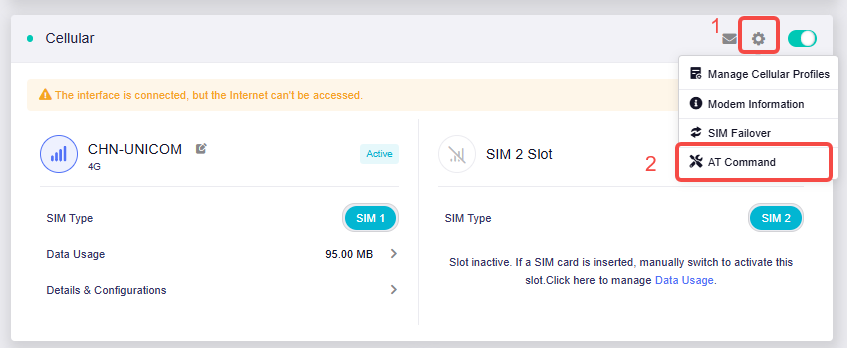
- Please also run the following AT commands individually from the Cellular page’s AT command tool and share the output.
AT+QENG="servingcell"

AT+QSCAN=3,1
The scan may take some time; please wait for it to finish.
Good morning Charles,
It seems wen I am out of the house the Mudi 7 works ok. It is only when I am in a building or at home it cannot register to the network.
Updated to the latest firmware: 4:10:2 beta
Please see output of the 2 AT commands and log file.
Regards,
Allen
+QENG: "servingcell","NOCONN","LTE","FDD",202,01,187E80D,455,1871,3,4,4,1222,-121,-14,-88,11,11,232,- OK
+QSCAN: "NR5G",202,01,630720,455,-126,-17,-29,1,1254A008F,160A,133,78,34,2,-
+QSCAN: "NR5G",202,01,431070,455,-128,-18,-31,0,061FA002B,160A,106,1,17,2,-
+QSCAN: "NR5G",202,01,156510,216,-125,-19,-28,0,064A7C05B,160A,52,28,13,6,-
+QSCAN: "NR5G",202,05,423130,315,-93,-11,6,0,035B5C12F,CF23,106,1,18,10,-
+QSCAN: "NR5G",202,05,154090,134,-88,-11,11,0,035B5C143,CF23,52,28,1,10,-
+QSCAN: "LTE",202,01,1871,455,-125,-18,-1,2,187E80D,1222,75,3
+QSCAN: "LTE",202,05,1451,134,-93,-9,35,119,98107,BD3,100,3
+QSCAN: "LTE",202,10,6200,266,-89,-7,39,121,2D6715,AE38,50,20
+QSCAN: "LTE",202,10,1301,266,-101,-7,27,121,2D670B,AE38,50,3
+QSCAN: "LTE",202,10,300,266,-116,-10,12,118,2D6747,AE38,100,1
+QSCAN: "LTE",202,05,3701,134,-95,-9,33,119,9813D,BD3,50,8
+QSCAN: "LTE",202,01,1700,455,-124,-19,-,1,187E803,1222,100,3
+QSCAN: "LTE",202,01,6400,216,-128,-16,-4,65534,1929F51,1222,50,20
+QSCAN: "LTE",202,01,3050,455,-131,-19,-7,1,187E817,1222,100,7
+QSCAN: "LTE",202,05,6300,134,-90,-6,38,122,98103,BD3,50,20
+QSCAN: "LTE",202,01,3194,455,-135,-22,-11,65534,187E821,1222,50,7
+QSCAN: "LTE",202,01,6400,455,-,-,-,0,187E853,1222,-,20

OK
Hi,
Thank you for the update.
The results show a very weak signal from the currently connected cell, with an RSRP of -121 dBm, and the other cells scanned on the same operator are also weak.
Together with your observation that the Mudi 7 works well outdoors, this suggests that weak indoor cellular coverage may be contributing to the connection issues.
Please try the following:
- Place the Mudi 7 near a window or in a higher, unobstructed position, away from metal objects, and try different locations and orientations to see whether the connection improves.
- If Band Masking is still enabled from your earlier tests, please disable it so the router can select from the available bands.
- If reception remains weak indoors, you may consider compatible external 4G/5G antennas placed near a window.
The Mudi 7 has two TS-9 cellular antenna ports; please refer to our antenna guide for connector details.