Glint — native iPhone / iPad / Mac monitor I built for Mudi 7 (and other GL.iNet routers)

Hi all.

Long-time GL.iNet user here. I've been running various boards over
the years — Mudi, Mudi V2, Slate 7, plus a few others — and I'm a
fan of the lineup. I was one of the Super Early Bird buyers of the
new Mudi 7 and got mine in the first batch.

Living with these routers daily, I kept missing a few things on the
companion-app side:

  • on macOS — a menu-bar pill with live router status, battery state,
    VPN tunnel state, and SIM switching from the laptop screen.
  • on iOS — all of the above, plus Lock Screen and Home Screen widgets
    and push notifications.

The Mudi 7 was the final push for me to actually build that companion
app. It's called Glint, and it's on the App Store today for iPhone,
iPad and Mac under one Universal Purchase. Wanted to share it with
this community first.

App Store: ‎Glint Router Monitor App - App Store

What it does:

  • Live dashboard — battery, RSRP / RSRQ / SINR / RSSI per SIM, active
    uplink, throughput sparklines, ping, tunnels, services, clients.
    Refresh every 5–60 seconds.
  • Lock Screen + Home Screen widgets on iOS — battery ring with a
    configurable centre value (Ping / Battery / Signal / Uplink / Speed),
    rectangular and inline variants, optional activity-chart background.
  • Live Activity that stays current while the phone is locked.
  • macOS menu-bar pill with up to two user-chosen metrics.
  • SMS read + send + reply, plus USSD send (Pro).
  • Multi-router profile picker — switch between Mudi 7 at home and
    Slate 7 in the bag with one tap. iCloud-synced.

How it connects:

Standard SSH using your own ed25519 key. No GoodCloud account, no
cloud middleman — same protocol the GL.iNet web UI uses internally.
Settings sync across devices via iCloud KVS. SSH keys never leave
the device. App Privacy is "Data Not Collected" honestly — no
analytics, no telemetry.

There is an optional companion daemon (Python) that
maintains 24h of metric history and powers push notifications + silent
widget snapshot updates. Free to install; the Pro features it powers
are gated behind the IAP.

Tested against:

  • Mudi 7 (GL-E5800)
  • GL-BE3600 (Slate 7)

Works on Beryl AX, Slate AX, Flint, Mango, Mudi V2 — most probes
degrade gracefully on legacy firmware, but a few (e.g. battery on a
wall-powered AP) won't populate.

Pricing:

Free download with the live dashboard. Glint Pro is a one-time $9.99
IAP that unlocks widgets, push, Live Activity,
multi-router, Speedtest history, SMS (read, send, reply), USSD send,
tunnel / service toggles, router reboot. 7-day free trial.
Family Sharing supported.

I'm the dev — happy to answer architecture questions and to fix probe quirks on whichever
GL.iNet board you run. If something blanks out on your firmware,
post the model + firmware version here and I will look at it.

5 Likes

Ulala :heart_eyes:

That looks pretty nice; I need to check it out!
(Btw: Logo on the webpage is broken)

1 Like

I can confirm that it works on Flint 3e (GL-BE6500) :partying_face:

Since it uses SQLite as the database (at least that is something I suspect after reading a bit of the code), I would recommend monitoring free disk space. The modern routers won't have issues here - but since it's a growing DB file, this might be something to check. I saw that you use tmpfs as a storage path. How often is it written back to flash?

1 Like

Thanks, @admon — confirmed Flint 3e (GL-BE6500) support is useful data. Adding GL-BE6500 to the "Tested" list in theApp Store description and on the site. Appreciate you taking the time to actually install it and dig into the code. On the storage path — you're right, the daemon uses SQLite (WAL journaling). The hot DB lives at /tmp/glintd/state.db in tmpfs during operation, primarily to keep flash writes down. The WAL is checkpointed and the DB file is rsync'd to /etc/glintd/state.db every 30 minutes and on graceful shutdown (SIGTERM trap). Onstartup the daemon hydrates from the on-flash snapshot, so worst-case data loss on a hard power-cut is roughly that flush window. On the growing-DB concern — the 24h ring is the upper bound: records older than 24h are pruned on each insert. After the first day, size stabilizes around 1.5-2 MB depending on probe count and refresh interval. Not unbounded growth. That said — agreed on monitoring free disk space being prudent on smaller flash boards. I'll add a free-space check + a graceful "stop writing if < N MB free" guard in the next release; that's a reasonable safety net I should have had already. If anything else looks off in the code path, please flag it. I'd rather get write-amplification and recovery semantics right while you're looking than have it bite users on legacy boards down the line. Logo on the webpage — fixed, thanks for catching that.

I tested it successfully on XE3000 as well.

However, I encountered an issue by adding another router.

  1. I saved the current endpoint as a preset in "saved routers"
  2. I tried to add a new router - did not work because the app needs to re-run the install wizard first.
  3. I ran the install wizard, but the SSH connection failed. It only worked after I restarted the app. I assume that the app does not handle "adding another router" well at this time and tries to connect by the SSH key or the old SSH password - even if you re-run the install wizard without quitting the app first.

I would suggest that you add a way to have multiple routers at the same time without needing to switch manually between them by the settings menu. So more like the official app, where you can choose the device by using the hamburger menu. The way of adding more routers should be more straightforward. Instead of pulling 192.168.8.1 as the default IP in the setup, maybe you can get the gateway IP directly? I am not sure if iOS allows that.

Furthermore, the app should not show the VPN switch if there is no VPN configured :smile: And sometimes it would be nice to get a message while the app waits for the daemon to do whatever is requested.

Perhaps "Enabling VPN ..." as a big loading screen would be cool, just to understand that it's not the app that is slow, but something is happening for real.


Another question: What is the "wireless" icon in the top menu bar about? It gets green when touching it - but I don't understand what I enabled there :laughing:

1 Like

Thanks again, @admon! XE3000 added to the tested list. The "wireless" icon in the top bar starts the iOS Live Activity (the Lock Screen + Dynamic Island card for the current router). Fair point that this isn't obvious from the icon alone - adding a label or a clearer glyph. On simultaneous use of multiple routers and the add-router flow - both points well taken. I'll think through how to make running multiple routers smoother (closer in spirit to a hamburger-style picker) and how to optimise adding a new router so the wizard doesn't inherit stale auth state. The smaller items (default gateway in setup, hide VPN switch when no tunnel, loading overlay for daemon ops) - agreed, all going in too. Really appreciate you running real flows on different boards.

2 Likes

Hello. I’ve installed the iOS app on my iPhone and the daemon on my Flint 2. Just wanted to ask what’s the name of the service/daemon that was installed and if ever how can I uninstall it/them? Thank you.

Hi @natscape! Thanks for installing Glint. The service is `glintd`. Easiest path to remove it is from the iOS app: Settings –> Router Daemon –> Uninstall. That stops the service and removes all installed files in one tap.

For full transparency, the install touches these paths:

/etc/glintd/ ← daemon directory + state.db

/etc/init.d/glintd ← procd init script

/usr/libexec/rpcd/mudi.glintd ←- ubus handler shim

/usr/share/rpcd/acl.d/glintd.json ←- ubus ACL

If you'd rather clean up manually over SSH (or want to verify what the in-app uninstall did), this matches what the in-app button runs:

/etc/init.d/glintd stop

/etc/init.d/glintd disable

rm /etc/init.d/glintd

rm /usr/libexec/rpcd/mudi.glintd

rm /usr/share/rpcd/acl.d/glintd.json

sed -i '/glintd/d' /etc/crontabs/root

/etc/init.d/cron reload

/etc/init.d/rpcd reload

rm -rf /etc/glintd

The iOS app can stay or be deleted independently - no leftover services on the router after that.

1 Like

Sorry I might be blind but I can’t find the uninstall option? :see_no_evil_monkey:

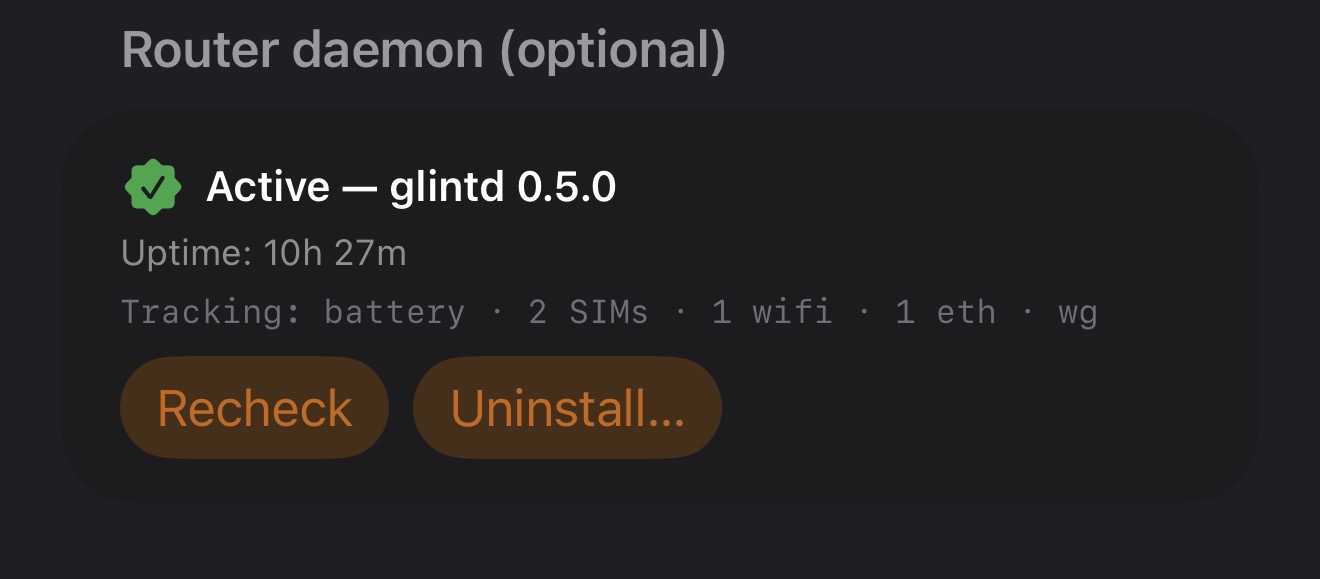
Sorry for the confusion, @natscape - the Uninstall button is in the next release (1.0.3, submitted to Apple for review yesterday). Should clear review shortly and land as an update. Here's a screenshot from my own device showing what the Router Daemon section will look like once it's out:

In the meantime, the manual SSH commands from my previous post above produce exactly the same result — all installed files cleaned up, no leftovers. Apologies for pointing at a button that isn't in your build yet.

The app looks very promising and the UI is very beautifully designed, I’d be playing with this all day if my Flint2 hadn’t gone kaput.

1 Like

Ok just updated to the latest iOS build and see the uninstall option for glintd. Thank you for your hard work.

1 Like

It works good on Flint 3 GL-BE9300

3 Likes

Thanks, @Aashish.007 - appreciate the kind words on the UI. Sorry to hear about the Flint 2 going kaput. When you'vegot a working board again, Glint will be there. Hope it either comes back or you find a worthy successor.

1 Like

Great, thanks for updating. The “Uninstall” button is in Settings –> Router Daemon once the daemon shows as Active.One tap handles the teardown. Apologies again for the timing mismatch last time.

Thanks, @alzhao - appreciate you giving it a try. Adding Flint 3 (GL-BE9300) to the tested list. If anything came across as off or quirky during the install or in normal use, post it here - happy to dig in.

2 Likes

Glint 1.1 is out on the App Store. This release includes:

  • In-app daemon uninstall. Settings → Router daemon → Uninstall removes everything in one tap.
  • Unread SMS badge on the sidebar, dashboard toolbar, and Home Screen widget.
  • VPN tunnel push notifications (Pro + daemon). Fires when a WireGuard handshake goes stale.
  • Multi-router flow improvements — adding a second router no longer requires a full app restart to connect.
  • Plus minor bug fixes across the board.

Daemon update (glintd 0.5.1) available via Settings –> Router daemon –> Recheck.

Quick update for the thread -

Glint for Android is in active development. Targeting a
first build within roughly the next month.

Day-one feature scope: the core dashboard (battery, signal,
SIM, throughput, tunnels, services, clients), push
notifications, multi-router profile picker. SSH-direct,
same daemon, same wire protocol — so a glintd already
running on your router will work for both iOS and Android
clients in parallel, no re-install required.

Out of scope on day one (Apple-only by definition): Live
Activity, Lock Screen widgets. Home Screen widgets on
Android will land too but as a separate post-release pass —
Android widgets are a different surface, I'd rather ship
the dashboard cleanly first.

Looking for testers ahead of release. If you have an
Android phone and a GL.iNet board and want to help shake
out the early builds, drop a note to glint@nakitel.com
I'll add you to the test channel.

1 Like

do you need to be on certain IOS? my app keeps crashing, wont event run? im still on ios 18

Hi @martinp ! No, you don't need a newer iOS for this. Glint supports iOS 17 and later, so iOS 18 is fully covered and shouldn't be the cause of the crash.

Since it crashes on launch, let's get to the bottom of it. Could you help with a couple of things?

  1. Make sure you're on the latest version of the app from the App Store (an older build may have a fixed bug).

  2. Try deleting and reinstalling the app - that clears any corrupted local state.

  3. If it still crashes, please send us the crash report: on your iPhone go to Settings –> Privacy & Security –> Analytics & Improvements –> Analytics Data, find the entries that start with "Glint", and share the most recent one with us.

With that report we can pinpoint exactly what's going wrong. Sorry for the trouble - we'll get it sorted.