Hey there all. New here and new to setting up a VPN on my router (BE9300).
Getting it to work on either OpenVPN or Wireguard was pretty straight forward so no issues there. I did however start to realize that having my VPN provider (NordVPN) set up on my router was not as practical and efficiënt in my situation, which is basic home use, as I thought it would be compared to having a VPN app running on certain devices previously. Switching between locations in regards to streaming services is a hassle and when my phone is outside my network I need to revert to the VPN app regardless. I’d like that control back while still having my a more private network, so started looking in to the possibility of splitting up the devices, and I seem to have found the answer with the policy mode in the VPN dashboard. Problem is though, I’m having quite a difficult time understanding how to set it up, even after having read the how-to doc and fiddling around with it.
Anyone able to help me with this perhaps pretty straight forward set-up?
In summary, I’d like my router to be covered by the VPN client, be it via Open or Wireguard, whichever is the better choice, and i’d like to exclude 3 devices from this on which I’ll be running a VPN app instead.
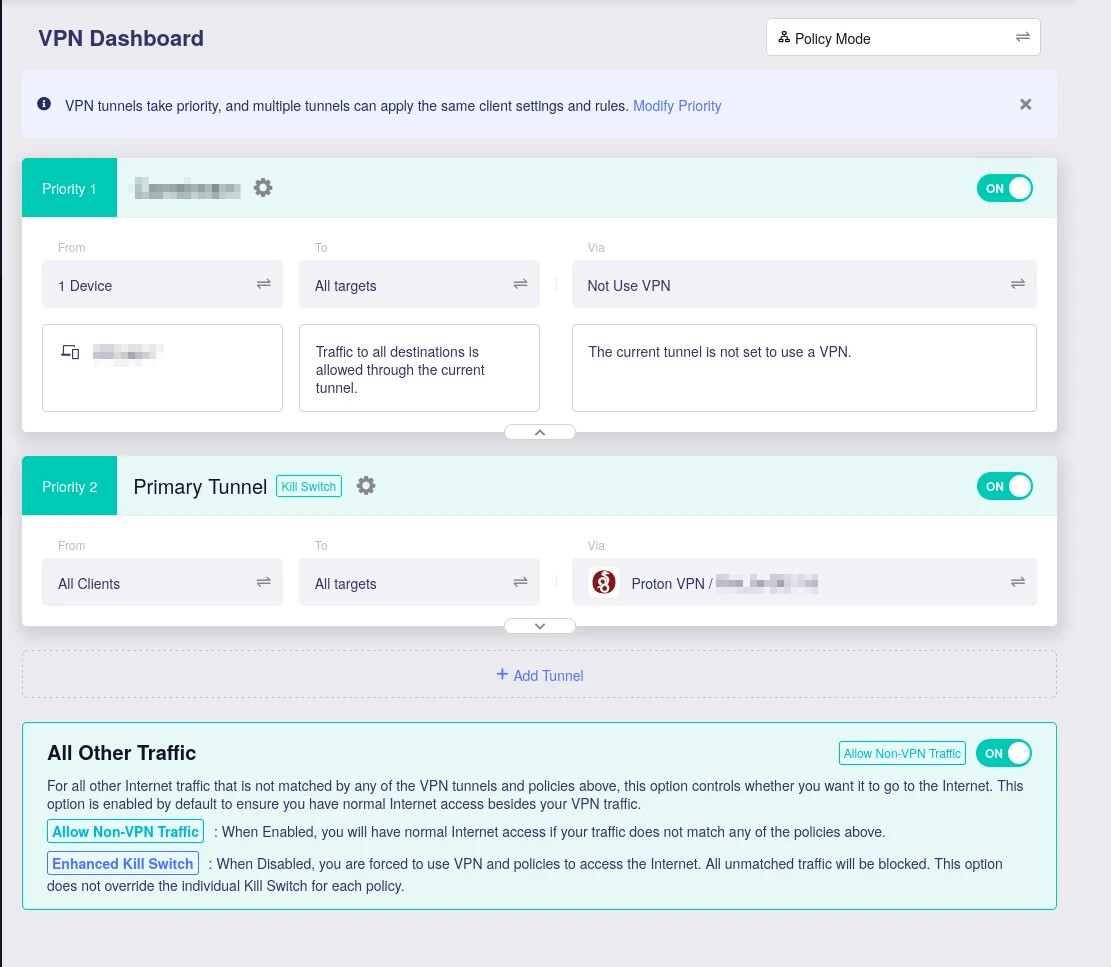
For this scenario you would setup policy based routing and select “ Exclude Specified devices”
Upload your wireguard config / login “Wireguard client”
Go to VPN dashboard and change from global mode to policy mode.
Choose “from devices” and then select “Exclude Specified devices” choose the 3 devices you DO NOT WANT TO BE ON VPN then apply.
To section “all targets”
Via: select your wireguard config that you added on the wireguard client page.
This will route ALL devices via VPN but exclude the 3 devices.
If you want to switch your logic to have ALL devices / traffic go over (WAN - NOT VPN) but make certain clients use the VPN then you would change the from section to “Specified devices” and select the devices that you want on the VPN.
Right, so these were the steps I initially took to set it up with the only difference being that I used OpenVPN because I understood that that might give you a greater chance of it working with Streaming services like Prime Video and HBOmax. After setting that up I went over to dnsleaktest.com on one of the excluded devices to check if it worked and it still gave me the hosting server provider as I got before setting up the exclusions within the VPN settings.
This time however, going through these steps again but choosing to go with Wireguard this time instead, the DNS leak test gives me Google being the ISP upon completion of the test.
Choosing either Wireguard or OpenVPN shouldn't matter, if your OpenVPN config is pointing to the same VPN provider / country then it should still pass the dnsleaktest and show it's results coming from the VPN country, not necessarily the same IPs but should be the country codes.
You could try another OpenVPN config from your VPN provider and see if it works by just changing the last part of the tunnel from the Wireguard config to the OpenVPN config, they both should work correctly (Wireguard and OpenVPN)
I recommend Wireguard where possible as it's more efficient in terms of speed and has less overhead on your routers performance compared to OpenVPN. If you do need to use OpenVPN then I suggest using UDP as the protocol inside the config.
If the OpenVPN still isn't working correctly then it could be a bug as it should work correctly out of the box for either Wireguard or OpenVPN.
Nord VPN uses different credentials to its main user login / password so ensure you are using the correct username / password - this might also be another reason why it wasn't working, maybe the authentication failed?