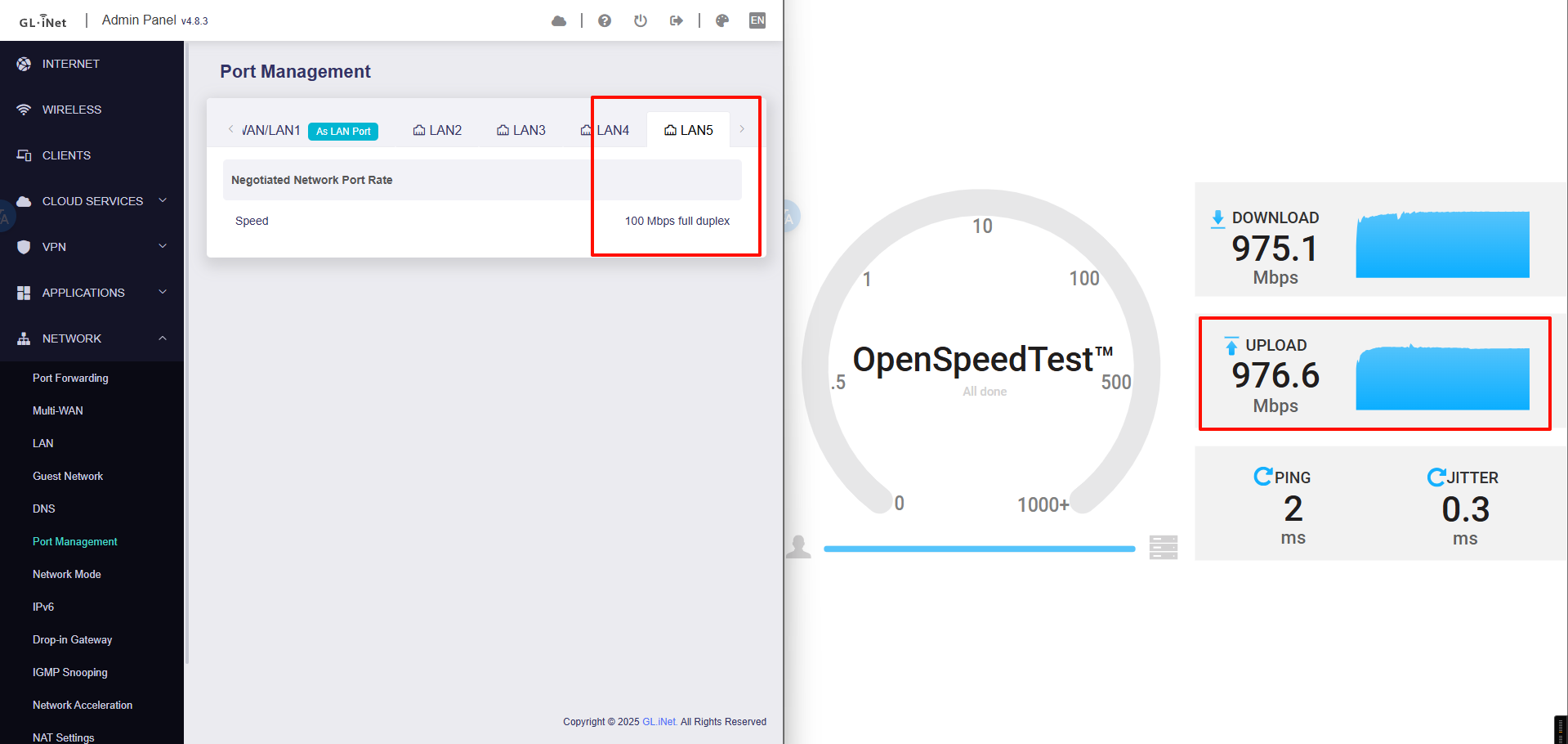
Horrible Upload Speed

Ehi,

i just bought a flint 2, but now i have a big issue over the upload speed. I’ve got a 2.5Gb/ 1GB fiber connection, but the speed has some issue i can’t fix yet.

Here some screen pre/post flint.
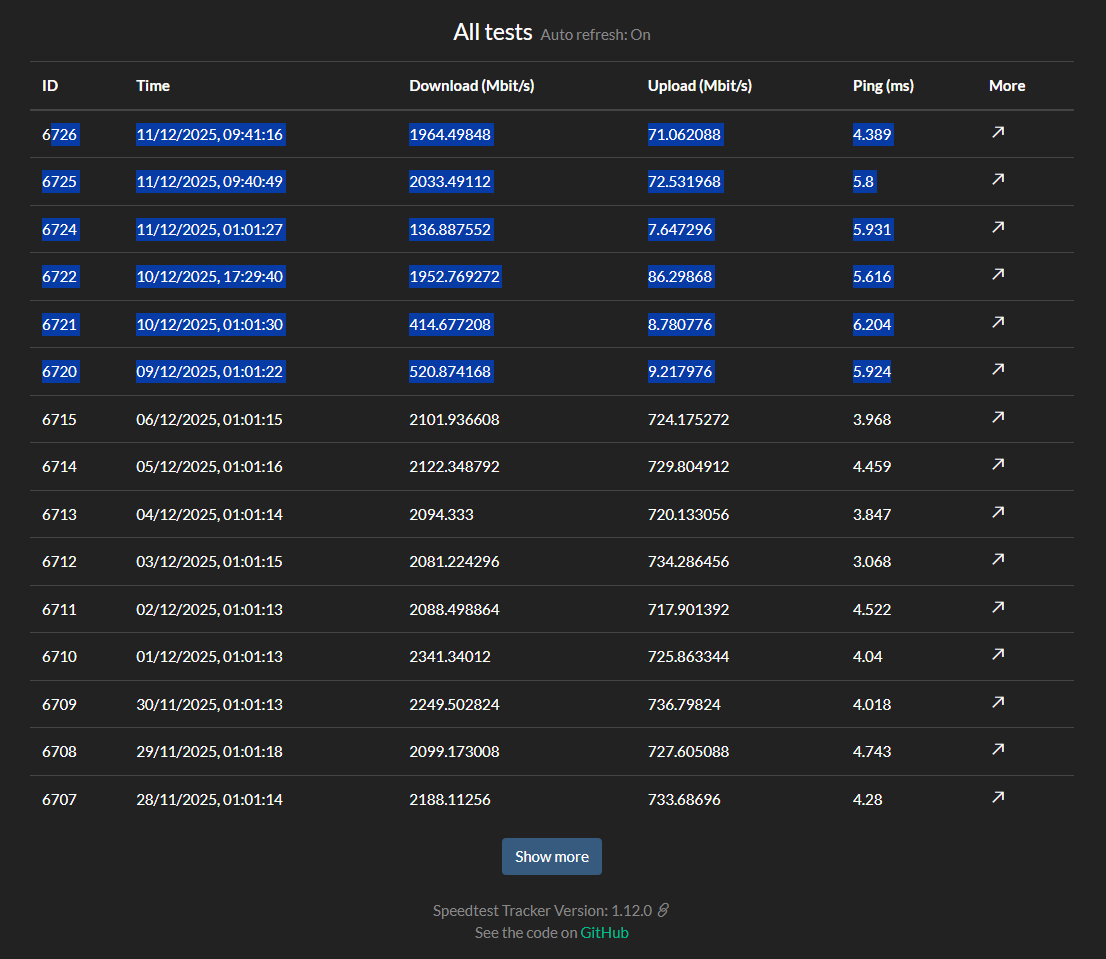
as you can see upload speed has dropped 10x times!

Performing a speed test via ssh gives me this:

  Server: PVDataNet - Milano (id: 42070)
     ISP: Dimensione
Idle Latency:     6.07 ms   (jitter: 0.58ms, low: 5.30ms, high: 6.55ms)
Download:  1292.45 Mbps (data used: 1.8 GB)11.40 ms   (jitter: 2.06ms, low: 5.87ms, high: 53.59ms)
Upload:   688.29 Mbps (data used: 337.0 MB)12.22 ms   (jitter: 0.51ms, low: 6.08ms, high: 13.83ms)

so the problem, as far as i understand, is behind the router.

Google Gemini talks about some “FLOW CONTROL BUG” over the mediatek chipset and my ont (a ZTE unit), and suggest me this:

root@GL-MT6000:~# ethtool -a eth0

Pause parameters for eth0:

Autonegotiate: off

RX: on

TX: on

and turn them OFF via “ethtool -A eth0 rx off tx off”

I don’t try it yet.

There’s nothing special on the router, i set up one new vlan only, both wireguard and tailscale are off, adguard server off, no strange firewall rules, only dhcp and dns exception to the vlan itself. And the hardware acceleration was both on or off during the test.

Sorry for my english :smiley: and thanks for the help!

Hi

Could you clarify the following:

  1. What is the current firmware version of Flint 2 being used?
  2. In the speed test history, which tests were conducted while connected to Flint 2, and which were conducted while directly connected to the main router/ISP modem?
  3. Please run a speed test with hardware acceleration enabled and disabled separately to see if the issue is related to this.

1- The firmware is the 4.8.3

2- The test in the first screenshot were all done on lan side via 2.5Gb

Let me be more clear:

  • This is from flint2 via SSH:
  Server: NetoIP.com - Milan (id: 21272)
     ISP: Dimensione
Idle Latency:     5.97 ms   (jitter: 0.30ms, low: 5.51ms, high: 6.24ms)
Download:  2054.18 Mbps (data used: 2.0 GB)9.68 ms   (jitter: 1.16ms, low: 5.75ms, high: 27.09ms)
Upload:   702.92 Mbps (data used: 344.4 MB)12.83 ms   (jitter: 0.87ms, low: 5.47ms, high: 17.79ms)
Packet Loss:     0.0%
  • This is from my pc, via gigabit connection.
  Server: Dimensione - Milan (id: 9329)
     ISP: Dimensione
Idle Latency:     5.49 ms   (jitter: 0.64ms, low: 4.57ms, high: 6.01ms)
Download:   877.07 Mbps (data used: 957.7 MB)25.04 ms   (jitter: 40.45ms, low: 5.65ms, high: 449.85ms)
Upload:    70.80 Mbps (data used: 71.9 MB)335.62 ms   (jitter: 88.55ms, low: 42.53ms, high: 628.47ms)
Packet Loss:     0.7%

That’s why i suppose the problem is on LAN SIDE. WAN port to my ISP seems perfect.

The interface are in fullduplex at proper speed, there is not random up&down in logs.

3- Nothing visible changes with or without hardware acceleration.

Sorry dunno how to edit.

I test some smartphone and my pc via wireless and guess what.

It works as expected!

  Server: NetoIP.com - Milan (id: 21272)
     ISP: Dimensione
Idle Latency:     5.13 ms   (jitter: 0.93ms, low: 4.81ms, high: 6.63ms)
Download:   486.96 Mbps (data used: 666.5 MB)11.21 ms   (jitter: 4.70ms, low: 6.09ms, high: 36.98ms)
Upload:   582.32 Mbps (data used: 711.9 MB)26.67 ms   (jitter: 10.58ms, low: 6.96ms, high: 98.34ms)
Packet Loss:     0.0%

So…wtf!!! :smile:

Based on our understanding, the current situation is as follows:

  • The PC achieves normal speeds when connected to the 2.5 Gbps LAN port of Flint 2.
  • The same test on a 1 Gbps LAN port results in abnormal upload speeds.
  • Wireless clients do not show any speed issues.

If this is correct, could you please help clarify the following:

  1. Is the same PC and the same Ethernet adapter used when testing both the 2.5 Gbps and 1 Gbps LAN ports?

  2. Please share the PC model and Ethernet adapter model.

  3. Please install OpenSpeedTest on the Flint 2 using the guide provided and run a local speed test. This will help determine whether the issue is caused by LAN-WAN forwarding performance or by the Ethernet connection between the router and the PC.
    Script: OpenSpeedTest Installer for NGINX on GL.iNet Routers

No wait, let me clarify.

  • Lan-to-lan traffic it’s ok. Max speed on every interface if the traffic is routed locally
  • Wan-to-lan dowload speed it’s ok. EVERY device, both wired and wifi reach the max speed

BUT

  • UPLOAD speed Lan-to-WAN:
    • WIFI device it’s ok! WHY?
    • WIRED TRAFFIC is routed in some strange route at less then 100Mbps!

Gotcha!

I found the issue!

My alarm is 10-100 Base T and was plugged on lan4.

Unplugging it fix the problem!

Is this normal? If you plug a 100T device ALL the wired network slow down at his max speed???

This is not normal behavior.

Based on our testing, connecting a 100BASE-TX device should not cause all wired connections on the Flint 2 to slow down to that speed.

We suspect the alarm may be faulty or negotiating the link incorrectly, which could be affecting the Ethernet interface of Flint 2.

Another test.

Alarm in not faulty but sadly something in the flint. I plug another 100T base device, my TV, and the upload speed slow down again. Removing it fix the problem.

It seems all the upload traffic to internet is routed via the slowest interface if you plug a 100T device direcly to the router. If the tv is behind a gigabit switch all is fine! but this is a workaround, not a proper solution.

Have you had a chance to try the following steps?

  1. Restore the device to factory settings and configure only basic internet access to rule out any interference from VLAN or other custom configurations.
  2. If the issue persists, please try firmware version op24-4.8.3 to check whether the same behavior occurs on the open-source firmware.
    Download link:GL.iNet download center
    Upgrade guide:Upgrade - GL.iNet Router Docs 4

Ok, i unplugged all, reset it and…it works now!

Added every cable one by one and then i simply did the basic configuration. Step by step i recreated the previus configuration and now everything is working.

Thanks, we can close!

1 Like