I recently purchased a Flint 2 router. Behind it, I connected a server running Yunohost, which I connected to the second WAN/LAN port and configured as LAN.
To access my instance, I followed the recommendations in the Yunohost documentation on opening ports. So I opened ports 22, 80, and 443 on the GL.inet interface in TCP in the Open Ports on Router section (Security menu) and in Port Forwarding for those same ports to the local IP. Also, since Yunohost requires ports 80, 443, and 22 (i.e., the standard ports), I changed the default ports for GLinet admin, which caused me to lose access to administration from my mobile app (another problem).
After all this, the Yunohost diagnostic tells me that the ports are apparently well configured for IPV4 but not for IPV6. I got confirmation from my ISP that I had full control over opening the ports. So I can't understand where the problem is coming from, hence this question: how can I make sure that my router's ports are open for IPV6 before tackling my local instance?
Port forwarding for IPv6 is not yet supported via the GL UI.
We’ll need to SSH into the router and manually configure the port forwarding rules.
Steps:
Verify that your ISP provides a valid IPv6 address to the router’s WAN port.
Otherwise, any IPv6 port forwarding rules will not function.
You can check this by going to Admin Panel → Internet → IPv6 tab for the WAN interface.
The IPv6 address should typically begin with 20xx.
Thank you for your reply. I started following your procedure and in the IPV6 section of the WAN section, I have an IPv6 address that starts with 2axx. Is this a problem, since you mentioned that we should expect an address starting with 20xx? I am waiting for your reply before continuing with the procedure. Thank you again.
Very well. Another quick question: how can I find out the correct IPV6 address for my local machine (which runs yunohost)? I can see in the device details on the GL.inet admin that it has three. I wonder if this one is “rotating”?
To resolve the issue mentioned in the previous message, I tried to define a reserved address on the machine hosting my Yunohost from the LAN section. However, a warning now appears in my client list with the following message: "This is a randomized MAC address.
Your settings for the client may be invalidated because of the change to the device's MAC address." I don't really understand where the problem comes from, and whether I can ignore it. In the meantime, I still have two IPV6 addresses (one starting with fe80 and the other with fd41).
For your information, AdguardHome is configured and active on my router.
Whether IPv6 addresses rotate depends on the configuration of LAN devices. By default, most devices will rotate their addresses. You can use address reservation to prevent this.
However, if a device has random MAC addresses enabled, its MAC may change after rebooting.
This causes address reservation to fail, which in turn can break port forwarding.
It is therefore recommended to disable random MAC addresses on the machine hosting Yunohost.
I asked about this on the Yunohost forums to set a static IP address. However, all the answers indicate that it is up to the router to manage this via DHCP and not the server itself.
You can use DHCP to manage IP addresses of LAN devices but please first disable the random MAC address feature on your LAN devices.
The purpose of random MAC addresses is to prevent routers from identifying specific LAN devices—meaning DHCP static leases will also become ineffective.
This is a device-specific feature, so it must be modified on the device itself.
If you’re running Yunohost in a Windows virtual machine with the host connected via Wi-Fi, navigate to:
Windows Settings → Network & Internet → Wi-Fi → Toggle "Use random hardware addresses" → Off
If Yunohost is installed directly on the host system, the MAC address is usually stable and does not require any changes. Maybe it was just mistakenly treated as a random MAC address.
That must be it, because it doesn't run on a virtual machine, and with my old ISP everything was fine in that regard for declaring a static lease on it. Can you just confirm that IP address reservation is done on the Glinet interface when AdGuard Home is enabled (without the DHCP feature)? Thank you for all this information. So I'm going back to my initial request to declare port forwarding in SSH. On the SSH machine, which ipv6 address should I use, knowing that it has two?
Currently, the GL UI does not support IPv6 address reservations.
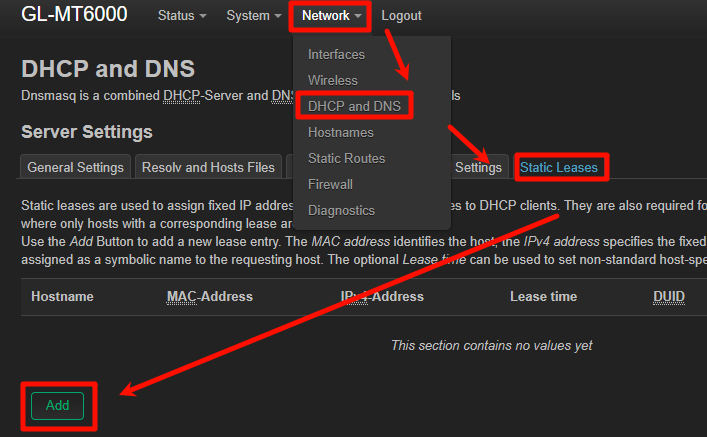
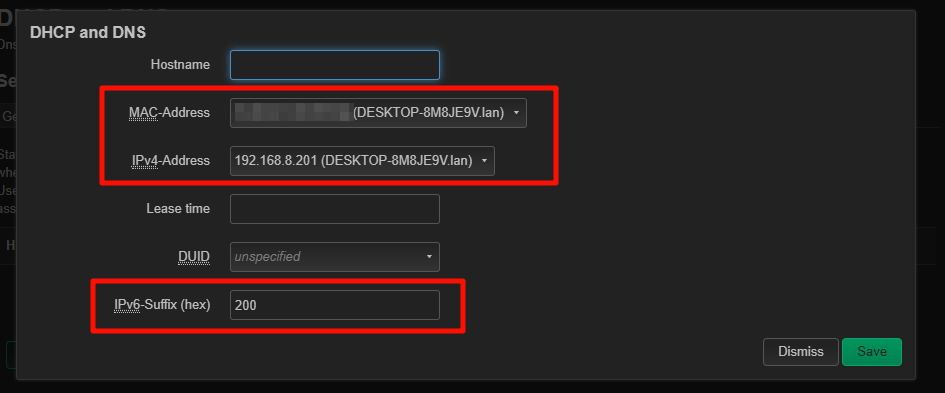
You can configure this using the IPv6-Suffix under Luci → Network → DHCP and DNS → Static Leases.
Everything is perfect! However, for ipv6tables, I entered the address beginning with fe instead of fd because I got the following error: “ip6tables v1.8.7 (legacy): Bad IP address”
In the end, I don't know why, but it doesn't work. Regarding your example command, should I put the IPv6 address between “[” and “]“ (e.g., “[fdxx]:8081”) or should I just put the IPv6 address followed directly by the port with a colon to separate the address from the port?
How can I verify (perhaps from the Luci interface) that the IPV6 port I just configured is working properly? Without testing by directly trying to connect to the public IPV6 with the port, since that's what Yunohost does in its diagnostics.
The most reliable way is still to test the connection externally, for example, by connecting from another network (different WAN) to the router’s public IPv6 address and port.
This ensures that both the forwarding rule and any potential ISP-side IPv6 filtering are properly verified.
Thanks, I'll try that. Are all the ip6tables rules I create reset when the router restarts? I've been doing a lot of testing in all directions and I'm afraid there might be some incorrect things left over that are causing interference.