Any guidance on how to change the time on the LCD panel for the Comet?
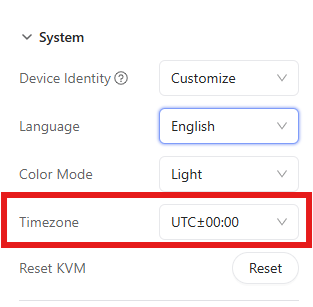
Connect RM10 to the internet, it will sync time automatically.
How please - RM10 is connected via WIFI at all times. Daylight saving isn’t being applied.
OK, so you're asking about time zone settings. Currently, we do not support time zones with daylight saving time. This might change in the future.
Of course ,you can set up by command, you can search how to set up /etc/localtime.
Is there any guide on how to do this?
I think this is quite important feature as most people use it as a clock. And if it has wrong time, then most of Europe has this issue.
I used this menu as shown above by Flora72. And to account for daylight savings, pick a country 1 hour to the right of you - so for London, pick Paris, etc.
This may only need doing twice a year (shift back to your home country during non-summer time) and if there’s a new firmware by then it may only need doing once/twice, ever.
I ran into issue with the time setting thing on my new comet tonight.. it’s not a great process or system.. would be nice if Gli-net made it bulletproof.
Thanks for the feedback. We’ll pass your feedback to our product team and look into improving it in future updates.
Sorry for the inconvenience!