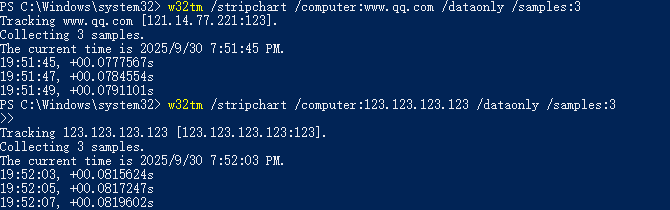
This tutorial will guide you to set the router to NTP (network time synchronization) server and overwrite it to the LAN client's NTP service (Including the LAN port and WiFi clients) .
There is no need to change the NTP server configuration on all clients. As long as the client is connected to the router LAN port or main WiFi, when it needs to sync time, it will be responded by the router's NTP server and provide the time sync service.
date

# If the time is not sync, you can trigger it manually:
/etc/init.d/sysntpd restart
Enable NTP server of router:
uci set system.ntp.enable_server='1'
uci commit system
/etc/init.d/sysntpd restart
Using the help of firewall rules, all NTP requests from listening to LAN clients are redirected to the NTP server of the router itself:
iptables -t nat -A PREROUTING -i br-lan -p udp --dport 123 -j DNAT --to-destination [Router LAN IP]:123

# Please use your router's actual LAN IP. 123 is a fixed NTP service port.
# For example, the router LAN IP of the NTP server is 192.168.8.1.
iptables -t nat -A PREROUTING -i br-lan -p udp --dport 123 -j DNAT --to-destination 192.168.8.1:123
Check whether the firewall rule is added and whether the port is starting to listen:
Limited number of users is utilizing a feature that doesn’t exist? Genius deduction…
It must also require a tremendous amount of resources to add a feature that basically exists and only needs a few lines of code to appear in your GUI. Yet you can afford releasing more and more routers that have almost exactly identical specs and set of features, while people keep asking for the most basic features like this one for years. Talking about priorities. Among which customer satisfaction is nowhere to be seen.
Sincerely apologize. We highly value every customer's requires and suggestions, and we have a complete internal evaluation process for every requires.
The reason for posting this guide is that we treat every request with care, we distilled it into a simple, quick guide so that users can achieve the desired feature with less time cost.
Given the current volume of requests, we have an internal assessment with the PM team, it will continue to monitor the number of user requests.
There is a slight difference: this is a redirection of NTP requests, meaning that no matter what NTP server the client uses, the NTP requests will be redirected by the router to the router’s own NTP server.
Beginning with firmware v4.8.3 , we have made a major upgrade to the system time synchronization component: Chrony (chronyd) is now officially introduced as the default time service, replacing the traditional ntp service (sysntpd), which has shown its limitations under modern security standards.
Please refer to this thread if your router firmware is v4.8.3 or higher: