Okay I work remotely from a country using beryl router and convexxa at home country.
However, I have heard many of the friends that corporate environments are now flagging GL devices.
This got me thinking, that theoretically if a scan was done and 192.168.8.1 detects the keyword “GL INET” in Html it would be troublesome for me for sure.
Is there a way to evade this detection? I don’t want to get fired.
The question more is, why would a corporation put so much afford doing this?
I don't think this detection method makes any sense.
Of course they may forge a html page somewhere manipulating DOM and in someway manage access to scrape this name, you have to realize they also need to know your network ip which can be different, in which I hardly doubt they do this, because it is not a standard, more like what a hacker would do by thinking out of the usual boxes, social engineering.
But in the end it is just a router... no proof of vpn usage, it could be easily a home connection.
Many home routers also come with vpn features so in the end its meaningless at that point.
What they can do however is maybe look into some mac addresses, hop counts, and have global vpn ip lists, this makes much more sense.
So if you vpn to home and at home is your server I don't see much of a problem.
What they also can do is pre install the bussiness laptop, then don't bother lol... if they don't allow it why even trying?, its a recipe to disaster not worth the time.
@xize11 Also FYI and other GL Users using a GL Router itself in corporate policy of top finance firms in usa IS, i repeat IS a grounds for termination. Just so you know.
The logic you describe is extremely flawed and doesn't exist, not with just a scan... So if you know it all which you seem to assume here, I want to ask you kindly please be respectfull to others on this forum.
If the job is that important to you, I would not do this, not with the technical knows how this detection works and even then consider if that worth the risk, probably in my case not.
The last 2 quotes basicly awnsers your question, don't do it, you can ask for help if you can be constructive how they detect it.
Edit
With constructive I don't mean it as a attack, but there are too many variables at stake, it would be reckless for me to just assume some things, you need to learn the network very well to understand the risks.
You can connect your work device to the Guest network. Devices on this network are isolated from the router itself (would not be able to access the 192.168.8.1), but they can still access the internet or forward to VPN tunnel.
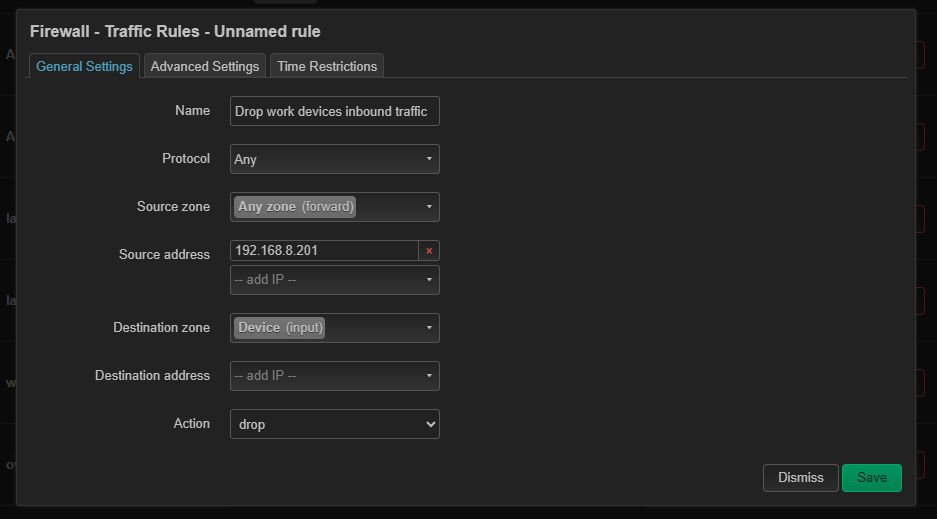
Alternatively, you can achieve a similar result by creating custom firewall rules. Since the exact model was not specified, the MT6000 is used as an example.
Please go to LuCI > Network > Firewall > Traffic Rules and add the corresponding rules.
Thanks for the input. I am thinking I'd just place a tp link router in front of it to evade detection. Also sounds nice having two layers. What do you think? @alzhao and everyone
why would it not? I will output the LAN cable of GL INET device as a WAN input to the TP LINK router and the tp link’s ethernet output as an input to the laptop.
Also in America corporate context of finance institutions, “proof of VPN usage” is almost never required. Plugging in a GL might be proof enough. Feel free to ask any security guy from one of these corporations.
This will not prevent your work laptop from accessing the GL.iNet Admin Panel.
In this topology, the laptop can still access the GL.iNet Admin Panel by visiting 192.168.8.1.
Laptop <-- (192.168.a.x) --> Routers from other brands <-- (192.168.8.x) --> GL.iNet Router
We recommend using the Guest Wi-Fi directly, as devices connected to the Guest Wi-Fi cannot access the GL.iNet Admin Panel.
I am glad I found this post, I configured my LAN port on my travel router to route to the guest network. Anything connected to the wired connection can’t get to the management side of the router. It might be overkill, nothing is wrong with an extra layer of security. Tested at home, going on a work trip to test again before heading overseas in a few weeks.