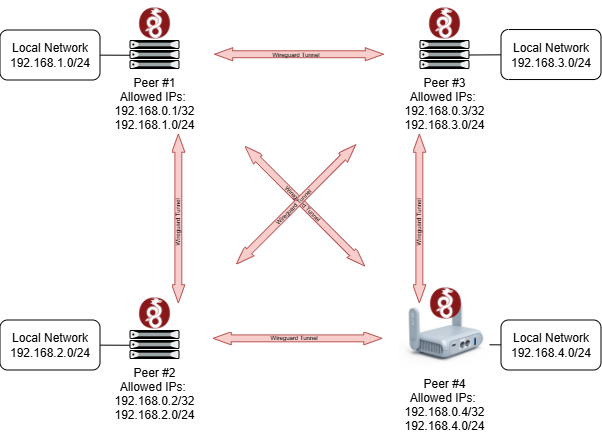
Peers #1/2/3 already exist and I have full Wireguard mesh routing working (including access to their local networks), but I am having trouble configuring my GL.iNET router to join the mesh...
Using the GL.iNET Admin Panel it seems there are two options to configure Wireguard:
WireGuard Client: The problem with this option is that it seems to only support a single peer.
WireGuard Server: Supports multiple peers, but does not appear to support adding the Public Key of a pre-existing peer, nor specifying the peer's Endpoint (since the GL.iNET router will be used as a travelling router I obviously need it to initiate the tunnel connections to the other peers in the mesh).
I have found several discussions (e.g. 1, 2) from a few years ago discussing this use case, but is it really the case that as of 2026 there is still no support for this?!?
As a last resort it appears I can manually define a Wireguard interface in LuCI but then there is no visibility in the GL.iNET Admin Panel...
I've given this a go, but it only seems to work if I define an independent interface for each client. If I use the same Interface settings for all clients, then starting one WG Client disables the others.
In effect, this means I'd have to create 3x tunnels with one client (peer) each, and my GL.iNET router would need 3x IPs in the WG mesh transport, which is not what I want.
As per the diagram I posted, I want a single Wireguard interface with all three peers associated with it. If I set it up using native Wireguard it would look like this:
I've had a similar problem. I have a working site to site, where all devices in site A have access to site B, and vice versa. But if I connect my AX to A, its devices can see A but not B, and if I connect to B, it s devices can see B but not A.
So, with 4.8 I've defined two tunnels, one for site A and one for Site B, with allowed IPs for each site's LAN. Both tunnels work and provide the equivalent to a mesh. But that works only because both sites have public IPs.
At the moment, it appears that the only available option is to configure it through LuCI.
The VPN features in the GL UI are currently focused mainly on client/server (C/S) scenarios, rather than site-to-site (S2S) or mesh-like architectures.
We will collect this request and forward it to the product team for evaluation, to see whether we can better support a wider range of use cases in the future.