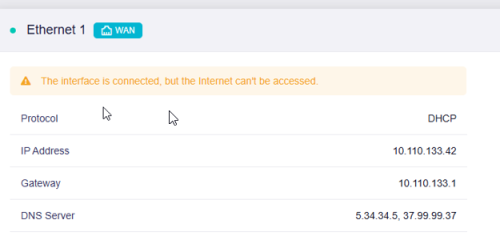
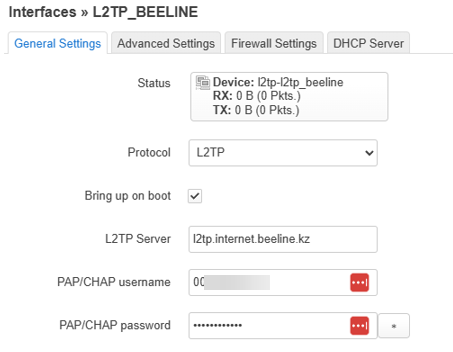
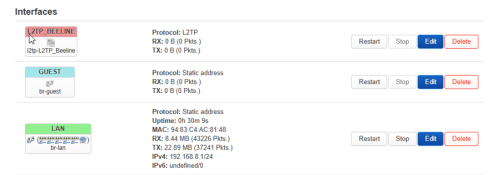
After resetting the router, I cannot connect to the provider; there are errors in the logs.
Firmware Version OpenWrt 23.05.0 r23497-6637af95aa / LuCI openwrt-23.05 branch git-23.236.53405-fc638c8
uci show network | grep beeline
network.beeline=interface
network.beeline.proto='l2tp'
network.beeline.server='l2tp.internet.beeline.kz'
network.beeline.username='0000000000'
network.beeline.password='123456789012'
network.beeline.ipv6='auto'
network.beeline.mtu='1400'
network.beeline.dns='5.34.34.5' '37.99.99.37'
network.beeline.force_link='1'
syslog
Sun Nov 16 22:32:19 2025 daemon.notice netifd: Interface 'beeline' is now up
Sun Nov 16 22:32:19 2025 daemon.info dnsmasq[1]: reading /tmp/resolv.conf.d/resolv.conf.auto
Sun Nov 16 22:32:19 2025 daemon.info dnsmasq[1]: using nameserver 5.34.34.5#53
Sun Nov 16 22:32:19 2025 daemon.info dnsmasq[1]: using nameserver 37.99.99.37#53
Sun Nov 16 22:32:19 2025 daemon.info dnsmasq[1]: using nameserver 5.34.34.5#53
Sun Nov 16 22:32:19 2025 daemon.info dnsmasq[1]: using nameserver 37.99.99.37#53
Sun Nov 16 22:32:19 2025 daemon.info dnsmasq[1]: using nameserver 5.34.34.5#53
Sun Nov 16 22:32:19 2025 daemon.info dnsmasq[1]: using nameserver 37.99.99.37#53
Sun Nov 16 22:32:19 2025 daemon.info dnsmasq[1]: using only locally-known addresses for test
Sun Nov 16 22:32:19 2025 daemon.info dnsmasq[1]: using only locally-known addresses for onion
Sun Nov 16 22:32:19 2025 daemon.info dnsmasq[1]: using only locally-known addresses for localhost
Sun Nov 16 22:32:19 2025 daemon.info dnsmasq[1]: using only locally-known addresses for local
Sun Nov 16 22:32:19 2025 daemon.info dnsmasq[1]: using only locally-known addresses for invalid
Sun Nov 16 22:32:19 2025 daemon.info dnsmasq[1]: using only locally-known addresses for bind
Sun Nov 16 22:32:19 2025 daemon.info dnsmasq[1]: using only locally-known addresses for lan
Sun Nov 16 22:32:19 2025 user.notice kmwan: config json str={ "op": 3, "data": { "cells": [ "beeline" ] } } Sun Nov 16 22:32:20 2025 kern.debug kernel: [ 907.424519] ================kmwan:[config_handle 372]op:3==============
Sun Nov 16 22:32:20 2025 kern.debug kernel: [ 907.431274] [remove_dev_config 174]delete node, interface:beeline
Sun Nov 16 22:32:20 2025 user.notice firewall: Reloading firewall due to ifup of beeline (l2tp-beeline)
Sun Nov 16 22:32:26 2025 daemon.info xl2tpd[4197]: control_finish: Connection closed to 77.74.65.249, port 1701 (No application/session timer expired), Local: 8063, Remote: 29910 Sun Nov 16 22:32:29 2025 daemon.info dnsmasq[1]: read /etc/hosts - 12 names
Sun Nov 16 22:32:29 2025 daemon.info dnsmasq[1]: read /tmp/hosts/dhcp.cfg01411c - 4 names
Sun Nov 16 22:32:29 2025 daemon.info dnsmasq-dhcp[1]: read /etc/ethers - 0 addresses Sun Nov 16 22:32:29 2025 kern.err kernel: [ 917.081430] l2tp-beeline: recursion detected Sun Nov 16 22:32:39 2025 kern.err kernel: [ 927.086744] l2tp-beeline: recursion detected Sun Nov 16 22:32:39 2025 kern.err kernel: [ 927.091023] l2tp-beeline: recursion detected