I’ve just copied your script as is. The Wi-Fi IoT is working fine, while the LAN port still connecting to the main network, getting its IP and not isolating from other devices. Tried other people similar scripts and nothing works. All I need is PORT 4 become a guest LAN with its own DHCP, internet only access and isolated from everything else. Cannot get it to work at all.
My script above sets physical lan port 3 as the IoT port. Which port did you try? 5ut in the script corresponds to physical LAN3.
You said you want port 4 to be a guest lan, do you want it to be the same VLAN as the built in guest wifi?
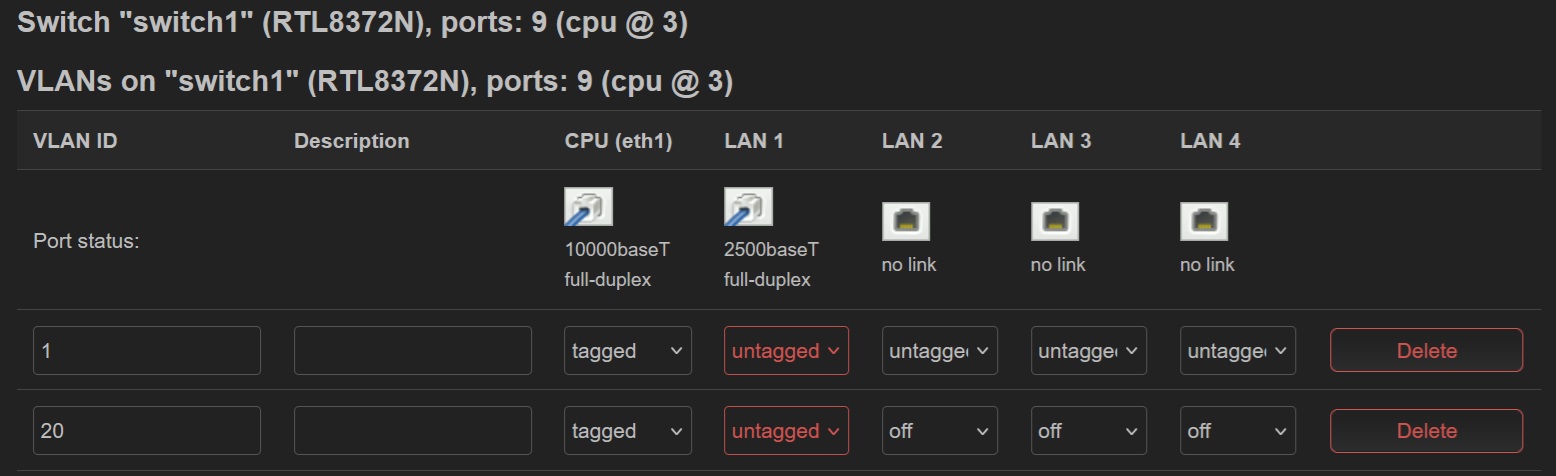
Here's how I did that on mine, as VLAN20, and set to port 4.
uci set network.vlan_guest='switch_vlan'
uci set network.vlan_guest.device='switch1'
uci set network.vlan_guest.vlan='20'
uci set network.vlan_guest.ports='3t 4ut'

uci set network.eth1_20=device
uci set network.eth1_20.type='8021q'
uci set network.eth1_20.ifname='eth1'
uci set network.eth1_20.vid='20'
uci set network.eth1_20.name='eth1.20'

uci set network.guest.ports='eth1.20'

uci set network.guest.ipaddr='192.168.20.1'
uci set network.guest.netmask='255.255.255.0'

uci set dhcp.guest=dhcp
uci set dhcp.guest.interface='guest'
uci set dhcp.guest.start='100'
uci set dhcp.guest.limit='150'
uci set dhcp.guest.leasetime='12h'

uci commit
reboot
Edit: I should add, while separate VLANS will be isolated from each other, like devices on the guest VLAN will be isolated from the main vlan, but devices on each vlan connected over LAN will not be isolated from each other. Multiple devices connected via LAN to the same VLAN, like guest, will not be isolated. This is because traffic on the LAN subnet doesn't pass through the router. If you want devices isolated on the LAN, you have to use multiple VLANs. The reason isolation works with WiFi is it passes through the router.
Can you go to Luci > Network > Switch, then dismiss the warning, then make sure VLAN20 is untagged on LAN1 (which is actually LAN4 on the router) and is the only VLAN untagged on LAN1?
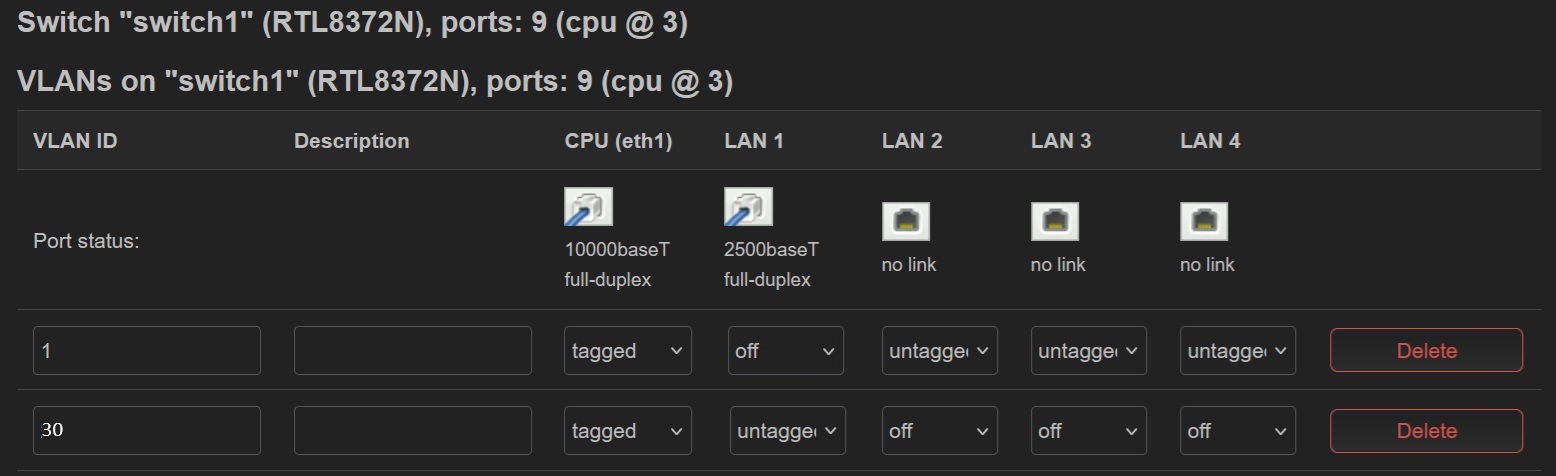
well, that pc cannot get an IP now. here is what I have now
uci set network.vlan_lan.ports='3t 5 6 7'

uci set network.vlan_guestlan='switch_vlan'
uci set network.vlan_guestlan.device='switch1'
uci set network.vlan_guestlan.vlan='30'
uci set network.vlan_guestlan.ports='3t 4ut'

uci set network.eth1_30=device
uci set network.eth1_30.type='8021q'
uci set network.eth1_30.ifname='eth1'
uci set network.eth1_30.vid='30'
uci set network.eth1_30.name='eth1.30'

uci add network device
uci set network.@device[-1].type='bridge'
uci set network.@device[-1].name='br-guestlan'
uci add_list network.@device[-1].ports='eth1.30'

uci set network.guestlan=interface
uci set network.guestlan.proto='static'
uci set network.guestlan.device='br-guestlan'
uci set network.guestlan.ipaddr='192.168.30.1'
uci set network.guestlan.netmask='255.255.255.0'

uci set dhcp.guestlan=dhcp
uci set dhcp.guestlan.interface='guestlan'
uci set dhcp.guestlan.start='100'
uci set dhcp.guestlan.limit='150'
uci set dhcp.guestlan.leasetime='12h'

uci add firewall zone
uci set firewall.@zone[-1].name='guestlan'
uci set firewall.@zone[-1].input='ACCEPT'
uci set firewall.@zone[-1].output='ACCEPT'
uci set firewall.@zone[-1].forward='REJECT'
uci add_list firewall.@zone[-1].network='guestlan'

uci add firewall forwarding
uci set firewall.@forwarding[-1].src='guestlan'
uci set firewall.@forwarding[-1].dest='wan'

uci add firewall forwarding
uci set firewall.@forwarding[-1].src='lan'
uci set firewall.@forwarding[-1].dest='guestlan'

uci add firewall rule
uci set firewall.@rule[-1].name='Allow-DHCP-GuestLan'
uci add_list firewall.@rule[-1].proto='udp'
uci set firewall.@rule[-1].src='guestlan'
uci set firewall.@rule[-1].dest_port='67-68'
uci set firewall.@rule[-1].target='ACCEPT'

uci add firewall rule
uci set firewall.@rule[-1].name='Allow-DNS-GuestLan'
uci set firewall.@rule[-1].src='guestlan'
uci set firewall.@rule[-1].dest_port='53'
uci set firewall.@rule[-1].target='ACCEPT'

uci add firewall rule
uci set firewall.@rule[-1].name='Block-GuestLan-Intra'
uci set firewall.@rule[-1].src='guestlan'
uci set firewall.@rule[-1].dest='guestlan'
uci set firewall.@rule[-1].target='REJECT'
uci set firewall.@rule[-1].proto='all'

uci add firewall rule
uci set firewall.@rule[-1].name='Block GuestLan WebUI'
uci set firewall.@rule[-1].src='guestlan'
uci set firewall.@rule[-1].target='DROP'
uci set firewall.@rule[-1].dest_port='22 80 443 8080'

uci commit
reboot
Ok, which VLANs do you want on which ports? You can't untag more than one VLAN per port, so you can't have VLAN20 and VLAN30 untagged on the same port 4. Earlier you had VLAN20 and now your script is for VLAN30 so I'm not sure what you have set.
One thing of note, that first line should be uci set network.vlan_lan.ports='3t 5ut 6ut 7ut'
if you wanted the main LAN on LAN1, LAN2, and LAN3. You forgot the "ut".
If you can tell me what ports you want for what VLANS I can help correct the scripts. You can also tag instead of untag if you're using a capable managed switch behind the router.
Are you connecting this guestlan VLAN to the guestwifi network?
Which VLAN number 20 or 30 does not matter, it’s just my final version compiled of many others. All we need here is a guest desktop PC connected to port 4 and have only internet connection without access to anything else - single isolated hardwired device.
I believe the '“ut” not really required, at least Luci says they are untagged. It’s more to turn port 4 off on VLAN1.
Here's my sandbox VLAN script that I know works changed to guestlan to match yours.
###Create VLAN 30 GuestLAN###

uci set network.vlan_lan.ports='3t 5ut 6ut 7ut'

uci set network.vlan_guestlan='switch_vlan'
uci set network.vlan_guestlan.device='switch1'
uci set network.vlan_guestlan.vlan='30'
uci set network.vlan_guestlan.ports='3t 4ut'

uci set network.eth1_30=device
uci set network.eth1_30.type='8021q'
uci set network.eth1_30.ifname='eth1'
uci set network.eth1_30.vid='30'
uci set network.eth1_30.name='eth1.30'

uci add network device
uci set network.@device[-1].type='bridge'
uci set network.@device[-1].name='br-guestlan'
uci add_list network.@device[-1].ports='eth1.30'

uci set network.guestlan=interface
uci set network.guestlan.proto='static'
uci set network.guestlan.device='br-guestlan'
uci set network.guestlan.ipaddr='192.168.30.1'
uci set network.guestlan.netmask='255.255.255.0'

uci set dhcp.guestlan=dhcp
uci set dhcp.guestlan.interface='guestlan'
uci set dhcp.guestlan.start='100'
uci set dhcp.guestlan.limit='150'
uci set dhcp.guestlan.leasetime='12h'

uci add firewall zone
uci set firewall.@zone[-1].name='guestlan'
uci set firewall.@zone[-1].input='ACCEPT'
uci set firewall.@zone[-1].output='ACCEPT'
uci set firewall.@zone[-1].forward='REJECT'
uci add_list firewall.@zone[-1].network='guestlan'

uci add firewall forwarding
uci set firewall.@forwarding[-1].src='guestlan'
uci set firewall.@forwarding[-1].dest='wan'

uci add firewall rule
uci set firewall.@rule[-1].name='Allow-DHCP-GuestLAN'
uci add_list firewall.@rule[-1].proto='udp'
uci set firewall.@rule[-1].src='guestlan'
uci set firewall.@rule[-1].dest_port='67-68'
uci set firewall.@rule[-1].target='ACCEPT'

uci add firewall rule
uci set firewall.@rule[-1].name='Allow-DNS-GuestLAN'
uci set firewall.@rule[-1].src='guestlan'
uci set firewall.@rule[-1].dest_port='53'
uci set firewall.@rule[-1].target='ACCEPT'

uci add firewall rule
uci set firewall.@rule[-1].name='Block-GuestLAN-Intra'
uci set firewall.@rule[-1].src='guestlan'
uci set firewall.@rule[-1].dest='guestlan'
uci set firewall.@rule[-1].target='REJECT'
uci set firewall.@rule[-1].proto='all'

uci add firewall rule
uci set firewall.@rule[-1].name='Block GuestLAN WebUI'
uci set firewall.@rule[-1].src='guestlan'
uci set firewall.@rule[-1].target='DROP'
uci set firewall.@rule[-1].dest_port='22 80 443 8080'

uci commit
reboot
I got it working, but there’s a damn weird problem with this router.
If I use “uci set network.vlan_lan.ports='3t 5ut 6ut 7ut'“ both LAN & GUESTLAN become inaccessible from hardwired devices.
If I use “uci set network.vlan_lan.ports='3t 5 6 7'“ then LAN is OK but GUESTLAN PC not receiving an IP.
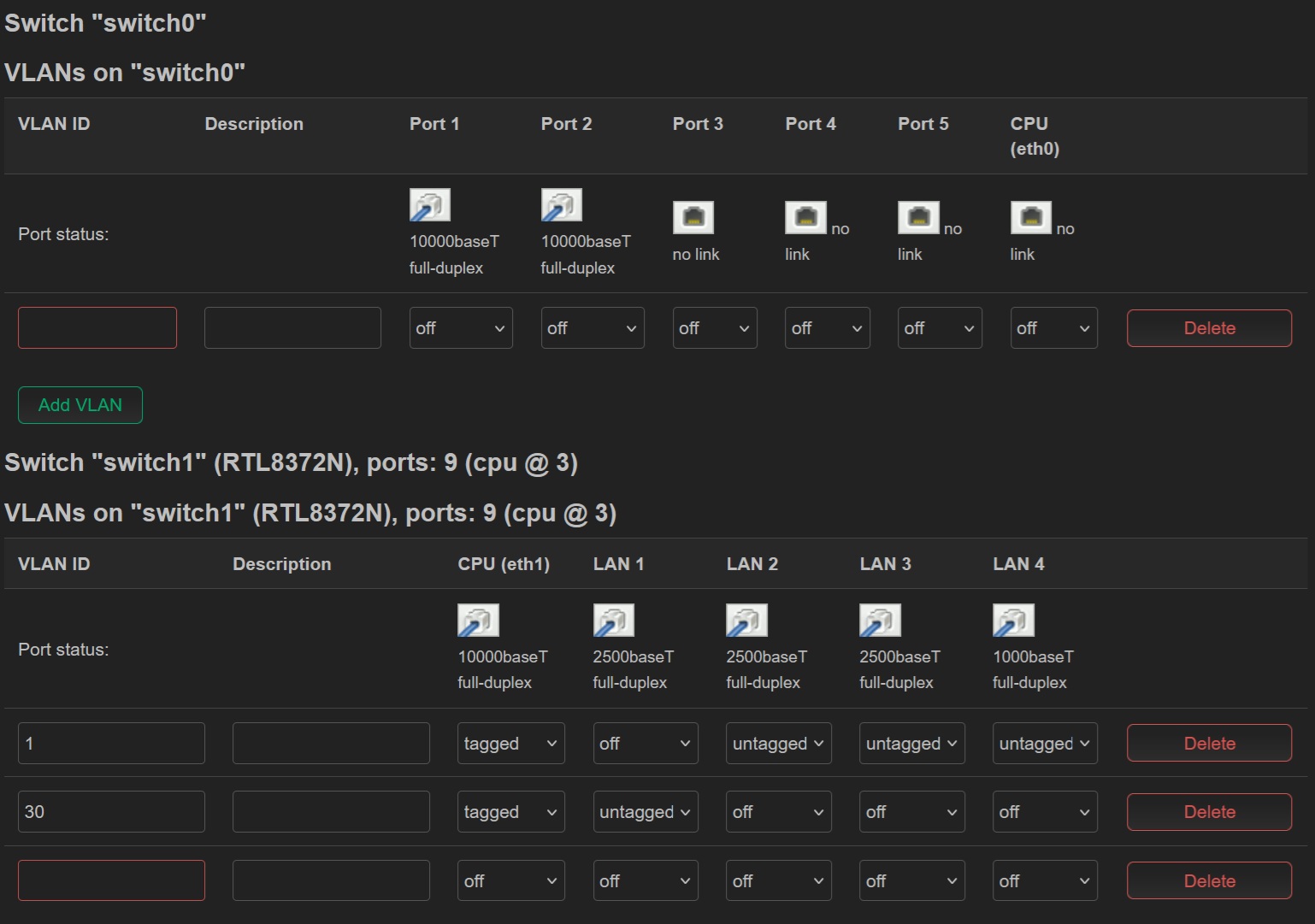
In both scenarios the solution is login from a wireless device and delete the last empty VLAN line in the Switch settings that appears after the script
the blank line came from a backup. not sure how it got there but every time I reload saved backup that line comes with it. deleted it and then made another backup wo the line.
surprisingly everything worked with that extra line, but without VLAN30
after running the script, even without the blank VLAN line on the page above the GUESTLAN PC won’t connect at start. what happens is that PC is waiting for an IP. solution is kinda weird - have to go to the Switch settings and simply click Save & Apply (without basically changing anything). then the GUEST PC comes online…. very strange. My guess is that something is broken in the code of the Switch page or CLI.
Yeah, I thought it was that extra line, but apparently it’s the CLI playing up. I had this problem with the guest PC going offline with other similar scripts found online and it was driving me nuts. Couldn’t understand why, especially after REBOOT.
No, I have given up on this router and gone back to my trusty Flint 2. The Flint 3 has too many problems for me to continue using it. My last attempt bricked the router so it’s a no go until GL.Inet support get their act together with the firmware.
i got it to work by using the LUCI UI and adding the VPN to the new IoT vlan like that on the guest network as their restrictions would be similar, so would their access to the vpn.
Settings - Network dropdown - Firewall.
Edit IoT which should say IoT - Wan only… Add the vpnclient.
Q: they newly added devices in the IoT VLan though dont show up on the list of device clients on the Admin of the router UI (not LUCI). There a way to add them?
Q: if i was to replace the 25 with 40 (incl IP addy) and IoT with TV (defines entertainment) (specifically for the firestick), what other variables would need to change to make it secure but not clash with this setup?