Any chance you can include how to add 5 and 6 mhz to this too?
Will a firmware update break all of these attempts at vlan configuration? Novice question, but I’ve spent many hours working with Copilot and Gemini using both Luci and ssh to configure three separate subnets on different bands and then a fourth using the WiFi 7 MLO setup in the Gl-inet gui only to have it “break” the 2.4 and 5 GHz radios and had to reset the router. I came close but didn’t get there. So if I spend the time and keep at it, is a firmware update coming along that will break it all? If I do and it does I sure hope the gui will be updated to allow easy vlan and firewall creation or at least allow better coordination between Luci and the Gl-inet gui. Shouldn’t it? That’s one of the reasons I bought the Flint 3 instead of a cheaper TP-Link consumer-grade router and after many, many hours of effort I haven’t yet been able to accomplish what I hoped to with the purchase. So for now my TVs, security cams, and data are all sharing the same subnet. Thinking about breaking out my old router and double “nat”ing it. I understand the Flint 2 is much better at this. Why is that so?
I bought the Flint 3 for the same thing, but lucky for me I have a Flint 2, so I’ve reverted back to that and put the Flint 3 back in the box until there is a fix. It’s disgusting how they have released this router with so many issues.
Don’t waste your time with the Flint 3….
1 Like
I tried flashing an old Linksys ea6350v3 with open-wrt but after two failed attempts I considered myself lucky to be able to bring the Linksys back to life. For now I’m running the Linksys double-natted behind the Flint 3 running my security cams on 2.4 GHz and TVs on 5. The Flint 3, using Luci, did allow me to firewall them off from my computers on 6ghz and triband MLO running on the Flint 3. It’s a temporary solution. I just ordered a Flint 2 on Amazon. It arrives Tuesday. At that point I will either make the Flint 3 an access point running only 6ghz and triband MLO or just return it. I have until the 21st to decide as I only recently bought it. It would make my recent purchase of the tplink BE9300 triband wifi7 MLO pci-e card worthless to return it though. I really wish the Flint 3 had been up to it but it’s obviously not.
I think i got it working… Im going to attempt to remember who to give credit too as well and show my sources:
- Thanks for the OP @Miles … this post has taught me a lot! - everyone else should copy this somewhere and edit a second copy to get going on the second vlan
- A little further down I found a good source from @RobWilJas -thank you too
- Next source and thanks to: https://wickedyoda.com/?p=3147 - much more indepth commands… I compared them a lot to figure out more
So the first thing to note,
- define your network, IE IoT…
- define your wifi name IE ‘things’
- give it a numerical number like 25 or 30… This will be used to define the vlan and ipaddr
- note that the wifi1 or wifi 2 in the wireless mustnt match any other of the radio or other device
Note, not sure, but the ports seem to be static
For adding in 5g and 6g: (this is what i did/would do)
uci set wireless.iot5=wifi-iface
uci set wireless.iot5.device='wifi1'
uci set wireless.iot5.network='iot'
uci set wireless.iot5.mode='ap'
uci set wireless.iot5.ifname='wlan6'
uci set wireless.iot5.ssid='GL-Router-IoT'
uci set wireless.iot5.encryption='psk2+ccmp'
uci set wireless.iot5.key='goodlife'
uci set wireless.iot5.wds='1'
uci set wireless.iot5.hidden='0'
uci set wireless.iot5.isolate='1'
uci set wireless.iot5.disabled='0'
uci set wireless.iot5.ieee80211k='1'
uci set wireless.iot5.bss_transition='1'
uci set wireless.iot6=wifi-iface
uci set wireless.iot6.device='wifi2'
uci set wireless.iot6.network='iot'
uci set wireless.iot6.mode='ap'
uci set wireless.iot6.ifname='wlan6'
uci set wireless.iot6.ssid='GL-Router-IoT'
uci set wireless.iot6.encryption='sae'
uci set wireless.iot6.key='goodlife'
uci set wireless.iot6.wds='1'
uci set wireless.iot6.hidden='0'
uci set wireless.iot6.isolate='1'
uci set wireless.iot6.disabled='0'
uci set wireless.iot6.ieee80211k='1'
uci set wireless.iot6.bss_transition='1'
Hope this helps
I have set up now Wifi for IoT/Main/media with 2.4/5/6ghz BUT i dont know how to set set up MLO… can someone help like @Miles or @RobWilJas (thank you both again)
For MLO, please refer to
Hey @will.qiu - thank you for this. appreciate it. (Ive used here to chat as the other thread is closed and its relevant to this discussion too)
If i wanted to set up the MLO for different vlans
vlan10 - trusted
vlan40 - media
vlan25 - IoT
how does this fit in:
uci set mlo.mld2=wifi-mld
uci set mlo.mld2.disabled='0'
uci set mlo.mld2.bands='2g'
uci add_list mlo.mld2.bands='5g'
uci add_list mlo.mld2.bands='6g'
Is it the same for each one, or do i use it only once?
When adding
uci set wireless.travelmld2g.mld='mld2' / uci set wireless.travelmld5g.mld='mld2' / uci set wireless.travelmld6g.mld='mld2' - i clearly change the travelmld-g to the name of my radio, but does the mld2 change with each vlan? or are they always mld2?
Same for the last bit, obv the ssid matches the ssid of the 3 radios but does the line above change at all?
Which are the variables and which are the constants?
Thanks in advance. Ive just tried one and had to reset the router back… Random Q, whats the UCI command so i can view and edit these amendments so i dont have to keep resetting and having to start way back?
Here are the variables for the configuration:
-
MLD Device Name
uci set mlo.{mld_device_name}=wifi-mld
uci set wireless.{mld_device_name}=wifi-mld
uci set wireless.travelmld2g.mld='{mld_device_name}'
Note:
mld0andmld1are already in use by the Main and Guest Wi-Fi. Each network requires a unique device name. -
Wireless Interface Name
uci set wireless.{wireless_interface_name}=wifi-ifaceFor MLO, you need to add separate sub-Wi-Fi interfaces for the 2.4 GHz, 5 GHz, and 6 GHz bands respectively.
-
Wireless Hardware Device Name (ifname)
uci set wireless.travelmld2g.ifname='{wireless_device_name}'Similarly,
wlanx,wlanx1,wlanx2, andwlanx3are already occupied by the Main Wi-Fi, Guest Wi-Fi, and their respective MLO configurations. -
Associated Network
uci set wireless.{wireless_interface_name}.network='{Network}'Note: This variable defines which logical network interface (usually
lan/guest/youriot) the wireless interface is bridged to.
For a detailed UCI tutorial, please refer to:
Thank you @will.qiu Will! Ill look over it over the next couple days! This is great!
Real architecture of the GL-BE9300 (Qualcomm IPQ5332)
Accelerated VLANs without software bridges or vlan_filtering
Note on authorship and translation
The explanatory text of this post was translated with AI assistance for clarity and readability.
However, the methods, commands, configuration logic, and validation steps are original, derived from hands-on testing in a real network lab on the GL-BE9300 hardware.
All commands shown below are executed and verified on-device.
This post documents a reproducible and hardware-accelerated method to expose VLANs over physical LAN ports on the GL-BE9300 (QSDK / Qualcomm IPQ5332), avoiding common generic OpenWrt configurations that silently disable NSS offloading.
Key points
Do not use vlan_filtering
Do not use software bridges (br-lan.X) for user VLANs
Use direct 802.1Q sub-interfaces (eth1.X)
This is not an alternative approach.
It is the method that preserves Qualcomm NSS acceleration on this platform.
Key concept (read before copying commands)
On the GL-BE9300:
eth1 = internal CPU-facing interface to the hardware switch
eth1. = 802.1Q sub-interface (this is what NSS accelerates)
LAN ports are not interfaces; they are switch members
Port mapping:
GUI port 3 = physical LAN2
Important behavior:
VLANs attached to bridges (for example br-lan.60) disable NSS
VLANs attached directly to eth1.X keep hardware offloading active
Practical example
Create one VLAN with the following properties:
VLAN ID: 60
IP address: 192.168.60.1/24
Exposed only on port 3 (physical LAN2)
Has an associated Wi-Fi SSID
Fully accelerated by Qualcomm NSS
- Create the 802.1Q sub-interface (hardware layer)
This is the critical step.
Blockquote
uci set network.eth1_60=device
uci set network.eth1_60.name='eth1.60'
uci set network.eth1_60.type='8021q'
uci set network.eth1_60.ifname='eth1'
uci set network.eth1_60.vid='60'
At this point, the Qualcomm NSS engine already recognizes the VLAN path.
Everything that follows is L3 and policy configuration.
- Create the L3 interface (no bridge)
Blockquote
uci set network.vlan60=interface
uci set network.vlan60.proto='static'
uci set network.vlan60.device='eth1.60'
uci set network.vlan60.ipaddr='192.168.60.1'
uci set network.vlan60.netmask='255.255.255.0'
No bridge. No br-vlan60. This keeps the datapath purely accelerated.
- Expose the VLAN only on port 3 (physical LAN2)
On the GL-BE9300, LAN ports are members of switch1.
Logical port mapping:
Port 3 → Physical LAN2
Conceptual example (exact numbering may vary by firmware):
Blockquote
uci add network switch_vlan
uci set network.@switch_vlan[-1].device='switch1'
uci set network.@switch_vlan[-1].vlan='60'
uci set network.@switch_vlan[-1].ports='3t'
Explanation:
3t = port 3, tagged
No other ports are members
Result:
VLAN 60 exits only via LAN2
Connecting a managed switch or AP on LAN2 receives a clean tagged VLAN
- DHCP for VLAN 60
Blockquote
uci set dhcp.vlan60=dhcp
uci set dhcp.vlan60.interface='vlan60'
uci set dhcp.vlan60.start='100'
uci set dhcp.vlan60.limit='150'
uci set dhcp.vlan60.leasetime='12h'
- Firewall (simple example)
Assuming zone[1] is an isolated or guest zone:
Blockquote
uci add_list firewall.@zone[1].network='vlan60'
No special rules required for NSS compatibility.
- Wi-Fi SSID associated with VLAN 60 (2.4 GHz example)
Blockquote
uci set wireless.v60_test_2g=wifi-iface
uci set wireless.v60_test_2g.device='wifi0'
uci set wireless.v60_test_2g.mode='ap'
uci set wireless.v60_test_2g.ssid='VLAN60-Test'
uci set wireless.v60_test_2g.encryption='psk2'
uci set wireless.v60_test_2g.key='change_this_password'
uci set wireless.v60_test_2g.network='vlan60'
uci set wireless.v60_test_2g.disabled='0'
Traffic path:
Wi-Fi → VLAN 60 → eth1.60 → port 3 → NSS hardware offload
- Apply changes safely
Recommended when working remotely:
uci commit network
uci commit dhcp
uci commit firewall
uci commit wireless
(
sleep 2
/etc/init.d/network restart
sleep 5
/etc/init.d/firewall restart
/etc/init.d/dnsmasq restart
wifi reload
) &
Running this in the background avoids SSH lockout during reconfiguration.
Final result
VLAN 60 isolated
Exposed only on LAN2 (logical port 3)
Working Wi-Fi SSID
Qualcomm NSS acceleration active
No vlan_filtering
No software bridges
No impact on AdGuard, VPN, or firewall behavior
Conclusion
The GL-BE9300 is not generic OpenWrt.
On Qualcomm IPQ5332 devices:
Use eth1.X
Avoid software bridges
Keep firewall rules simple
Do this, and NSS stays active.
Use generic wiki recipes with bridges, and the CPU becomes the bottleneck at multi-gigabit speeds.
This is not an experimental workaround.
It is the correct architecture for the IPQ5332 platform.
2 Likes
Hi all, in the last few months Ive been trying to learn Linux and OpenWRT.
If i am trying to all MLO for new wifi networks, Will, your notes say that i need MLO for each of the interfaces (2.4/5/6) for each subgroup. In looking at the config file for wireless, i only see the wifi-mld for the SSID/macaddr rather by thr freq.
Currently there is mld0, mld1, i assume i can add mld2 and mld3 per SSID?
Also, it shows the macaddr, where is the macaddr from? Where do i find this if i wanted to add it directly to the config file?
We recommend referring to the commands we previously provided for creating MLO Wi-Fi.
MLO Wi-Fi isn’t created simply by setting up wireless.mld; you also need to create mlo.mld and the corresponding sub-interfaces such as wireless.xx.mld='mldx'.
After that, you can adjust and modify the configuration to create two new MLO SSIDs.
The MAC address can be obtained from /proc/gl-hw-info/device_mac, or checked in the Admin Panel under System → Overview.
Be sure to slightly adjust the last digit to avoid conflicts with other internal interfaces that may already be using it.
How many wireless vlans can be created per radio? Im trying to set up a WDS with a second router to act as a wireless switch to plug my tv/console/AV/firestick (vlan40-media) into so theyre a wired connection but cant seem to get the vlan to work nor the WDS. Tne 2nd router is a Linksys WRT1300 so has 2 radios (so i assume this creates the backhaul infrastructure). Id like to set up vlans for administration, trusted1 and 2, guest, IoT, VM server (so i can practice things without the fear i break my whole network*), media and nas/backup/storage… Thats 8 wlans… Can the Flint 3 handle 8 seperare wireless vlans? I can make the IoT and guest 2.4ghz only and the 2 trusted as the remaining 5/6/MLO. Id like the others to have access to 2.4 and 5 but dont need the full MLO.
Am i being to hopeful?
*this is not going so well, as i keep breaking it
We have not actually measured the limit on the BE9300 ourselves, but the driver reports the following max number of VAPs per radio:
iw list

Please note that with MLO Wi-Fi, depending on your configured band combination, each SSID may consume one VAP on each of the three bands.
The compatibility of WDS is generally not very reliable across different chipset brands and models. If the Linksys WRT1300 supports it, we would recommend using Extender Mode instead.
Thank you for the latest update!!! Ive managed to use it and our conversations to clear some things up.
If i wanted to add subnet isolation to a non standard (main/guest/IoT) network, what is the line i would include into say the config file?
IE option isolate ‘1’
Also awesome work. Really appreciate it. Is there a way to add other vlans like you have with m/g/iot?
I think im on the right path… THOUGH, i havent dont true vlans… Ive sorted out Admin/trusted1/trusted2(wife wants to shop)/IoT/Media/VM Server (so i can break things)
Ive also seen youve updated to include a WDS function (may be old, but ive only seen it now)… What GlL.iNet devices have this functionality to match with my Flint3?
You can refer to the existing wireless interface configuration. Basically, you should add option isolate '1' under the corresponding wifi-iface section, at the same level as the SSID configuration:
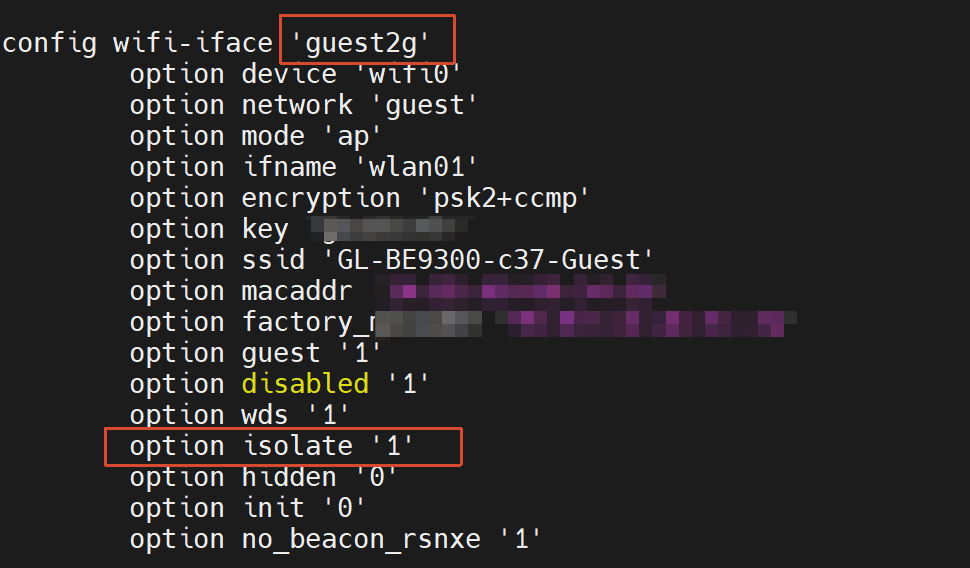
Please refer to the content of this thread?
If you only plan to add a new network without VLAN-related settings, you can instead refer to steps 2–5 below:
WDS compatibility across different chipset brands/models is generally not very reliable, so we only recommend using it between the models that using same chipset, such as:
- Flint 3 + Flint 3
- Flint 3 + Slate 7
The OpenWRT community also offers some tutorials that might be helpful:
I've been setting up an IoT VLAN (VID 10) on my Flint 3 following the official guide, but VLAN tagging is not working. I've done extensive debugging with tcpdump and found the root cause.
Setup:
3x Flint 3 as access points (repeaters)
Brume 3 gateway as main router
Araknis managed switches for VLAN trunking
VLAN 10 configured on Flint 3 with eth1.10, bridged to IoT SSID
Switch Config on Flint 3:
config switch_vlan
option device 'switch1'
option vlan '10'
option ports '3t 4t'
option description 'iot'
Port 4 (LAN1/eth1) is tagged for VLAN 10, which is correct for the trunk to the Araknis switch.
The Problem: When a device connects to the IoT WiFi SSID and requests DHCP, I captured the traffic on eth1 with tcpdump. The packets are leaving eth1 completely untagged — there is no VLAN 10 tag at all:
tcpdump -i eth1 -vv port 67 or port 68
14:10:23.232200 IP (tos 0x0, ttl 64, id 0, offset 0, flags [DF], proto UDP (17), length 319)
0.0.0.0.68 > 255.255.255.255.67: [udp sum ok] BOOTP/DHCP, Request...
No vlan 10 or 802.1Q tag in the output.
The same packets arrive at the Brume 3's eth0 (which has eth0.10 configured) completely untagged. This causes the Brume 3 to treat the DHCP request as main network traffic instead of IoT traffic.
Evidence:
Switch is configured to tag VLAN 10 on port 4 ✓
Wireless SSID is bridged to br-iot → eth1.10 ✓
Packets are leaving eth1 on the Flint 3 completely untagged ✗
Packets are arriving at the Brume 3 completely untagged ✗
Conclusion: The Flint 3's nss-dp driver or switch fabric is not applying VLAN tags on port 4, even though the UCI configuration specifies it should. This appears to be a firmware or hardware issue.
Has anyone else encountered this? Is there a firmware fix or workaround?
Some more data - it really seems that the flint3 doesn't
add the VLAN tags. Since ARP requests go unanswered, I added
the MAC of the brume3 manually, then started a tcpdump (later one with -x)
to see if I could spot VLAN tags in the packets. I cannot.
root@flint3-1:~# ip neigh add 192.168.10.1 lladdr $brume dev br-iot nud permanent
root@flint3-1:~# tcpdump: verbose output suppressed, use -v[v]... for full protocol decode
listening on br-iot, link-type EN10MB (Ethernet), snapshot length 262144 bytes
root@flint3-1:~# ping -I br-iot 192.168.10.1
PING 192.168.10.1 (192.168.10.1): 56 data bytes
09:09:33.920256 IP 192.168.10.32 > 192.168.10.1: ICMP echo request, id 13743, seq 0, length 64
09:09:34.920469 IP 192.168.10.32 > 192.168.10.1: ICMP echo request, id 13743, seq 1, length 64
09:09:35.920716 IP 192.168.10.32 > 192.168.10.1: ICMP echo request, id 13743, seq 2, length 64
09:09:36.920946 IP 192.168.10.32 > 192.168.10.1: ICMP echo request, id 13743, seq 3, length 64
^C
--- 192.168.10.1 ping statistics ---
4 packets transmitted, 0 packets received, 100% packet loss
root@flint3-1:~# fg
tcpdump -n -i br-iot
^C
4 packets captured
4 packets received by filter
0 packets dropped by kernel
root@flint3-1:~# tcpdump -x -n -i br-iot &
root@flint3-1:~# tcpdump: verbose output suppressed, use -v[v]... for full protocol decode
listening on br-iot, link-type EN10MB (Ethernet), snapshot length 262144 bytes
root@flint3-1:~# ping -I br-iot 192.168.10.1
PING 192.168.10.1 (192.168.10.1): 56 data bytes
09:10:04.338847 IP 192.168.10.32 > 192.168.10.1: ICMP echo request, id 14334, seq 0, length 64
0x0000: 4500 0054 6256 4000 4001 42e1 c0a8 0a20
0x0010: c0a8 0a01 0800 800c 37fe 0000 f460 4b94
0x0020: 0000 0000 0000 0000 0000 0000 0000 0000
0x0030: 0000 0000 0000 0000 0000 0000 0000 0000
0x0040: 0000 0000 0000 0000 0000 0000 0000 0000
0x0050: 0000 0000
09:10:05.339091 IP 192.168.10.32 > 192.168.10.1: ICMP echo request, id 14334, seq 1, length 64
0x0000: 4500 0054 62af 4000 4001 4288 c0a8 0a20
0x0010: c0a8 0a01 0800 9cc7 37fe 0001 c8a4 5a94
0x0020: 0000 0000 0000 0000 0000 0000 0000 0000
0x0030: 0000 0000 0000 0000 0000 0000 0000 0000
0x0040: 0000 0000 0000 0000 0000 0000 0000 0000
0x0050: 0000 0000
root@flint3-1:~# uci show network | grep -A 5 "br-iot"
network.iot.device='br-iot'
network.iot.proto='static'
network.iot.ipaddr='192.168.10.32'
network.iot.netmask='255.255.255.0'
network.iot.ip6assign='60'
network.iot.multicast_querier='1'
network.@device[3].name='br-iot'
network.@device[3].type='bridge'
network.@device[3].ports='eth1.10'
network.modem_1_1_s1_6=interface
network.modem_1_1_s1_6.proto='dhcpv6'
network.modem_1_1_s1_6.disabled='1'
root@flint3-1:~# brctl show br-iot
bridge name bridge id STP enabled interfaces
br-iot 7fff.c4be23d49483 no eth1.10
root@flint3-1:~# uci show network.eth1_10
network.eth1_10=device
network.eth1_10.name='eth1.10'
network.eth1_10.type='8021q'
network.eth1_10.ifname='eth1'
network.eth1_10.vid='10'
root@flint3-1:~# uci show network | grep -A 5 "switch_vlan.*10"
network.@switch_vlan[1].vlan='10'
network.@switch_vlan[1].description='iot'
network.eth1_10=device
network.eth1_10.name='eth1.10'
network.eth1_10.type='8021q'
network.eth1_10.ifname='eth1'
root@flint3-1:~# uci show network.@switch_vlan[1]
network.cfg171ec7=switch_vlan
network.cfg171ec7.device='switch1'
network.cfg171ec7.ports='3t 4t'
network.cfg171ec7.vlan='10'
network.cfg171ec7.description='iot'
This topic was automatically closed 90 days after the last reply. New replies are no longer allowed.