My parents have a (Livebox) router, to which my Synology NAS is connected via Ethernet.
I have also connected a Brume 2 behind this box, where I have enabled a WireGuard VPN server.
I have configured the NAS to accept Wake-on-LAN.
When I am at their place, connected to the box’s Wi-Fi, everything works as expected: I can wake up the NAS with the WolOn app on my phone.
Now I want to configure Wake-on-WAN: I have set up port forwarding on the box (port 9 to the NAS). This works from outside their network only if the NAS hasn't been powered off for too long; otherwise, it doesn't work anymore (I believe that the box eventually clears the ARP or routing table, which stops WOL from working).
I'd like to leverage the VPN to send WOL through the secure tunnel, but it seems the magic packet doesn't reach the NAS subnet, or doesn't traverse from the VPN subnet to the main LAN.
My question: how can I wake up the NAS remotely via VPN?
Is it possible to send the WOL command directly from the Brume 2 (with SSH or another method), since it is on the same subnet as the NAS—rather than sending it from my phone?
I played around with various proxies and stuff to achieve this, but gave up. Hopefully someone has a solution since I used to use an IOT device to send the wake on lan packet to my NAS when it was on the same network, but I moved that IOT device to another IP network subnet which caused it to stopped working.
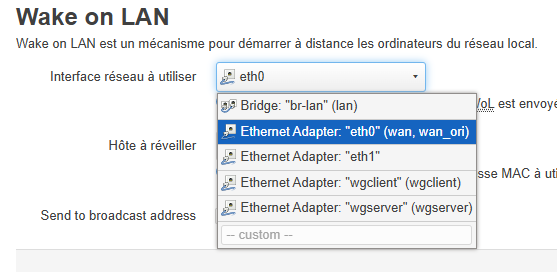
I ended up installing the luci-app-wol package on my router which installs a service in the router’s advanced luci GUI so that I can select the br-lan lan interface to send the magic packet from, with the mac-address of my NAS to the broadcast address of the subnet that wakes up my NAS. I also setup a static DHCP lease for my NAS on the router which may be why it is always listed on the wake on lan plugin’s dropdown list so all I do is select it on the list. However, after every router firmware upgrade, I have to reinstall the luci-app-wol package since it’s removed from the advanced luci GUI.