Hi all
to answer my question I dug deeper in troubleshooting GPS on OpenWRT. Perhaps you may be interested.
For troubleshooting GPS related stuff in Linux you'd like to opkg install gpsd-clients.
NMEA sentences from serial device
The easiest way is to
cat /dev/mhi_LOOPBACK
and you'll see NMEA messages like
$GPGSV,1,1,0,1*54
$GPGGA,121825.25,,,,,0,,,,,,,,*42
$PQXFI,121825.2,,,,,,,,*6B
$GPVTG,,T,,M,,N,,K,N*2C
$GPRMC,,V,,,,,,,,,,N,V*29
send the AT+QGPS=1 and AT+QGPSEND commands to your modem and watch the messages starting and stopping.
readable by gpsd
To interpret those messages with a "gpsd view", use gpsdecode:
cat /dev/mhi_LOOPBACK | gpsdecode
{"class":"TPV","device":"stdin","mode":1}
{"class":"TPV","device":"stdin","mode":1}
{"class":"TPV","device":"stdin","mode":1}
We expect some TPV entries, which tell the ground-based things like location, speed, etc.
and some SKY values, which tell about the satellites, how many seen, how many used, which ones, etc.
{"class":"TPV","device":"stdin","mode":1}
{"class":"SKY","device":"stdin","nSat":1,"uSat":0,"satellites":[{"PRN":31,"el":21.0,"az":92.0,"ss":16.0,"used":false,"gnssid":0,"svid":31}]}
{"class":"TPV","device":"stdin","mode":1}
{"class":"TPV","device":"stdin","mode":1}
{"class":"SKY","device":"stdin","nSat":1,"uSat":0,"satellites":[{"PRN":31,"el":21.0,"az":92.0,"ss":16.0,"used":false,"gnssid":0,"svid":31}]}
but currently, only one satellite is seen (nSat:1) and none is used (uSat:0).
ok, waiting for more satellites to be seen.
running gpsd
Next configure /etc/config/gpsd
you might logread -e gpsd -f & while starting the service.
check if gpsd is running and listening on port 2947:
root@router:~$ netstat -anp | grep gpsd
tcp        0      0 0.0.0.0:2947            0.0.0.0:*               LISTEN      28724/gpsd
tcp        0      0 :::2947                 :::*                    LISTEN      28724/gpsd
now you can use
gpspipe --json
to see the above output.
or better: use
cgps
to get the same messages, plus two boxes:
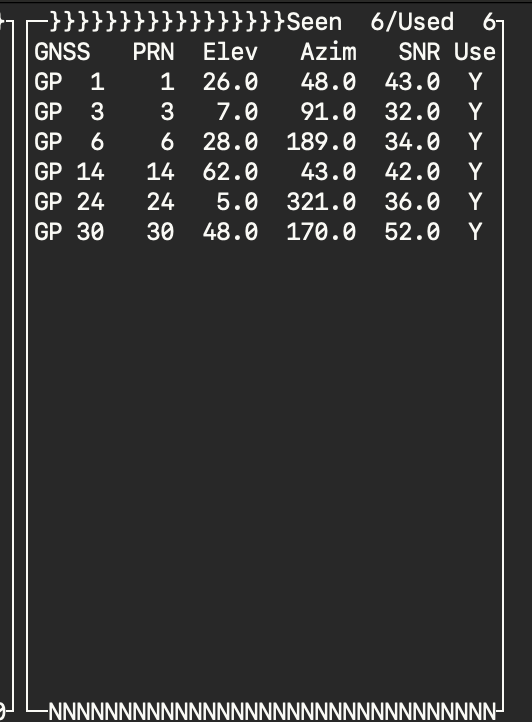
the right one with the satellites ("SKY" messages) and
the left one with the ground-based params ("TPV" messages).
watch satellites appear
┌───────────────────────────────────────────┐┌──────────────────Seen  4/Used  0┐
│ Time           n/a (0)                    ││GNSS   PRN  Elev   Azim   SNR Use│
│ Latitude         n/a                      ││GP  8    8  28.0  103.0  24.0  N │
│ Longitude        n/a                      ││GP  9    9  30.0  171.0  22.0  N │
│ Alt (HAE, MSL)         n/a,       n/a     ││GP  2    2  83.0  267.0  18.0  N │
│ Speed            n/a                      ││GP 12   12   2.0   80.0  22.0  N │
│ Track (true, var):                n/a deg ││                                 │
│ Climb            n/a                      ││                                 │
│ Status          NO FIX (6 secs)           ││                                 │
[...]
While waiting for more satellites to be seen, I checked this website, entered my location (on the right side), selected only navigational satellites (gps, galileo, glonass and beidou, down below the radar view) and selected brightness limit to "all illuminated" (left side above the radar), to get an estimate which satellites my router possibly could see.
When placing the router in the open window of my house, overseeing half of the sky (the next big mountains are 100km away), the cgps is telling me about 3 satellites seen and two of them are used. And after a while I got a fix:
┌───────────────────────────────────────────┐┌──────────────────Seen  3/Used  2┐
│ Time         2024-07-22T19:12:39.000Z (0) ││GNSS   PRN  Elev   Azim   SNR Use│
│ Latitude          -46.7635408 N           ││GP  8    8  26.0  105.0  28.0  Y │
│ Longitude       -140.19284582 E           ││GP  9    9  85.0  287.0  21.0  Y │
│ Alt (HAE, MSL)      59.383,      1.575 ft ││GP 12   12  33.0  170.0  23.0  N │
│ Speed              0.00 mph               ││                                 │
│ Track (true, var):                n/a deg ││                                 │
│ Climb            137.80 ft/min            ││                                 │
│ Status          3D FIX (1 secs)           ││                                 │
                  ^^^^^^
and yes, it can take a while to get a fix.
testing with external usb gps receiver
Beside the internal /dev/mhi_LOOPBACK i testet an external usb gps receiver on my PuliAX.
When attaching my usb gps device, I check the
dmesg | grep attached | grep ttyUSB | tail -n 1
to figure out the right device to add to /etc/config/gpsd.
btw. my usb device needs a baudrate of 57600,
how can I configure this into/etc/config/gpsd?
same procedure as above, my external GPS device found some more satellites:
┌───────────────────────────────────────────┐┌──────────────────Seen  8/Used  8┐
│ Time         2024-07-22T19:35:51.000Z (0) ││GNSS   PRN  Elev   Azim   SNR Use│
│ Latitude         -46.76345408 N           ││GP  8    8  21.0  109.0  26.0  Y │
│ Longitude       -140.19284582 E           ││GP  9    9  21.0  109.0  15.0  Y │
│ Alt (HAE, MSL)     59.383,       1.575 ft ││GP 12   12  40.0  169.0  27.0  Y │
│ Speed              0.92 mph               ││GP 18   18   7.0   73.0  22.0  Y │
│ Track (true, var):   135.3,   2.2     deg ││GL  8   68  31.0   61.0  23.0  Y │
│ Climb              0.00 ft/min            ││GL 32  320   7.0  189.0  13.0  Y │
│ Status          3D FIX (159 secs)         ││BD 26  426  29.0   65.0  19.0  Y │
│ Long Err  (XDOP, EPX)   1.57, +/- 77.5 ft ││BD 12  312  34.0   23.0  13.0  Y |                               │
conclusion
so... back to my original question... I guess, I just had poor reception of the gps satellites (in combination sitting inside my house and with the builtin gps capabilities) and was too impatient to wait "for ages" for an gps fix.
cheers
Frank