When MT1300 has an active vpn tunnel to vpn server, and all non-vpn traffic are blocked, With wireshark sitting between MT1300 and WAN router, I see periodic ICMP ping request and reply between mt1300 and 1.1.1.1. This is from MT1300 as I have no devices attached to it.
Can anyone advise if this is by design, and not a leak?
Hello,
This behavior is related to Multi-WAN, which for detecting whether the Internet connection of the WAN port is available.
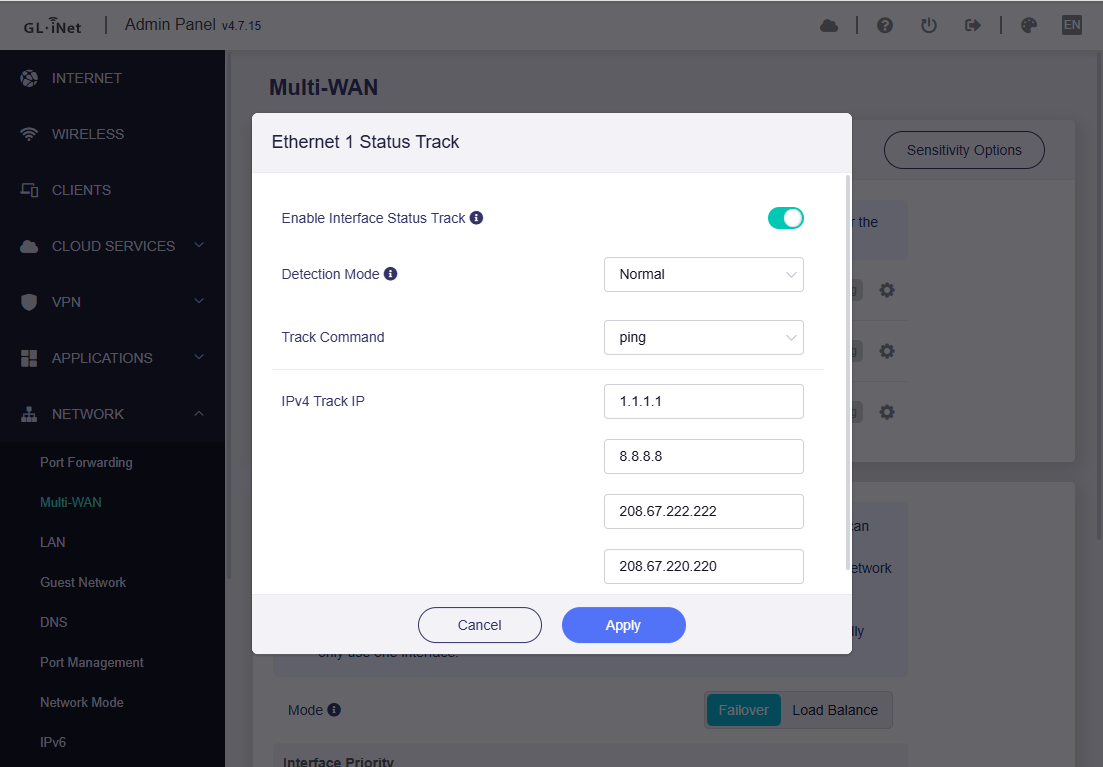
This is by design, and it's not a leak.
Great. Thank you @bruce
Another thing I noticed is that the WAN interface of MT1300 answers to pings from devices behind it while the VPN is set up to block all non-VPN traffic. Granted this is usually a non-public IP assigned by the upstream router, but there can be cases which the upstream router assign a public IP as well, no?
The WAN port is response to ICMP ping, I think it is related the configuration of the WAN port itself and has nothing to do with VPN-related functions.
Whether it is a non-public or public IP, if it responds to ICMP, this is related to this setting:

@bruce WRT the screen you showed above, Remote Access Control –> Allow Ping from WAN, these options deal with remote access, presumably from WAN side. The issue I raised has to do with devices on local LAN able to ping the ip address assigned to the gl-inet WAN interface while VPN is enabled. I tested this with the “Allow Ping fro WAN” Enabled and Disabled.
I believe this ping should not be allowed. With VPN enabled, all traffic from the local LAN device should go through the VPN. And this means the ip address assigned to the gl-inet WAN interface should be invisible to the local LAN device.
Hello,
I misunderstood your question before, sorry. May I know did you want the router's WAN IP to reject ICMP ping from LAN clients?
I think the LAN client is an internal network, so it does not matter whether it rejects pings, cause LAN is a trust zone and safe for WAN IP.
If you do reject ping the WAN IP from LAN clients, please try the following command (temporary):
# Assume the WAN IP is 192.168.6.146
iptables -I INPUT -i br-lan -d 192.168.6.146 -p icmp -j REJECT
# Permanently, will not be lost after restarting
sed -i '/exit 0/i\iptables -I INPUT -i br-lan -d 192.168.6.146 -p icmp -j REJECT' /etc/rc.local
@bruce I tested your command above. It works. Thanks.
The reason for my request is this:
If router’s WAN IP is receiving and responding to ICMP pings from LAN clients, that means traffic (at least ICMP packets) are being transmitted outside the VPN tunnel.
Imagine the GL-inet is directly connected to the service provider’s modem, then the GL-inet will receive an public IP address on its WAN interface. If a local device behind the GL-inet can ping this address, then it will be able to geolocate.
Granted, in most cases, the GL-inet is connected to an ISP router, so it will likely received a private IP address on its WAN interface.
1 Like
This topic was automatically closed 90 days after the last reply. New replies are no longer allowed.