Improvement on Tailscale for SDK v4.8 and potential issue notifications

Dear users:

We've recently become aware that some users using firmware v4.8.0-v4.8.3 have reported needing to enable masquerading of the tailscale zone in the firewall in order for LAN clients able to reach other devices and subnets of their tailnet.

We apologize for any trouble this may have caused.

PHENOMENON:

Even if Tailscale has announced and accepted routes, and approved the subnet in Tailscale cloud console, if masquerading is disable in the tailscale zone of the router's firewall, communication of tailnet can only occur on the router itself, but the router's LAN clients will not be able to access other devices of tailnet (if other devices are also routers, they include the subnets of those routers).

REASON:

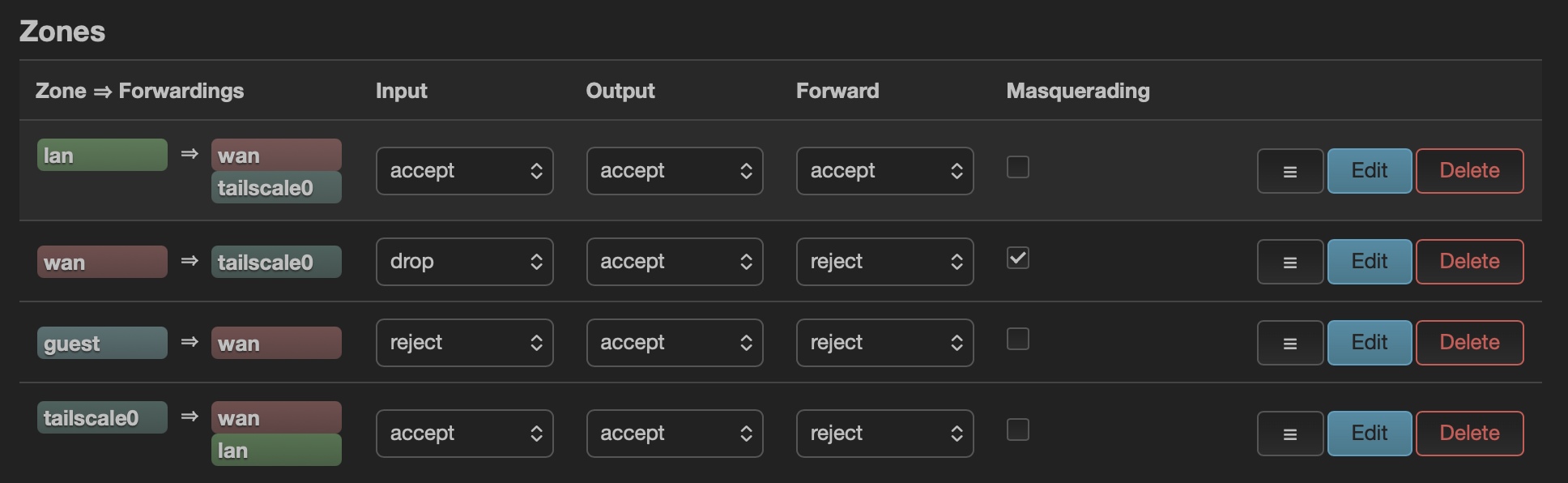
The firmware versions v4.8.0-v4.8.3, we modified the Tailscale firewall rules to improve the security of the router's Tailscale network and ensure more stable tailnet communication. The firewall zone for tailscale appears as follows:

config zone 'tailscale0'
        option name 'tailscale0'
        option input 'ACCEPT'
        option mtu_fix '1'
        list device 'tailscale0'

config defaults
        option syn_flood '1'
        option input 'ACCEPT'
        option output 'ACCEPT'
        option forward 'REJECT'

The key is to add mtu_fix to ensure large TCP packets are able to pass through correctly, and only LAN clients on the primary (main) network can access the tailnet; but guest clients cannot access to the tailnet or subnets.

Before upgrading to v4.8.0-v4.8.3 firmware, some users had manually added tailscale0 to the WAN zone.
After keep settings and upgrading to v4.8.0-v4.8.3 firmware, Tailscale now has its own dedicated zone, which conflicts with the rules manually added to the WAN zone. Some users have reported that LAN clients are blocked from accessing tailnet, but manually enable masquerade of the tailscale zone (added by firmware) for LAN clients to access normally.

TEMP WORKAROUND:

If you met this this issue in v4.8.0-v4.8.3 firmware,

  1. SSH to the router and execute the following command to clear the tailscale0 interface in the wan zone:
idx="$(uci -q show firewall | sed -n "s/^firewall\.@zone\[\([0-9]\+\)\]\.name='\?wan'\?$/\1/p" | head -n1)"
[ -n "$idx" ] && uci -q del_list firewall.@zone[$idx].device='tailscale0'
uci commit firewall
/etc/init.d/firewall restart
  1. If worried that the above is troublesome, you can reset firmware and reconfigure your router.

The expected behavior of the firmware v4.8.0-v4.8.3, does not need to add the tailscale0 interface to the wan zone, nor need to enable masquerading in the dedicated tailscale zone.
Once the Tailscale cloud console has the correct subnet approved, the tailnet communication in LAN clients will work.

SOLUTION:

A script will be added in the next firmware update. During the upgrade process, it will check if the user has manually added the tailscale0 interface to the wan zone.
If yes, it will be removed the tailscale0 of wan zone, and the tailscale0 will be assigned to the dedicated Tailscale zone.

This will prevent some conflicts and ensure that users upgrading to v4.8.5 (and later) can use Tailscale without issues, the LAN clients can access other subnets in the tailnet.

-end


We sincerely apologize for the inconvenience this issue may cause!

GL.iNet Technical Support Team

2 Likes

I still had to tick masquerade in that zone for lan devices to get access. It also resets itself every time Tailscale is disabled again. Currently not very user friendly. This is with an exit node specified on a Slate 7 in 4.8.1 and 4.8.3

  1. Reset firmware
  2. Execute the command in SSH. After execution, restart tailscale in GL GUI:
idx="$(uci -q show firewall | sed -n "s/^firewall\.@zone\[\([0-9]\+\)\]\.name='\?wan'\?$/\1/p" | head -n1)"
[ -n "$idx" ] && uci -q del_list firewall.@zone[$idx].device='tailscale0'
uci commit firewall
/etc/init.d/firewall restart

Did all that. Went through the hassle of resetting it all on 4.8.3 and as stated, no traffic flow unless ticking masquerade when using an exit node. Subnet routes are fine. Problem is, that firewall change isn’t persistent, when Tailscale is disabled then re-enabled you have to do it again which is annoying.

Refer to tailscale configuration guide from gl docs, do you have approved router's LAN and WAN subnets on tailsclae console?

Hi Bruce,

With all due respect, if I didn’t have the Tailscale config correct, it wouldn’t work at all. I’m saying that when using an exit node, I need to tick masquerade. The default rule only works without an exit node being used.

With our testings to know, if the LAN and WAN subnets are not approved in Tailscale, but masquerade is enabled on the router firewall for tailscale zone or tailscale0 interface (in wan zone), it can still work fine with the tailscale exit node. However, we do not recommend enable masquerade because it may bring some hidden dangers.

If possible, please share your router with us via GoodCloud, I would like to remote check your router about this issue.

Please PM me your router MAC address and the Admin Panel password, please screenshot the Edit route settings of this router in tailscale console to confirm.

Sent via PM

Thanks to pcmike for the discussion on Tailscale firewall settings to make things more clear.

To handle subnet conflicts in a Tailnet:

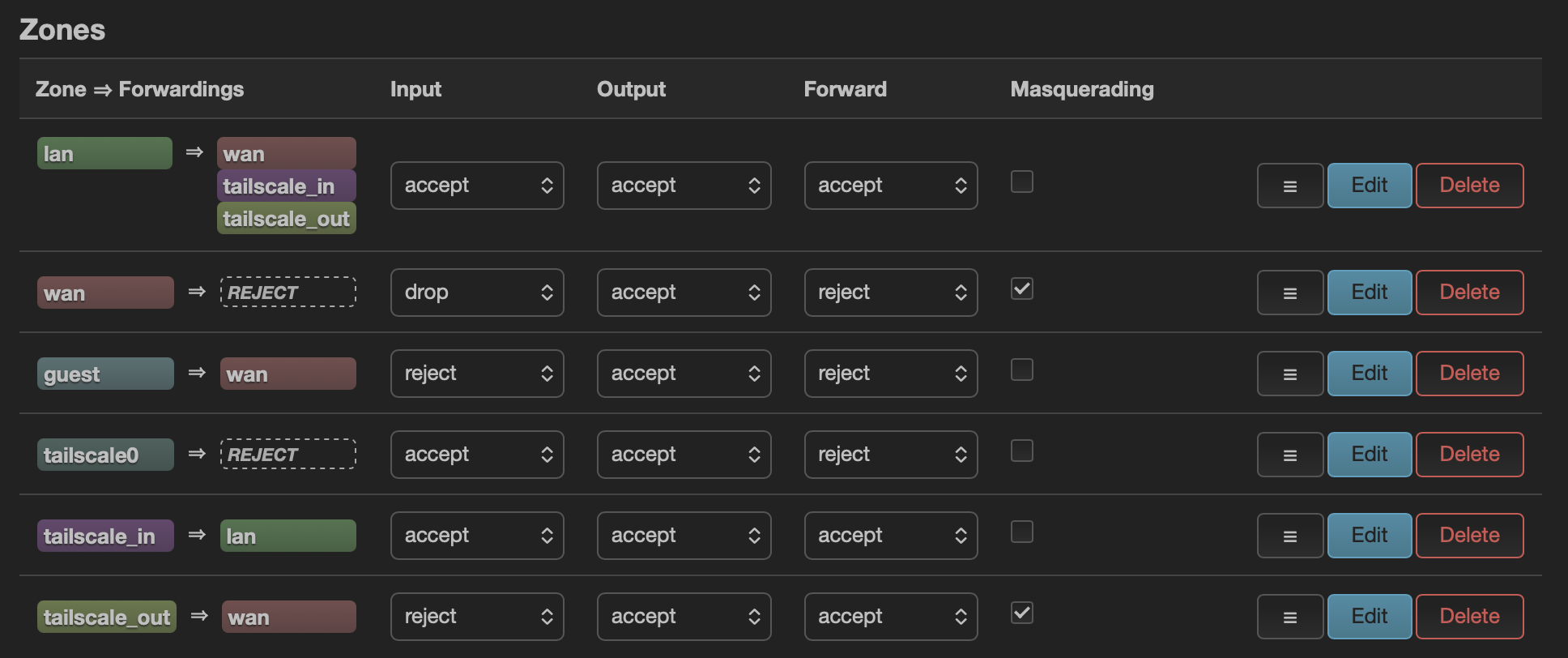
The quick workaround is to enable masquerading on the stock tailscale0 zone. It “fixes” connectivity, but at the cost of breaking an important Tailscale feature on a travel router: remote access to LAN devices with real Tailnet source IPs. Once MASQ is enabled, all incoming traffic looks like it comes from the router, logs become useless, ACLs break, and many services relying on client IP fail.

uci set firewall.tailscale0.masq=1
uci commit firewall
/etc/init.d/firewall reload

We intentionally choose Tailscale’s proper “allow subnet” behavior instead of sacrificing functionality for connectivity.
If connectivity fails, the root cause is usually a real subnet conflict—not something we want to hide with masquerading.

1 Like

@hansome and @bruce

With all due respect, you guys are missing the most popular use case that draws people to mesh VPNs. Most people just want to setup two tailscale instances; one at home on their LAN (which has access to multiple vlans) on a router, VM, whatever and then they want to travel with another one (on a gl.inet travel router). The instance at home is likely setup as a subnet router and it’s likely advertising routes to multiple vlans; it could also be setup as an exit node (that’s a separate thing). The one their traveling with them and it’s could be setup as a subnet router and it could be setup as an exit node (thought not via the gl.inet web ui), however in most cases they’re just looking for the travel router to join their tailnet and then allow whatever clients are connected to the gl.inet travel router to reach ANY vlans that are advertised by any subnet router on the tailnet and you’re implementation does not allow that to happen at all. It doesn’t matter if you turn on “allow remote access WAN” or “allow remote access LAN” .. clients on the gl.inet router can still not access clients that are behind a subnet router on the tailnet.

Let me try to illustrate this another way by trying to describe the most popular use case…

Home network looks like this.. you have a router that has three VLANs: 192.168.1.x (default, likely has servers running like jellyfin, home assistant, a tailscale instance setup as a subnet router advertising routes to 1.x,2.x,3.x inside a VM, etc.. things in this vlan have one way + established/related access to every other vlan), 192.168.2.x (iot, likely has random untrusted devices, could also include Apple TVs, printers, etc), 192.168.3.x (kids, has devices kids use, maybe one of the kid’s is a teenager and runs a game server for their friends). The important thing to take notice of and remember is that this entire network (all 3 vlans) is accessible on the owner’s tailnet by way of a single subnet router. The ONLY thing appearing on the tailnet is a single tailscale instance (could be on anything.. that’s not even important), yet every single server/service/device is 100% accessible to ANY other device on the tailnet at their normal LAN IP (192.168.1/.2/.3.x). No tailscale magic dns, none of that nonsense..

GL.inet travel router (slate) travels with the owner/family to vacation. The slate connects to some random wifi and all the family’s devices (phones, computers, tablets, Apple TV) that traveled with them all connect to the travel router, that’s great and all, but what they want is to access everything back at home as if they were there. The owner says “oh hey, I have a tailscale subnet router at home.. let me connect this slate to my tailnet and then we should all be able to access all our stuff at home.” Except… the way GL.inet implemented tailscale, that isn’t even possible from the web ui no matter what you enable. You need to be masquerading tailscale out the wan, there is absolutely no way around this. This is highlighted time and time again almost everywhere on the internet.

If you refer back to all the posts I made in the other thread (this post in particular.. Tailscale cannot reach subnets on other devices - #72 by pcmike ) I explain the proper way to implement this so that actual tailscale client’s identities (their tailnet IPs) are preserved (not that anyone in the above circumstance even cares, because there is literally only two tailnet clients in play here).

So again, whatever it is you think you’re doing or preventing from happening is the very thing everyone wants! People just want their travel router to connect to their tailnet in a way that allows all the clients locally connected to the travel router the ability to access literally any device that may be available via the tailnet EVEN IF THAT DEVICE IS BEHIND A SUBNET ROUTER! You have no reason to protect or prevent this behavior.. it’s exactly the reason people are using tailscale on their travel router! You guys are too preoccupied with thinking that people are installing tailscale on every device/service that they may want to access via the travel router and that’s simply not the case. #subnetroutersmatter

IF I MAY BE SO BOLD… I recommend adding an additional option on the tailscale page on the web ui that reads “Allow access to devices behind subnet routers via masquerading” that when enabled disables the other two “Allow” options and then simply institutes the changes I recommended; then we can finally put this ongoing saga to rest. :wink:

:cross_mark:

:white_check_mark:

1 Like

Just to double check, is this similar to what was raised here:

1 Like

Thank you again to all power users in the community for your continued attention and hard-core discussions on this issue. We attach great importance to the pain point that everyone mentioned that "the LAN subnet cannot be directly accessed in tailscale".

About technical stance: The R&D team’s previous concerns were mainly that masquerade would lead to source address NAT, which would make it impossible to trace the source of traffic during network auditing and fine-grained ACL control. In order to ensure the lowest security limit of the firmware, we have always been cautious.

Our improvement plan: But we see that in everyone’s actual usage scenarios, the convenience of connection has a high priority. Everyone’s suggestion to “let users choose” is a very pertinent suggestion.

  1. Short-term solution: We will post a quick CLI command in the Forum, so that friends who need this function can open it.
  2. Long-term solution: I have formally fed back this requirement to the R&D team. Let us evaluate if add an optional to enable Masquerade to the Tailscale settings page.

This is where the power of the community lies. Thanks to everyone for helping make GL.iNet firmware better through lively discussions.

3 Likes

Not the same issue, but I’ll come back to your post when I get home tonight and look into it and see if I can come up with anything.

1 Like