ZenFish
November 29, 2025, 3:57pm
1
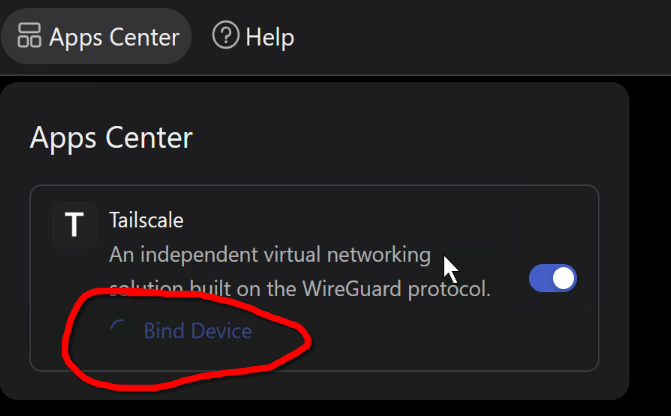
I just got a Comet GL-RM1, it works great for KVM, but I have a problem getting it registered to Tailscale.
Following the doc here: Remote access via Tailscale - GL.iNet KVM Docs
(This just keeps on spinning…)
I have tried 3 different browser, Firefox, Brave, Edge og different computers.
Firmware version is: v1.7.2 release1 (RM1)
Is there a known workaround for this issue? maybe some CLI commands I can run via SSH?
admon
November 29, 2025, 3:57pm
2
You should be able to use tailscale login via SSH.
Might want to check if the GL-RM1 has sync’ed time.
ssh root@{hostname}

date
If it comes back at December 31, 1969 or January 1, 1970, then it has not sync’ed time.
ZenFish
November 29, 2025, 7:00pm
4
Thanks for the suggestions, I was able to fix the issue by running “tailscale update” via the webterminal.
1 Like
Putte
January 8, 2026, 9:14pm
5
Ialso have problem with binding my comet to tailscale…
I can ping 8.8.8.8
Seems to be a DNS-problem
[root@glkvm:~]# tailscale updatehttps://pkgs.tailscale.com/stable/?mode=json&os=linux ": dial tcp: lookup pkgs.tailscale. com on 127.0.0.1:53: read udp 127.0.0.1:51080->127.0.0.1:53: i/o timeout
minmie
January 9, 2026, 1:23am
6
#manual DNS
connmanctl config `connmanctl services |grep ethernet|awk -F' '  '{print $3}'|head -1` nameservers 192.168.113.244
setup dns by connmand , It seems your router might not be distributing DNS configurations automatically, so you may need to set it up manually.
Putte
January 10, 2026, 7:08pm
7
It was a DNS-issue…