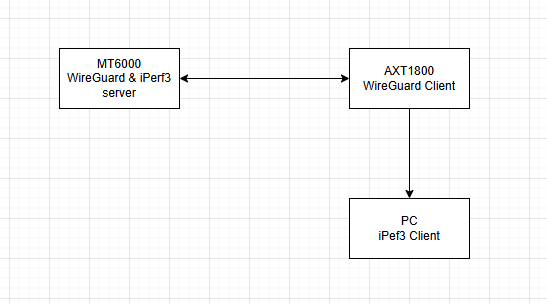
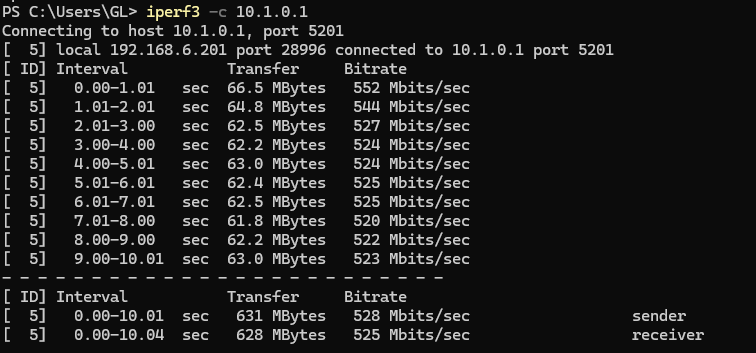
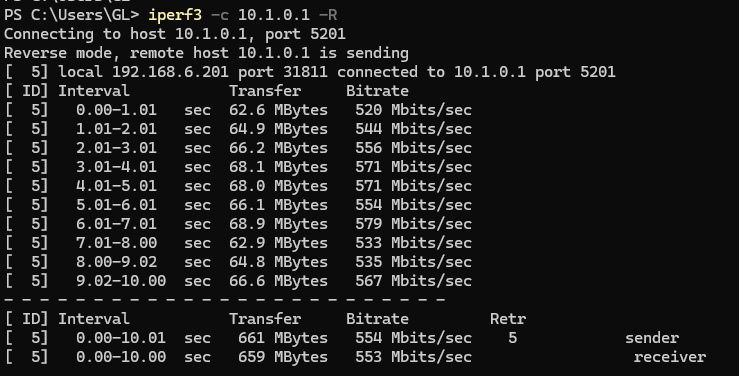
I am currently using a GL‑AXT1800 (Slate AX) running firmware version 4.8.2. While testing WireGuard performance, I noticed that enabling both software flow offloading and hardware flow offloading in the LuCI interface does not actually activate flow offload in firewall.
Here are the details:
• I enabled both offload options in the GUI and rebooted the router.
• I also tried adding flow_offloading and flow_offloading_hw options in /etc/config/firewall under config defaults.
• In both cases, firewall restarts fail with the error:
Error: Could not process rule: No such file or directory
meta l4proto { tcp, udp } flow offload @ft;
• Running nft list rulset | grep offload shows no active flow offload rules, only a “DHCP no offload” exception.
• As a result, WireGuard throughput remains capped at ~50 Mbps, even though the hardware (Qualcomm IPQ8072A with NSS cores) should be capable of much higher speeds when offload is active.
This strongly suggests that in firmware 4.8.2, firewall4 is not correctly creating the flowtable (@ft) required for offload, leaving the feature non‑functional.
Could anyone here please confirm:
- Whether this is a known limitation in 4.8.2.
- If there is a patch or upcoming firmware release that resolves flowtable creation and enables proper hardware/software offload.
- Any recommended workaround in the meantime.
Thank you for your support. I look forward to your input and guidance, as enabling offload is critical for achieving the expected WireGuard performance on the GL‑AXT1800.
Best regards,
Wajahat