When starting the target PC it boots to Bitlocker and nothing is displayed and keyboard and mouse emulation is not enabled. After inputting manually through a keyboard the screen works as normal. Please fix
UPDATE: Fimware 1.7.0 solved this issue
maybe there’s some setting in the bios/firmware? I have a lenovo laptop with bitlocker and pin/unlock screen shows just fine over the kvm for me.
Hello, I still have the Problem, that i cannot enter the Bitlocker pin at Startup, .. normal Keyboard works, and later in Windows also everything works. I’m on 1.7.1 firmware allready. Any solutions ? I tried everything in Bios…
Could you please try the following troubleshooting steps on the BitLocker PIN page:
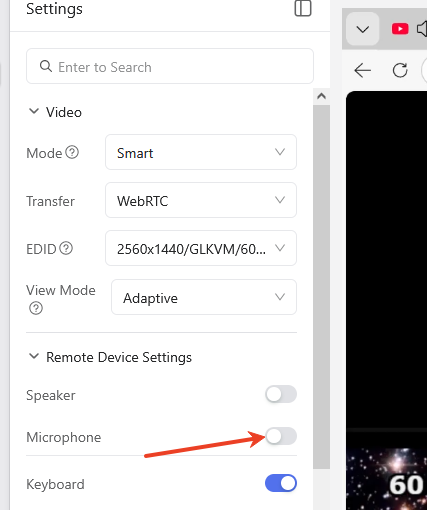
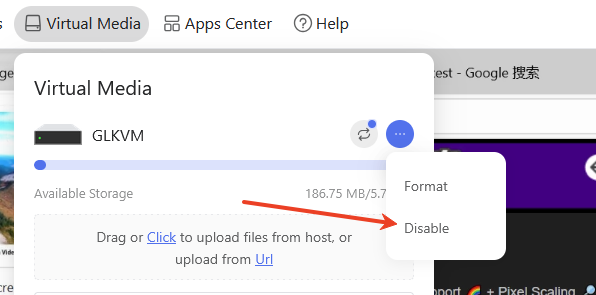
- Try disabling virtual media and the microphone
- Enter the terminal and execute the following command:
tee /etc/kvmd/override.yaml >/dev/null <<'EOF'
otg:
    devices:
        hid:
            mouse_alt:
                start: false
EOF
reboot
If it still doesn't work, please disable all mouse functions.
tee /etc/kvmd/override.yaml >/dev/null <<'EOF'
otg:
    devices:
        hid:
            mouse:
                start: false
            mouse_alt:
                start: false
EOF
reboot
In this case, only the keyboard is running
If all of the trobleshooting is not work, please export the log files to us(flora.wan@gl-inet.com)
Hope this helps!