BenGa
1
Hi all,
We’ve recently received an RM10 to play with test at work with the hopes of deploying to remote sites.
We have an issue with Dell BIOS (tested only OptiPlex Micro 7020 so far) where we can get to the BIOS but unable to interact with it in any way.
Device tested: RM10.
We've tried the following:
- Firmware update to V1.7.0
- USB Device changed to various options
- USB changed to Keyboard only (Mouse disabled)
- Various "Device Identities" used
- Tried USB C Output (from KVM) into PC (USB A), along with USB C both sides.
Any suggestions? We'd really like to deploy this to multiple sites.
minmie
2
provide a log when enter BIOS?
BenGa
4
Hi Minmie,
Where's the best place to send them? Just in a PM?
Thanks!
BenGa
6
I've had a look and I can't see any way to send a personal/direct message through the forum?
BenGa
8
Ah, I don't seem to have that option:
Maybe my member role is too low/new?
minmie
9
1 Like
I've upgraded your trust level, and you should now be able to send private messages normally.
1 Like
BenGa
12
Thanks, have just sent that as I got the editor level from will.qiu.
Happy to continue over email or PM.
minmie
13
Okay, I assume you can now see the BIOS screen normally.
I need you to try the following steps:
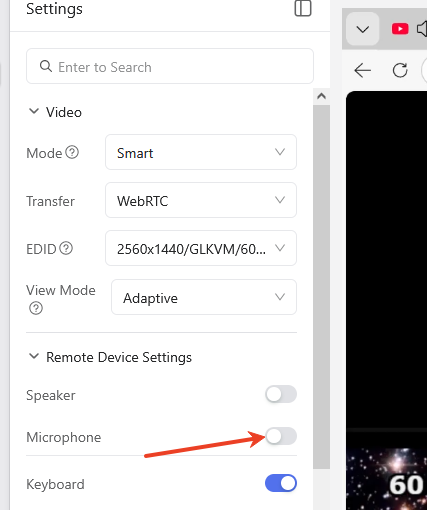
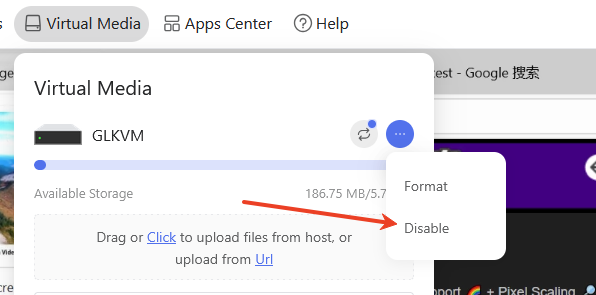
- Disable the microphone and virtual media.
2. disable second mouse
running below command in termial
tee /etc/kvmd/override.yaml >/dev/null <<'EOF'
otg:
    devices:
        hid:
            mouse_alt:
                start: false
EOF
reboot
minmie
14
If it still doesn't work, disable all mouse functions.
tee /etc/kvmd/override.yaml >/dev/null <<'EOF'
otg:
    devices:
        hid:
            mouse:
                start: false
            mouse_alt:
                start: false
EOF
reboot
In this case ,only keyboard is running
BenGa
15
Disabling the microphone is what fixed this - thank you!
I believe (from reading other posts), that this is an issue with the USB device appearing as multiple devices at once?