I'm experiencing intermittent latency spikes whenever I play VRChat using my Flint 3 router. I've ruled out my connection, wifi interference, and the computer causing the issue, and it does not occur at all if I switch back to my older wifi 6 TP-link router. The spikes seem to occur randomly and often occur repeatedly once they start.. Virtual Desktop's performance overlay says the network latency jumps anywhere between 20 and over 100ms and everything lags horribly during it..
I've tried upgrading to the newest firmware and resetting back to factory settings. Is there anything else I can do?
One thing worth checking: is your headset on the router's MLO Wi-Fi? GL.iNet's own wireless documentation lists the Flint 3 (GL-BE9300) as supporting MLO, which bonds several bands at once - good for throughput, but real-time streaming like Virtual Desktop usually behaves best on a single clean 5 GHz link. A quick test: connect the headset to the plain 5 GHz main network instead and watch whether the spikes stop. This is a hypothesis from my side, I cannot reproduce your exact setup here.
Thanks for responding. There's no MLO network set up on mine, nothing was ever added to it. The headset is connected to the 5ghz wifi only, as far as I can tell.
I'm having similar issues as you when streaming to the quest 3 with steam link, normally starts dropping frames when moving around, I've tried 5ghz and 6ghz different channels and such dropped down to 80mhz channel width and tried turning off hardware network acceleration, the quest is a few feet from the flint, it's on the latest firmware
I've also tried streaming to my steam deck oled with moonlight and I get the same drops if I walk around, i got the flint 3 to replace a older puppis S1 to operate as a streaming router for my pc, I can't currently even get the performance as stable as the puppis S1 was, which was good but limited as it's not a full router, I'm running out of ideas of what settings I can change on the flint, thinking of trying an older firmware next to see if that helps
Erf.. Yeah, that happened with me as well whenever I moved on the Quest 2.
I've tried changing the 5ghz to 80mhz on different channels to no avail as well. At the moment, I'm going back and forth with email support, and they're going to try to remote into the router to look at it. I'll try to update if there's anything that works.
Oh wait, this actually won't work since my desktop needs to be wired (so it's always on the main gateway). I use virtual desktop to connect the headset through the router to the computer. I tried putting the desktop on the guest wifi with the headset but vd apparently didn't like that and wouldn't connect..eh, that would've been much more laggy anyway.
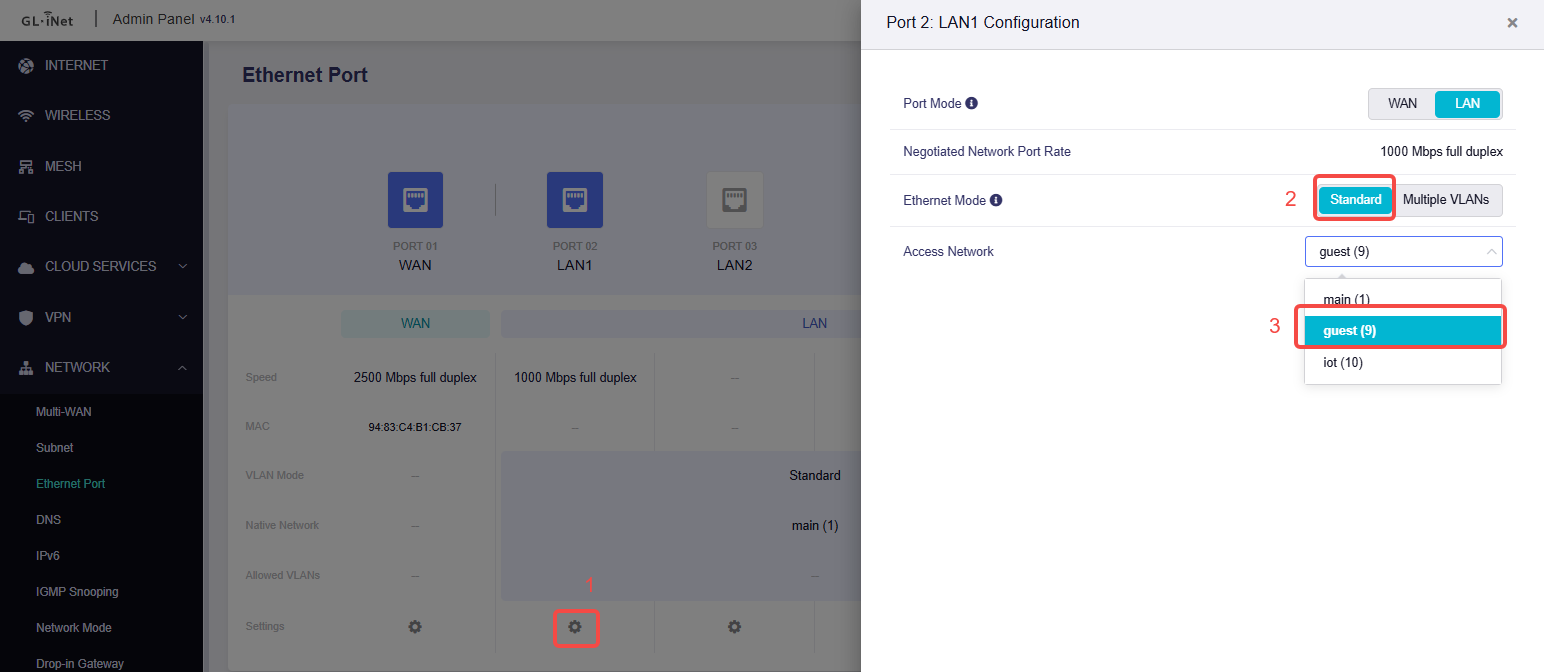
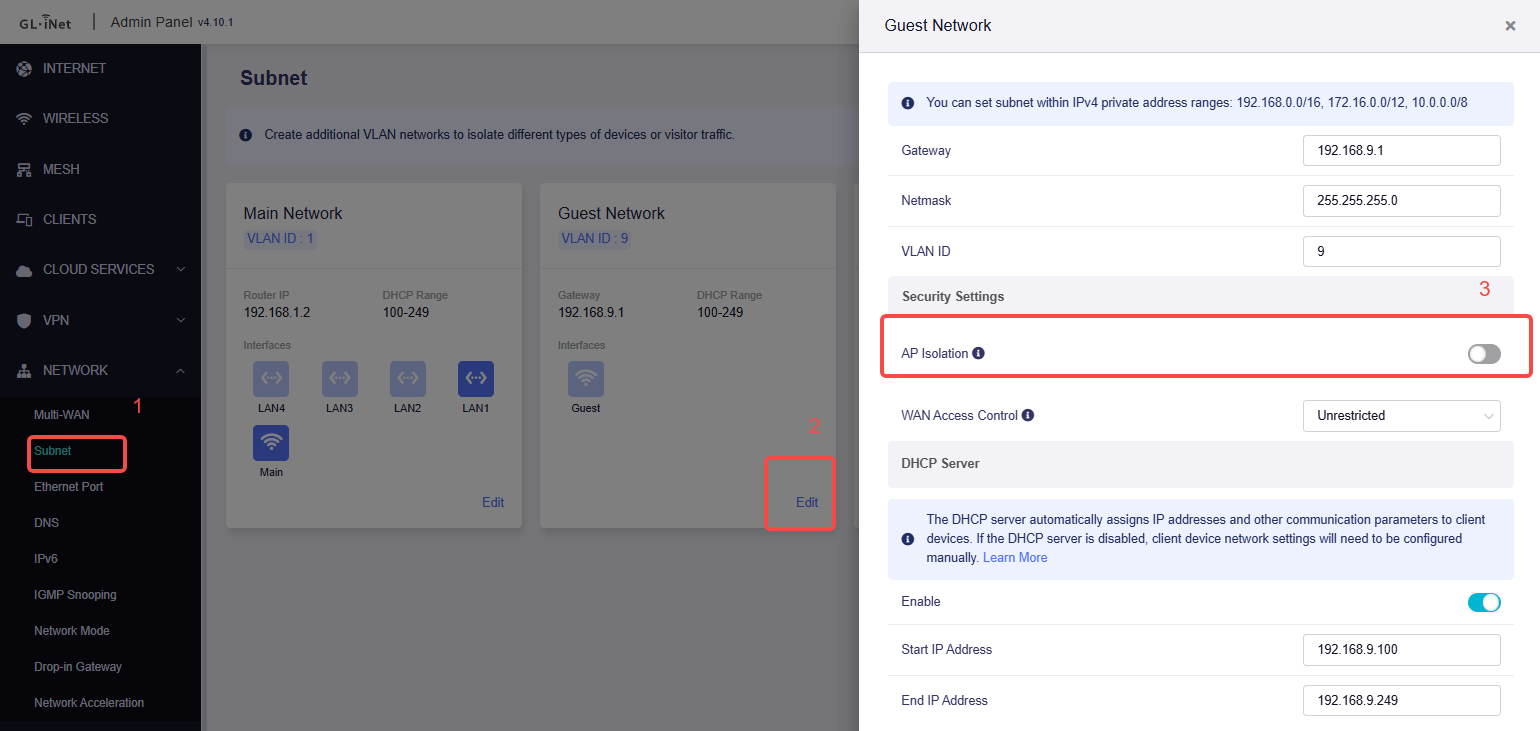
If you'd like to test whether placing both devices on the Guest network helps, you can assign the LAN port connected to your desktop PC to the Guest network's VLAN while keeping the desktop connected via Ethernet.
On firmware v4.10.1, you can do this by going to Network → Ethernet Port:
After applying the changes, connect your Quest headset to the Flint 3's Guest 5 GHz Wi-Fi network.
Please also make sure AP Isolation is disabled so the desktop PC and headset can communicate with each other.
I tried this tonight and it still lags when I look around in VR, and it also seemed to freeze the connection between the computer and headset during connect/disconnect from steamvr.
Do your 2.4 GHz, 5 GHz, and 6 GHz networks use the same SSID? If so, could you try giving each band a different name, reconnecting your headset to the 5 GHz network, and checking whether this improves the issue?
If convenient, could you please keep your PC and VR headset connected to the Flint 3 and share the router with our support team through GoodCloud so we can investigate remotely?
Once shared, please send us the router’s MAC address and temporary login password via private message.
Thank you for your understanding and support.
They all have different SSIDs and I've shared the router with support on goodcloud, though I never heard back from anyone about it. I don't see anyone else having logged into it in the logs.
For everyone following this issue, we have been communicating with Cyg via private messages and have carried out remote checks and collected diagnostic data.
We are continuing to investigate with the user and will share further findings here as they become available.