Dear Experts,
I am using my new Mango to tether an old iPhone to a wired network, and - if you receive this message OK - it is working well.
Can anyone tell me what I should do to make one of the LEDs flash with network activity, on either the ethernet or the USB port? Blinking lights are always good, right!
(If anyone has any specific hints or advice about using a tethered iPhone to provide connectivity via a Mango, I would be interested to hear them.)
Thanks.
Hi,
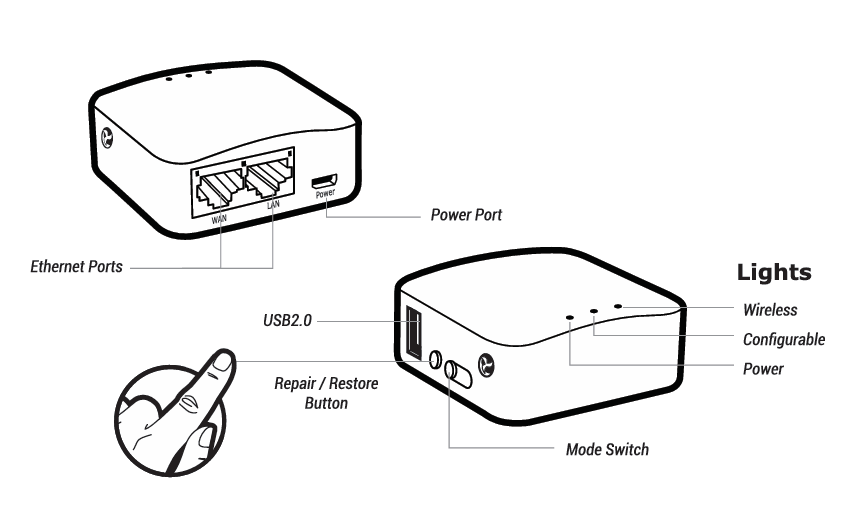
The Mango has three LEDs on top of the case, as shown in the LED layout diagram.
- Power LED: The outer LED closest to the USB/reset-button side indicates power status and normally stays on while the router is powered.
- Configurable LED: The middle LED can be assigned to a network interface or another supported trigger; its system name is
green:wan.
- Wi-Fi LED: The outer LED at the other end indicates Wi-Fi status and activity.
You can choose how the configurable LED behaves:
-
Always on: Use the default-on trigger.
-
Always off: Use none and set the brightness to 0.
-
Blink at a fixed interval: Use timer and set the on/off durations.
-
Follow network activity: Use netdev, select an interface, and choose link, tx, and/or rx.
For netdev, link keeps the LED on while the interface link is up, tx rx makes it flash during data transfer and stay off when idle, and link tx rx combines a steady connected light with activity blinking.
For your iPhone-to-wired-network setup, a useful option is to make the middle LED flash with LAN traffic.
On the Mango running firmware 4.3.30, the LAN interface is eth0.1, so the following SSH commands configure the middle LED to flash during LAN traffic and stay off when idle:
uci set system.led_wan.trigger='netdev'
uci set system.led_wan.dev='eth0.1'
uci set system.led_wan.mode='tx rx'
uci commit system
/etc/init.d/led restart
You can then adjust the combination to suit your preference—for example, use link tx rx for a steady light with activity blinking, or select the iPhone’s tethering network interface to monitor USB tethering traffic.
Thanks for the reply - that works!
Since I'm not using the WiFi, I have also repurposed the WiFi LED (confusingly called "led_wifi_led" in uci) for the USB network interface on eth1.
Maybe more of this could be exposed in the web UI?
Hmm, so this didn't survive a restart.
"uci show" showed that the settings had been remembered, but the LEDs didn't behave as I expected until I did "/etc/init.d/led restart".
Is this expected?
Hi,
Thank you for your feedback.
-
Configuring LEDs through the web UI
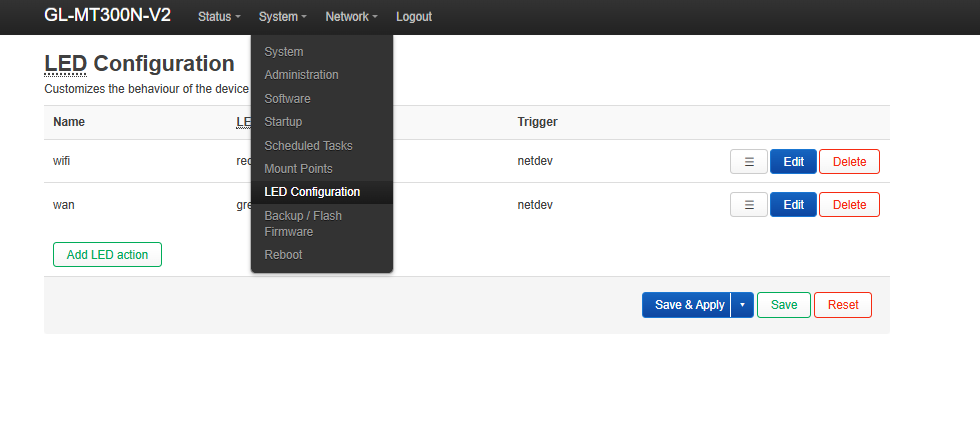
You can go to LuCI → System → LED Configuration to select the LED, network interface, and trigger mode.
For your USB tethering setup, select red:wlan, set the trigger to netdev, choose eth1, and enable Transmit and Receive.
-
Keeping your LED settings active after a reboot
We reproduced this behavior on a Mango running firmware 4.3.30: your configuration is saved, but a later startup service restores the default LED behavior.
As a workaround, you can add a startup script that reapplies your saved LED configuration after that service has run:
cat > /etc/init.d/custom_led <<'EOF'
#!/bin/sh /etc/rc.common

START=99

start() {
    /etc/init.d/led restart
}
EOF

chmod +x /etc/init.d/custom_led
/etc/init.d/custom_led enable
/etc/init.d/custom_led start
This script uses your existing LED configuration, including future changes saved through LuCI.
Thank you for your understanding and support.