Apparently it features even faster wifi than the Flint 3.
Based on the BE14000 I expect:
2.4GHz: 802.11 b/g/n/ax/be, 2x2 @ 688Mbps,
5GHz: 802.11 a/n/ac/ax/be, 3x3 @ 4,323Gbps,
6GHz: 802.11 ax/be, 3×3 @ 8,643Gbps
So compared to the Flint 3, 2 more antennas allowing for 3x3 on 5GHz and 6GHz bands.
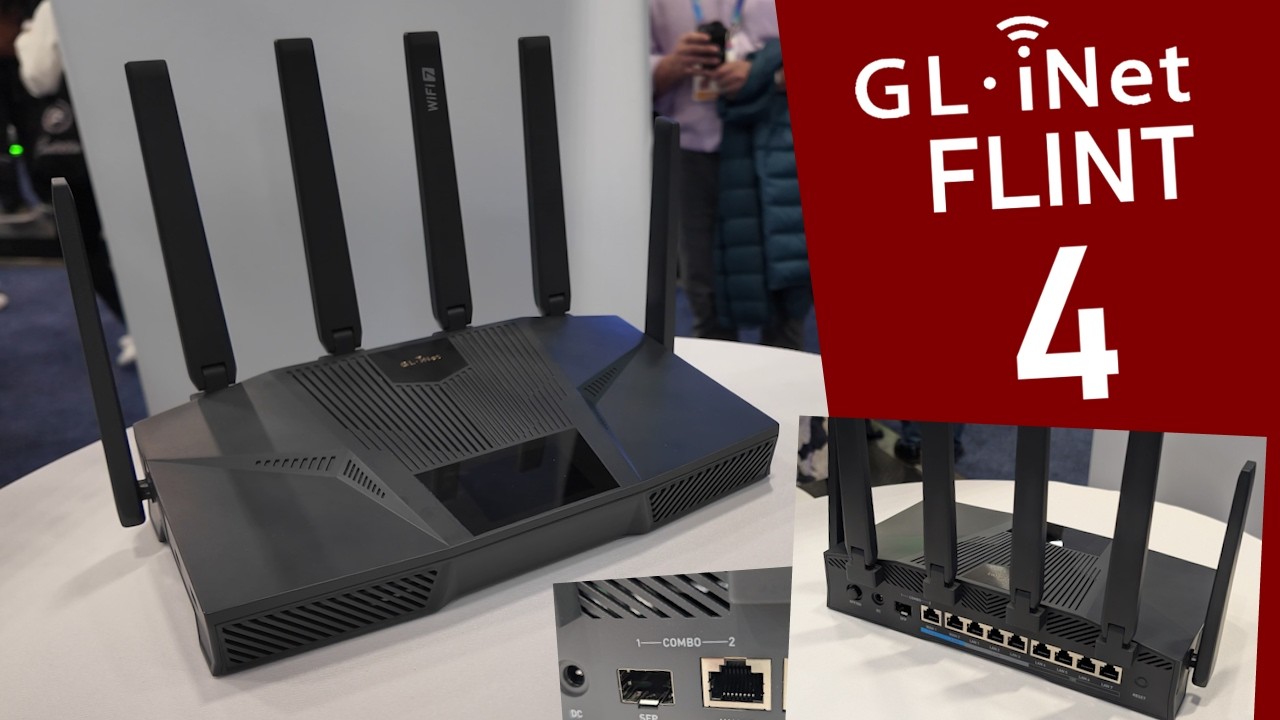
The backside features an SFP/10Gbps combo WAN-port, a 2.5Gbps WAN2 port, 3 2.5Gbps LAN ports and 4 more 1 Gbps LAN ports. Sadly no 10Gbps LAN port...
Apparently Flint 4 will get a fancy touch screen on it and there appear to be 2 ports on the side. My guess is USB-C and USB 3 based on the available images.
And it is powered by a MediaTek CPU. The precise type is yet unknown yet.
Sadly that's all there is for now. Over time it will start mentioning more and more. I did update my post to reflect all those things you mentioned, so it is all in one nice place.
The ports do it for me for this , as for now my Flint 2 has a single port for my full 2.5g network which can be a little tricky, I rather have my areas on their own ports.
I was so hoping it would get a 10Gbps Wan AND a 10Gbps LAN so that I could keep the 10Gbps in my internal network switch or directly connecting to another Flint 4 … sadly it appears it’s not the case, and if so, it’s a huge miss by Gl.Inet team.
I see a WAN combo SFP or Ethernet witch is a great option, but for people wishing to get a full 10Gbps internal network, this will sadly not work, since LAN ports are at maximum 2,5Gbps and that is what I already get from my FLint 3.
Yeah, we can saturate the 10Gbps with several 2,5Gbps connections, but that’s not what I would expect from the Flint 4, my video edition desktop pc would not be able to get the 10Gbps that I want
I think if I would go for this, you can also have sfp ethernet copper module to keep this for wan, and then for this single rj45 wan port I would configure it as lan, it's not the best choice but still something. edit: see the reply on this post by @oorweeg unfortunately this is not possible.
I'm not sure if GL-iNet has plans in their ui to change it like that.
But another problem is is that these 2 ports seem to share the speed between, if I look to that youtube video.
I don't like such designs tbh, it will complicate vlans with this aswell because they are wired together as a single port, but they can still be seperated into invidual ports with vlan, but at the compromise you don't get the full 10gb speed but a little lower.
I wish GL.iNet would consult/survey its customers before developing new products. That touchscreen is pretty much a useless feature which will needlessly add cost to the BOM. What a shame.
100% agree with you, putting a screen like that on a home router is just a waste of resources, increased cost, increased heat, increased unnecessary complexity and failure points, all that we don’t need on a fixed home router, I get it that on the travel category it can be handy (for some ppl and for marketing it looks great), but for the home versions it’s just plainly unnecessary.
It was so much better to put the extra resources on an extra 10Gbps LAN side to create a true 10Gbps network, that would put the Flint 4 miles ahead of what sadly will be … a half backed 10Gbps router with an unnecessary screen that I will have to bypass.
I will want to upgrade all my devices to 10Gbps and I was hoping to do that with the Flint 4, sadly I don’t think that will work.
Exactly. Why would anyone need a touchscreen when you can do everything from your computer or smartphone? Seems like a bad design choice in an otherwise great product.
I feel the same way. I've purchased all three Flints and several travel routers. I'm planning on getting the Flint 4, but will disable the screen immediately.
It simply depends on the usage. Of course, if your router just lives behind the seating area, a display is useless. But if it is your main gateway in your hallway, it might be different.
Even if my router sits in the hallway, why would I bother getting up from my couch and to use its touchscreen, when I can do everything from my phone or tablet? Is there any feature I can control through the touchscreen that I can’t control remotely?
The more I think of it, the more this seems like a gimmick that absolutely no one asked for.
We have a massive problem with Wi-Fi 7 right now. Everyone wants it, but most of us have no idea what it is, let alone concepts like MLO (Multi-Link Operation) or STR.
GL.iNet is trying to catch up with the Wi-Fi 7 trend, but their newer routers miss the two most important bands—2.4GHz and 5GHz. These remain the most common bands used by 95% of the world. Furthermore, their router upgrades have been inconsistent:
Flint 1: An okay router.
Flint 2: A fantastic upgrade (and my favorite router).
Flint 3e: Only really shines on the 5GHz band.
Flint 3: A disappointment; it doesn't even feel like a proper Wi-Fi 7 router (if such a thing even exists right now).
Let's also not forget that client devices supporting Wi-Fi 7 are still very limited. So, we have a bottleneck: we lack both fully-capable Wi-Fi 7 routers and the clients to use them.
To get the actual benefits of Wi-Fi 7, you need to be really close to the router. So what is the point? If I really need speed and fast data transfer, I just plug in an ethernet cable and call it a day.
Personally, I am just going to buy a second GL.iNet Flint 2, and you should too. I don't see a better router coming out anytime soon. Maybe we will have to wait for the Flint 4e...
I do not understand what you mean with "their newer routers miss the two most important bands—2.4GHz and 5GHz." All of them have that?
The Flint 3 does offer 6GHz and that can actually be REALLY useful in case you are in some places with A LOT of networks already around.
In all honestly, for a lot of people even some simple wifi-5 devices will easily handle their video-streams and social-media needs.
Depending on your precise needs some devices will do better than others.
With OpenWRT it will always be a bit of a tricky thing. The open source OpenWRT is always a while behind the latest and greatest tech. As simple example I will mention your feature MLO within OpenWRT's default web-gui luci. Very recently someone bothered to make some little plug-in ( GitHub - YYH2913/luci-app-mlo · GitHub ) to make it possible to configure a bit of MLO...
Us people always want that latest and greatest, but.... you know what I will say... That comes at a price: Maybe limited option for chipsets, Pretty much always less mature software.
To me wifi 7 is not at my interest at all, maybe in the future but none of my devices support 6ghz, but also there is alot of broken clients still with their own hacky/patchy behaviour how it works with MLO, this is ironic but not always the problem on GL-iNet side.
My eyes are rather on the older protocol with fast roaming (802.11r) which is so old now that most devices support it or just connect normally without fast roaming, this is better for me than breaking.
MLO is not roaming indeed, but it has a similar way of making client decisions which streams are preferred simultaneously, but on some routers this makes not really sense like on the Beryl 7 which does not have 6ghz, then you get streams between a noisy band and a less noisy band....
Between 5ghz and 6ghz this can be interesting but manufacturers need to step off the hacky/patchy behaviour there need to be a really strong consensus about the implementation but it isn't there yet imo, to early for me.




 )
)