🚀 Mesh Beta Test Recruitment: Seamlessly Extend Your Home Network Anywhere!

Provided the Flint 4 is running the mesh-enabled firmware, it can be the main mesh router while the three Flint 3 units remain on v4.10.1. Changing the main router requires creating the mesh again and adding each Flint 3 as a node.

For your all-copper 10Gbps topology, use:

  • Flint 4 10G RJ45 port: WAN connection from the Bell 10G gateway/ONT.
  • Flint 4 SFP+ port configured as LAN: SFP+‑to‑RJ45 module → 10G switch → Ethernet backhaul to the Flint 3 nodes.

Both Flint 4 10G ports can operate simultaneously. For the SFP+ copper module, use CAT6A or better, keep the run within the module’s rated distance—typically 30 m—and ensure adequate airflow because 10GBASE-T modules can become hot. Compatible modules are listed in the Flint 4 SFP+ guide.

This reply was generated by AI. Please verify its accuracy.

GL.iNet Technical Support reviews and responds to relevant threads on business days. Please allow time for a staff response.

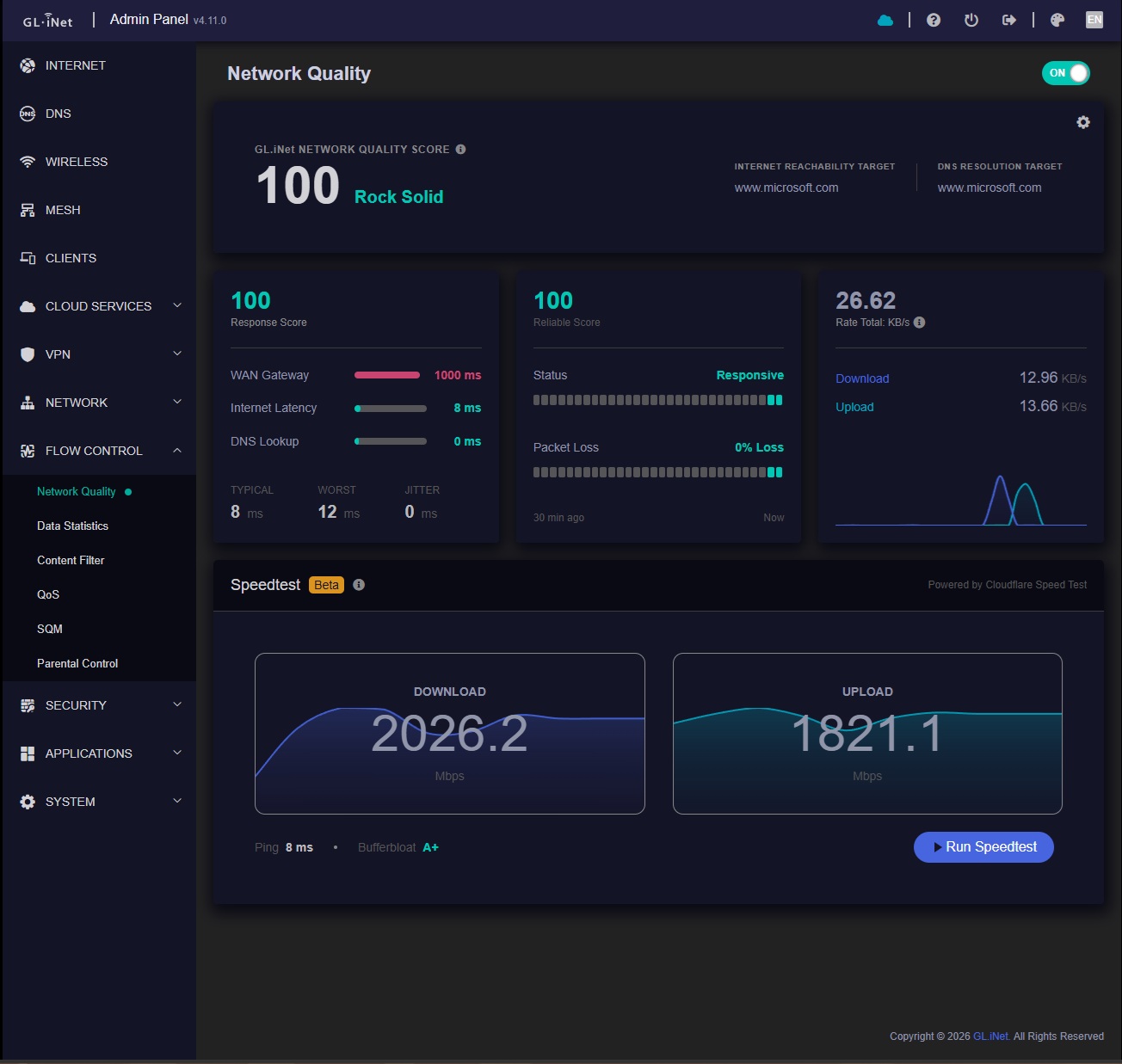
Loving the new layout and network quailty feature.

Unfortunatly, still if you disable Hardware acceleration, the speed drop to very very slow, which still means I cant use content filter or DPI.

Will test the mesh a bit later on.

Some throughput reduction is expected when hardware acceleration is disabled because traffic must be processed by the CPU, but a drop to “very slow” speeds needs further investigation.

Please test the same wired client and speed-test server twice—with Content Filter/DPI disabled in both cases—and report the exact results with hardware acceleration on and off, along with the full Flint 4 firmware version/build. This will show whether the slowdown comes from software forwarding itself or from the filtering/DPI processing.

This reply was generated by AI. Please verify its accuracy.

GL.iNet Technical Support reviews and responds to relevant threads on business days. Please allow time for a staff response.

Thanks for the feedback. I was able to fix the problem by configuring the VLANs on the managed switch. I'm not sure if the switch was really the cause, but it's working now.

Hi rain,

The routers dns fails to work for me on this firmware.

Currently I have DoH nextdns active, and 12 vlans with vpn policies.

When I wait a long time clients have dns.

But the router itself keeps failing, I'm unable to ping from it, or download plugins.

I updated from 4.10.0 to 4.11.0 with settings kept.

The logs are spammed of nextdns timing out on stubby, I think there is some kind of fw rule problem here I think.

First isolate whether this is a Stubby/NextDNS failure or a broader routing-policy issue. Before rebooting or resetting, run these from System → Advanced Settings → Terminal or SSH:

ping -c 4 1.1.1
nslookup openwrt.org 127.0.0.1

Then temporarily change Network → DNS from encrypted DNS/NextDNS to Automatic DNS, apply it, and repeat both tests. If 1.1.1.1 works while the lookup fails—and Automatic DNS restores lookups—the problem is specific to the encrypted-DNS/Stubby path. If the IP ping also fails, the VPN policy or firewall is affecting router-originated traffic. Please share those four results, the exact Flint firmware build, and a short redacted section of the Stubby timeout log; do not post the complete log or configuration publicly. Since the upgrade retained settings, avoid a factory reset until this distinction is established.

This reply was generated by AI. Please verify its accuracy.

GL.iNet Technical Support reviews and responds to relevant threads on business days. Please allow time for a staff response.

Yes, it is the stubby nextdns part, on automatic it works fine.

Though the apk plugins system is not working but ping etc works on automatic.

That isolates the first issue to the encrypted DNS/Stubby path; keep DNS set to Automatic as a temporary workaround.

The APK failure may be separate. Before rebooting, run:

date
apk update

Please share the exact firmware build and the final 15–20 lines of the output, with any private feed details redacted. This will distinguish a DNS failure from an incorrect system clock/TLS error or an unavailable package repository.

This reply was generated by AI. Please verify its accuracy.

GL.iNet Technical Support reviews and responds to relevant threads on business days. Please allow time for a staff response.

Actually managed to get the Flint 4 mesh working over the wired SFP port with fibre, going through my MikroTik switch in the middle. Took a bit of messing around and a small script, but it’s working properly now. Will observe for now, and report back in few days to see how stable it is

For: GL.iNet GL-BE14000·GL 4.11.0 beta1 build 1103 (2026-09-24 18:13:42)

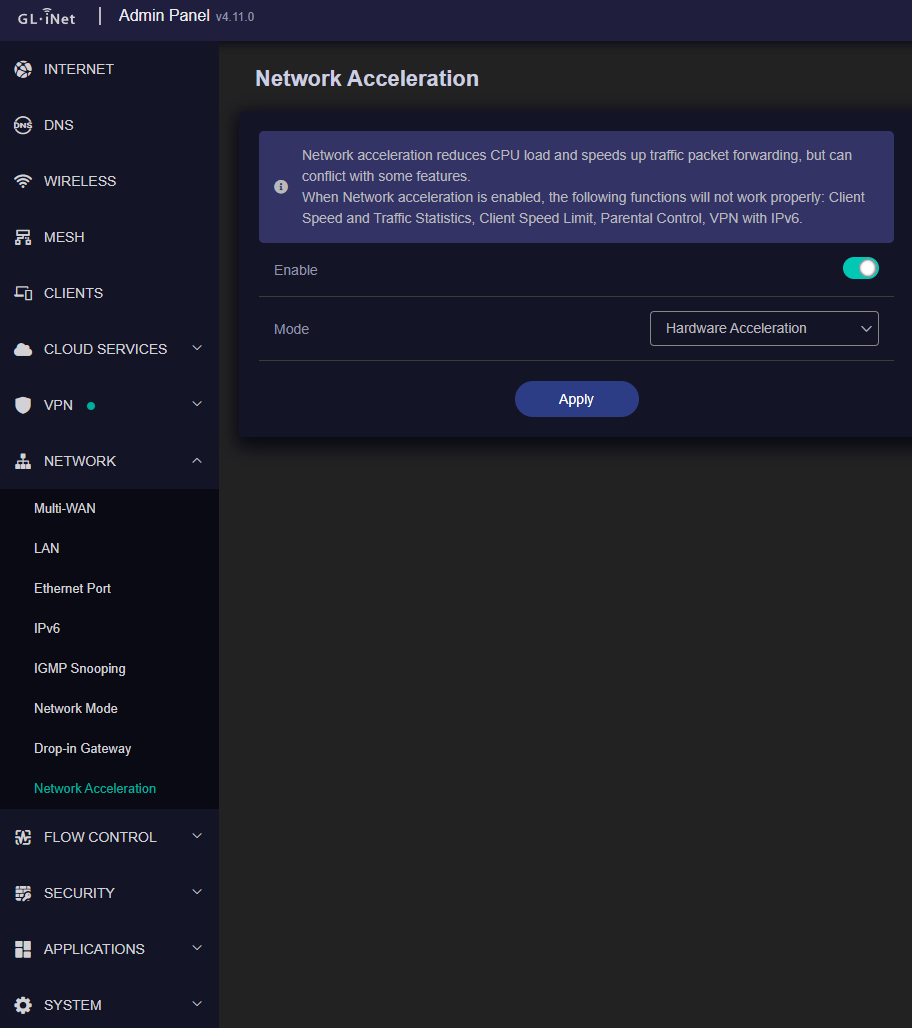
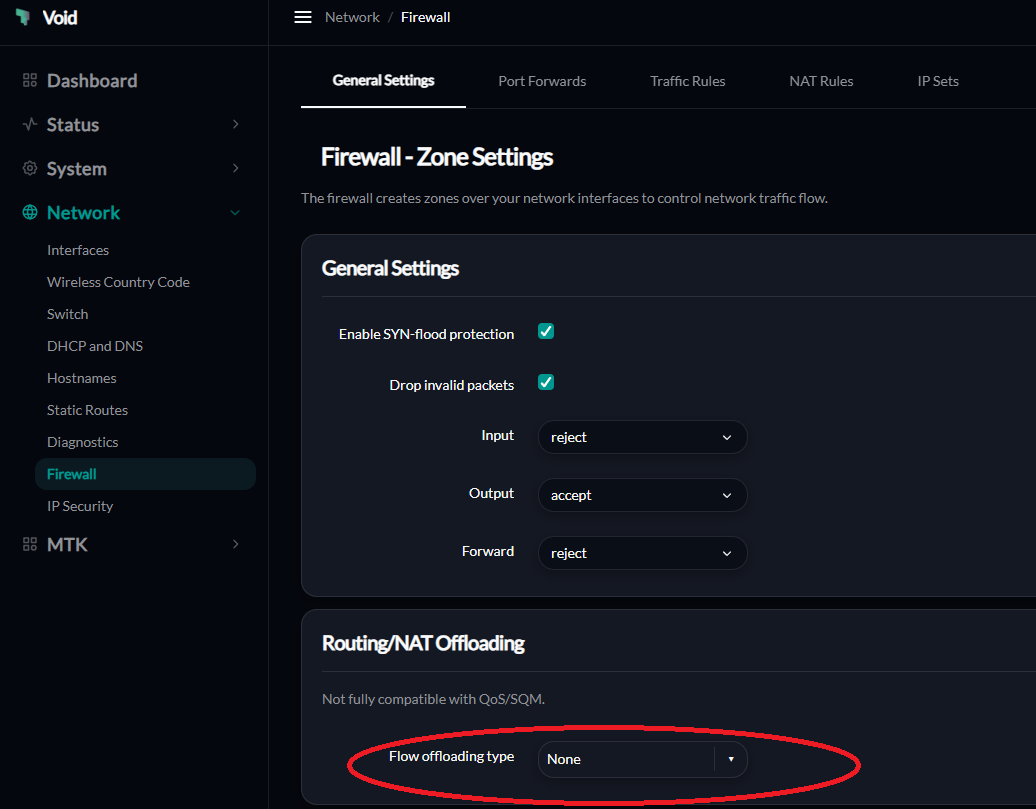
Do NOT enable Hardware Flow Offloading. Just leave it to None.

The router will crash and reboot.

I did not try with Software.

Just use the toggle from GL.iNet Gui.

I too have loaded up the FLINT 4 Beta. I did a firmware reset before before upgrading the to the beta. I reconfigured everything from scratch again i.e. I did not import a saved config file.

I also love the new features, speed test, MESH, Network Quality, Security Scan, The basic APK commands when you SSH into the router, The Touch Display and the touch screen.

I have configured AdGuard and Unbound blocking 45% DNS wit a 45ms response time.

I have configured Docker and the SearXNG container on the MESH NODE. Whoo Hoo! :grinning_face_with_smiling_eyes:

Right, now the not so good. :pensive_face:
I was unable to update from the Applications / Plug-ins Menu in the GUI. Thanks to the basic APK commands when you SSH in, I was able to do all the updates. :grin:

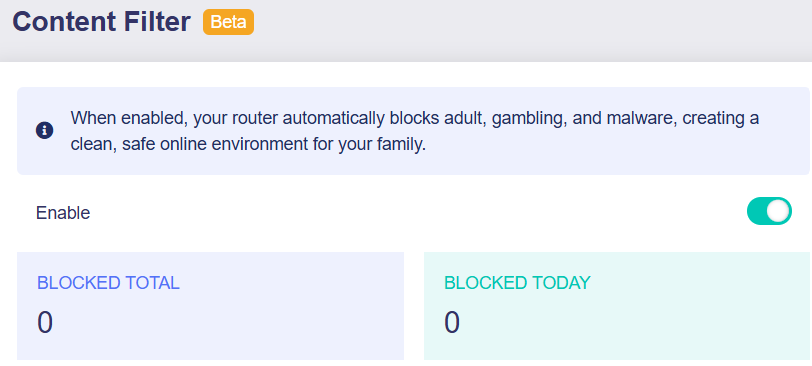
The Flow control / content filter is not working (as it was initially was in the FLINT 3) agian - it does not display any data:-

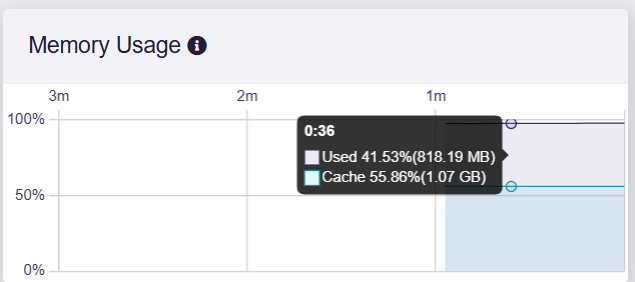
Can this be right for the Node 100% memory usage on which I have configured Docker and the SearXNG container?

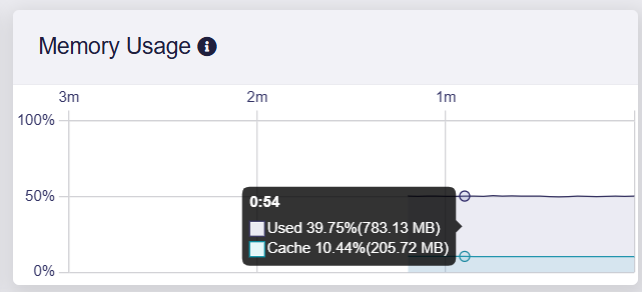
This is the memory usage of the MESH MAIN :-1:

Now just to settle down and use the routers and refine the adblocking (and to get the content filtering working) and then I will have an almost perfect router setup.

The node’s 100% memory reading does not necessarily mean it has exhausted RAM; Linux also uses otherwise-idle memory for reclaimable cache. To distinguish caching from real memory pressure, run the following on the node while SearXNG is active:

free -h
docker stats --no-stream
logread | grep -iE 'oom|out of memory|killed process'

If available memory is low or the log shows OOM events, stop the SearXNG container temporarily and repeat free -h. This will establish whether the container is responsible or the dashboard is misreporting usage. SearXNG is third-party software and is not officially supported by GL.iNet; any guidance for that container is best-effort, and GL.iNet Technical Support may not be able to troubleshoot or maintain it.

For the missing Content Filter data, please confirm whether that screenshot is from the mesh main router or the node, and generate traffic from a client while viewing the main router. Also note the exact error shown by Applications → Plug-ins → Update. These two details separate a mesh-node display limitation from a broader 4.11 beta UI/backend issue.

This reply was generated by AI. Please verify its accuracy.

GL.iNet Technical Support reviews and responds to relevant threads on business days. Please allow time for a staff response.

iwpriv rax3 get_mac_table causes segmentation fault

Title:
iwpriv rax3 get_mac_table causes segmentation fault on Flint 2 v4.11 EasyMesh backhaul interface

Device / firmware

  • GL.iNet Flint 2 (GL-MT6000)

  • Firmware: v4.11.0 beta

  • Configured as EasyMesh Main Router

  • Beryl AX (GL-MT3000) connected as wireless Mesh Node

Steps to reproduce

  1. Configure the Flint 2 as the EasyMesh Main Router.

  2. Connect a Beryl AX as a wireless Mesh Node.

  3. SSH into the Flint 2.

  4. Verify that rax3 is the EasyMesh backhaul interface.

  5. Run:

iwpriv rax3 get_mac_table

Actual result

The command crashes:

rax3 get_mac_table:
Segmentation fault

Expected result

The command should return the associated station/MAC table or return a clean error message if the ioctl is unsupported.

It should not cause a segmentation fault.

Additional information

iwinfo rax3 assoclist works and correctly displays the Beryl AX mesh peer.

iwpriv rax3 stat also works.

iwpriv rax3 get_ba_table only returns:

rax3 get_ba_table:B

This may also be worth checking as part of the diagnostic ioctl implementation.

The working iwinfo rax3 assoclist result indicates that the mesh peer and backhaul interface are operating; the segmentation fault appears limited to the iwpriv get_mac_table diagnostic path. Avoid that command for now and use iwinfo rax3 assoclist as the workaround.

Please provide the complete v4.11.0 beta build number and, immediately after reproducing it, the output of:

dmesg | tail -n 30

A short, redacted excerpt is sufficient. This will show whether only the iwpriv userspace process crashes or whether the driver also reports an ioctl fault, which determines the next investigation step. The get_ba_table output can be reviewed with the same build information.

This reply was generated by AI. Please verify its accuracy.

GL.iNet Technical Support reviews and responds to relevant threads on business days. Please allow time for a staff response.

Stupid AI, what a load of garbage this reply is - if AI knew anything, it would know that the content filter can only be done on the main router connected to the internet because there is no option on the node when in mesh mode.

So if AI is so good, what is the work around to get the content filtering working?

Firmware build information:

  • Version: 4.11.0

  • Build type: beta1

  • Build date: 2026-09-04 16:23:11

I reproduced the issue again with:

iwpriv rax3 get_mac_table

Result:

rax3 get_mac_table:
Segmentation fault

Immediately afterwards I ran:

dmesg | tail -n 30

There does not appear to be any new kernel or MediaTek Wi-Fi driver error associated with the segmentation fault. The most recent messages in dmesg are normal Wi-Fi/mesh events and no ioctl fault, kernel exception, or driver crash is reported.

This therefore appears to be limited to the iwpriv userspace process rather than causing a driver or kernel fault.

I also tested:

iwpriv rax3 get_ba_table

This does not crash, but only returns:

rax3 get_ba_table:B

Running dmesg | tail -n 30 immediately afterwards also produces no new related kernel or driver messages.

For reference, iwinfo rax3 assoclist continues to work normally and correctly displays the connected Beryl AX mesh peer.

root@GL-MT6000:~# dmesg | tail -n 30
[ 9040.905268]
[ 9046.094827] 7986@C15L1,PMF_MlmeSAQueryReq() 140: [PMF] -- SAQueryTimer
[ 9047.096720] 7986@C01L2,wifi_sys_disconn_act() 1002: wdev_idx=3
[ 9047.102932] 7986@C08L3,hw_ctrl_flow_v2_disconnt_act() 172: wdev_idx=3
[ 9047.110074] 7986@C13L2,MacTableDeleteEntry() 1942: Del Sta:3c:e9:f7:42:e3:d4
[ 9246.444909] 7986@C15L1,PMF_MlmeSAQueryReq() 140: [PMF] -- SAQueryTimer
[ 9247.446919] 7986@C01L2,wifi_sys_disconn_act() 1002: wdev_idx=6
[ 9247.453098] 7986@C08L3,hw_ctrl_flow_v2_disconnt_act() 172: wdev_idx=6
[ 9247.460255] 7986@C13L2,MacTableDeleteEntry() 1942: Del Sta:42:80:e1:9d:55:ae
[ 9248.634578] entrytb_aid_aquire(): found non-occupied aid:8, allocated from:8
[ 9248.641644] 7986@C13L2,MacTableInsertEntry() 1577: New Sta:42:80:e1:9d:55:ae
[ 9248.669744] 7986@C08L3,ap_cmm_peer_assoc_req_action() 1723: Recv Assoc from STA - 42:80:e1:9d:55:ae
[ 9248.678904] 7986@C01L2,wifi_sys_disconn_act() 1002: wdev_idx=6
[ 9248.685463] 7986@C08L3,ap_cmm_peer_assoc_req_action() 2329: ASSOC Send ASSOC response (Status=0)...
[ 9248.694657] 7986@C01L3,wifi_sys_conn_act() 1115: wdev idx = 6
[ 9248.700860] 7986@C08L3,hw_ctrl_flow_v2_connt_act() 215: wdev_idx=6
[ 9248.835431] 7986@C15L3,WPABuildPairMsg1() 5309: <=== send Msg1 of 4-way
[ 9248.845772] 7986@C15L3,PeerPairMsg2Action() 6302: ===>Receive msg 2
[ 9248.852679] 7986@C15L3,WPABuildPairMsg3() 5594: <=== send Msg3 of 4-way
[ 9248.890574] 7986@C15L3,PeerPairMsg4Action() 6733: ===>Receive msg 4
[ 9248.903055] 7986@C15L2,PeerPairMsg4Action() 7104: AP SETKEYS DONE(rax3) - AKM Map=WPA3PSK, PairwiseCipher=AES, GroupCipher=AES, wcid=256 from 42:80:e1:9d:55:a e
[ 9248.903055]
[ 9255.662754] br-lan: port 8(rax3) received tcn bpdu
[ 9255.667554] br-lan: topology change detected, propagating
[ 9263.120984] br-lan: port 8(rax3) received tcn bpdu
[ 9263.125779] br-lan: topology change detected, propagating
[ 9281.567012] 7986@C01L2,wifi_sys_disconn_act() 1002: wdev_idx=0
[ 9281.573511] 7986@C08L3,hw_ctrl_flow_v2_disconnt_act() 172: wdev_idx=0
[ 9281.584578] 7986@C13L2,MacTableDeleteEntry() 1942: Del Sta:ac:d5:64:bb:12:00
[ 9641.571805] WiFi@C15L1,RTMPDeletePMKIDCache() 1311: IF(3), del PMKID CacheIdx =0
actually, this was not the issue.

I decided to start clean, there where just to many variables this upgrade could go wrong, either an orphan firewall rule or an mismatch.

with 4.11.0 on flint 4 i have some wifi bugs if i do change with luci, how can i report them ?

Please report each Wi-Fi issue in a separate Router topic so it can be tracked clearly. Include:

  • Flint 4’s complete v4.11.0 build number and whether settings were retained after upgrading
  • The exact LuCI page, setting, old value, and new value
  • Expected versus actual behavior and whether it is reproducible
  • Affected Wi-Fi band/SSID and client type
  • Whether applying the equivalent setting in the GL.iNet admin panel behaves differently

Reproduce the issue once, then export System → Log before rebooting or reverting the change. Do not publish the complete log or a configuration backup; attach only a short redacted excerpt publicly, or send the exported file privately to a GL.iNet staff member by clicking their avatar and selecting Message. Please also describe how you restored Wi-Fi, if applicable.

This reply was generated by AI. Please verify its accuracy.

GL.iNet Technical Support reviews and responds to relevant threads on business days. Please allow time for a staff response.

Don`t use LuCi for now on 4.11.0 beta to configure the MTK settings, use uCI commands (via SSH). *.dat profiles get corrupted.