Thanks for the information, even though I paid the price for it.

Thanks for the information, even though I paid the price for it.
First determine whether v4.11.0 is failing to detect the USB port itself or only the SSD filesystems. Using the original Flint 4 power adapter, disconnect the SSDs, reboot, and connect one simple USB flash drive directly to the router without a hub. Then run via SSH:
lsusb
block info
dmesg | tail -n 50
If the flash drive appears, reconnect one SSD at a time; use an externally powered enclosure or hub if available, since two SSDs may exceed the USB port’s available power. If even the flash drive does not appear, please provide the complete v4.11.0 build number and a short, redacted copy of those command results. Do not reformat the SSDs, because that could erase their data.
This reply was generated by AI. Please verify its accuracy.
GL.iNet Technical Support reviews and responds to relevant threads on business days. Please allow time for a staff response.
anyone else have issues with IPv6 in native mode not working on this firmware with Flint 4?
Check whether the Flint 4 receives an IPv6 prefix from the upstream connection. Over SSH, run:
ifstatus wan6
ip -6 route
If wan6 is not up or has no delegated prefix, the issue is on the WAN/DHCPv6-PD side; if a prefix and default route are present but clients receive no IPv6 address, the LAN advertisement/delegation path is the next area to check. Please share the complete v4.11.0 build number, your ISP/upstream topology, and these outputs with all public IPv6 addresses and prefixes redacted.
This reply was generated by AI. Please verify its accuracy.
GL.iNet Technical Support reviews and responds to relevant threads on business days. Please allow time for a staff response.
I tried turning on IPv6 again and now it works fine.
Hi Miles, unfortunately due to major on-going issues with the 2 x Flint 2’s in Mesh mode I’m going to have to revert back to AP mode. The last week has been terrible with Homekit devices. I’ve lost connectivity of my Smart devices with no responses and mixed connectivity issues. I’ve had to reset my iPhone and and attempt re-pairing of devices unsuccessfully in most cases, or they will pair, then a few hours later everything is unresponsive again.
I’ve spent the last 2 days on this troubleshooting and had to use AI (yes, had to revert to that for some explanation!), but says out of memory errors:
Here are some of the issues reported:
daemon.err dnsmasq[23354]: failed to allocate -1 bytes
“(What this means: dnsmasq (the service handling your local DNS and IP addresses) is crashing because the router has completely run out of RAM. When an application attempts to allocate memory in a critically low-memory state, the integer wraps around to -1. Because of this, your local network devices will soon lose the ability to load web pages or get new IP addresses)”
Secondary Issues: Wi-Fi Roaming & Handshake Failures:
While the system is starved for memory, the MediaTek wireless driver (7986@C...) is aggressively trying and failing to manage roaming devices:
PMKID Cache & pStaCfg is null: Your devices are attempting fast roaming. The router is looking for the client's saved security handshake (PMKID) but finding empty data pointers. This drops connections and forces devices to perform a slow, full re-authentication.
4Way-MSG1 timeout: A device (MAC ending in ed:ba) failed to complete its WPA2/WPA3 security handshake, causing a timeout and a Wi-Fi disconnect.
AP(...e2:3e) not support rrm: Your router is trying to send Radio Resource Management (802.11k RRM) requests to neighboring access points or mesh nodes, but those nodes do not support it, generating repetitive log clutter.
ap_peer_auth_req_at_idle_action... SKIP: A dual-band device is bouncing rapidly between your 2.4GHz and 5GHz bands, causing the router to drop packets because the client is confused about which band it is authenticated on.
I have constantly been rebooting the routers to try and clear all this up but I have the same issues over and over, so will be going back to the stable 4.9x firmware and dumping mesh until these issues can be resolved as I simply don’t have the time to deal with the constant errors nor the time to keep troubleshooting whilst devices are not functioning. I appreciate this is beta, so hope you can iron out problems in future versions.
Edit:
I have now restored V4.9.1, and noticed that the routers are now pushing the ‘Stable’ V4.11.0. Can somebody confirm if this is the exact same version as the Beta version I have just removed? We can’t tell if it’s the same version as the numbering sequence is identical and I’m not going to re-install it if it is the version that I have had all the recent issues with.
Did you also update the Netifyd plugin version on Flint 4? This may cause Data Statistics to fail to update.
Thanks for your report.
I have confirmed that the issue of dropped connections during WiFi Mesh backhaul on the MT6000 has been fixed in firmware v4.11 release. We recommend that you upgrade to version v4.11 for use.
Here is the download link: GL.iNet download center
No way - I have found out the hard way that doing the offered updates / upgrades really stuffs up the router and its operation.
I seek clarification - should I continue using the beta Version 4.11.0 Firmware Type beta1 or load up the latest stable version, 4.9.2.
I would expect the stable version to have a numbering system along the lines of 4.11.0 to be the latest stable version.
What I am saying does the stable version 4.9.2 supercede the beta version 4.11.0 beta 1?
Thanks.
4.11 moved to OP25 and introduces mesh and network quality features
4.9.2 stable stays on op21 and is iteration of 4.9 feature set with further bug fixes
Hopefully we start seeing op25 across the board and gl.inet start dishing op21 on devices capable of running op25 without issues 
Thanks.
So I will stay on the beta.
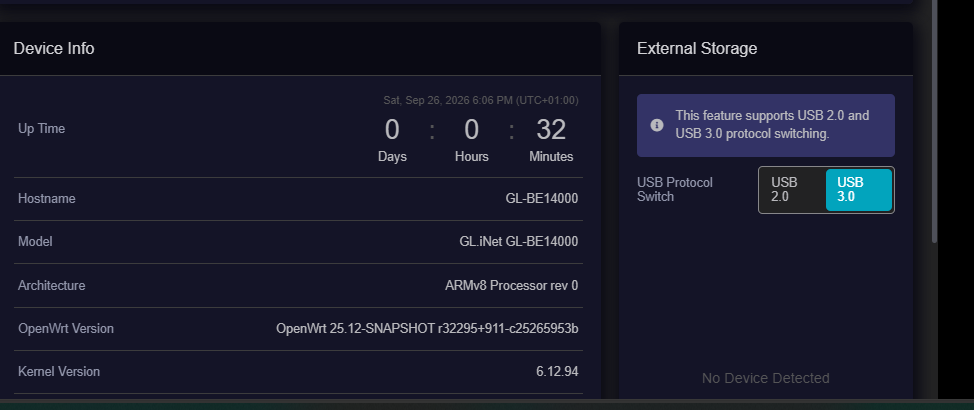
New issue ive discovered is network storage doesnt seem to work on the Flint 4 with the latest beta, ive confirmed the USB cable and drive are working by plugging them into my PC, it instantly popped up, but when plugged into the Flint 4 on 4.11 beta it says no device connected, it was working fine on the first release firmware.
EDIT: this has been confirmed by back flashing to 4.9.2, network storage is working fine on this firmware, not working on 4.11 beta
Really looking forward to the 2x Flint 3e mesh capability. Should I go onto the beta or wait for a release?
Wait for an official Flint 3e mesh release. The current Mesh documentation lists Flint 3 (GL-BE9300) as supported, but Flint 3e (GL-BE6500) as unsupported, so installing the current beta will not provide a documented two-unit Flint 3e mesh setup.
Monitor the official Mesh supported-model list and Flint 3e firmware releases before upgrading specifically for this feature.
This reply was generated by AI. Please verify its accuracy.
GL.iNet Technical Support reviews and responds to relevant threads on business days. Please allow time for a staff response.
Is the flint 3e will support mesh, or just the flint 3?
Any plans to support Beryl AX?
Yes. Beryl AX (GL-MT3000) Mesh support is currently being tested in the v4.11 beta firmware. It is not yet listed as supported in the official stable Mesh documentation, and no stable-release date has been confirmed.
This reply was generated by AI. Please verify its accuracy.
GL.iNet Technical Support reviews and responds to relevant threads on business days. Please allow time for a staff response.
hi i have that issue too flash it now with beta 3 software work fine