I just purchased 4x”Flint 3”s updated them to beta 4.10 firmware, enabled astromesh, seemed like everything working, but whatever I try I can’t make the 5ghz radio work, it works when I’m near the master node in the basement, but the bedroom node 3 stories above doesn’t work, I tried everything, same ssid, different ssid, change channels reduce bandwidth to 80mhz, nothing fixed the issue, the 6ghz radio on my tablet worked, but 5ghz radio doesn’t show up in any device, and when I maked them the same ssid my phone keeps getting disconnected until it shows wrong password, even though all radios have same password.
My experience from the olden days was WiFi did not work well vertically - I suppose nothing has changed. Try a different orientation of the antennae perhaps (horizontal instead of vertical)??
How are the nodes connected? Ethernet is the best way.
Hi guys. That's so good news about mesh routers.
Quick question how visible clients devices list? If two router with same SSID WiFi at home. Still conflict visible name device and icon wired or wireless.
Same situation I posted last few years ago about main router and access point (two router flint2).
seems I solved it, did a factory reset on all nodes, same problem, finally it worked when I made it connect using wireless backhaul (by disconnecting the wan ethernet) then added each node using pair code wirelessly, oh also forgot to switch to local mesh node mode so now I’m afraid changing that option will ruin everything, now I’m afraid changing anything will make the 5ghz radio disappear again, I’ll try changing them one by one and hope nothing happens again.
wired backhaul, and this has nothing with how far the node is because the issue is not the connection quality its that 5ghz radio is not showing up, only 6ghz and 2.4ghz
We have confirmed the issue and will fix it in the next beta version.
1 Like
The next beta version will be released at the end of August. It should take about two weeks. You can wait for the next update and check back. Thanks.
3 Likes
how does the update works, should I just check keep settings or I should reconfigure everything when the next beta release ?
Thank you @Miles
Please test renaming SSIDs, changing passwords, VLANs, etc basic mesh functionality; Also keeping the mesh working when nodes are connected wired, have the wire “gets cut”, and then “repaired”. It looks like spanning tree issues in beta1, then the MLO on top of that, and devices not connecting unless one manually goes to every node to set bss_transition='0' on every channle (well, can’t do that on 5G as it seems to be used as wireless backhaul).
Let me know if I can test anything. Last night’s rebuilt ended up with main node (flint-3-node0) having all SSIDs fine, Flint-3-node1 missing IoT and Guest, Flint-3-node2 having only 2 SSIDs both showing as toggled off, yet also claiming 27 devices had connected to it; Slate-7 having only 2G on but with wrong SSID. I’m going to just manually reset everything but node-0 and could test something if you need me to.
The Client list in enabled Mesh will show which node (router)the terminal is connected to.
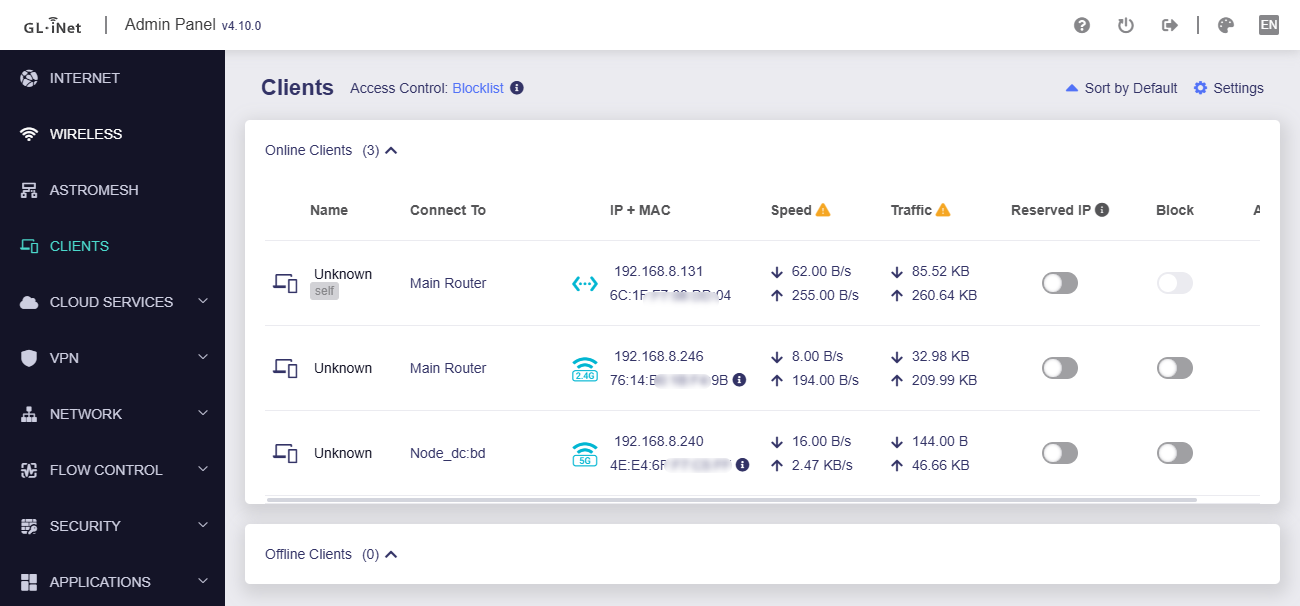
The specific node connection isn't implemented yet. It is in the preview phase, so things might shift around a bit as we keep refining it.
3 Likes
Flint 3 Beta 4.10 VLAN - custom IP and custom device name.
I have configured a VLAN on ethernet port 4 that goes to a managed switch then my entertainment devices.
It seems I cannot configure a custom name / rename devices nor set an IP address of my choice (within the VLAN IP range) on any of my devices on that VLAN.
(I am not an expert of VLANs) Is this the normal behavior for devices on a VLAN?
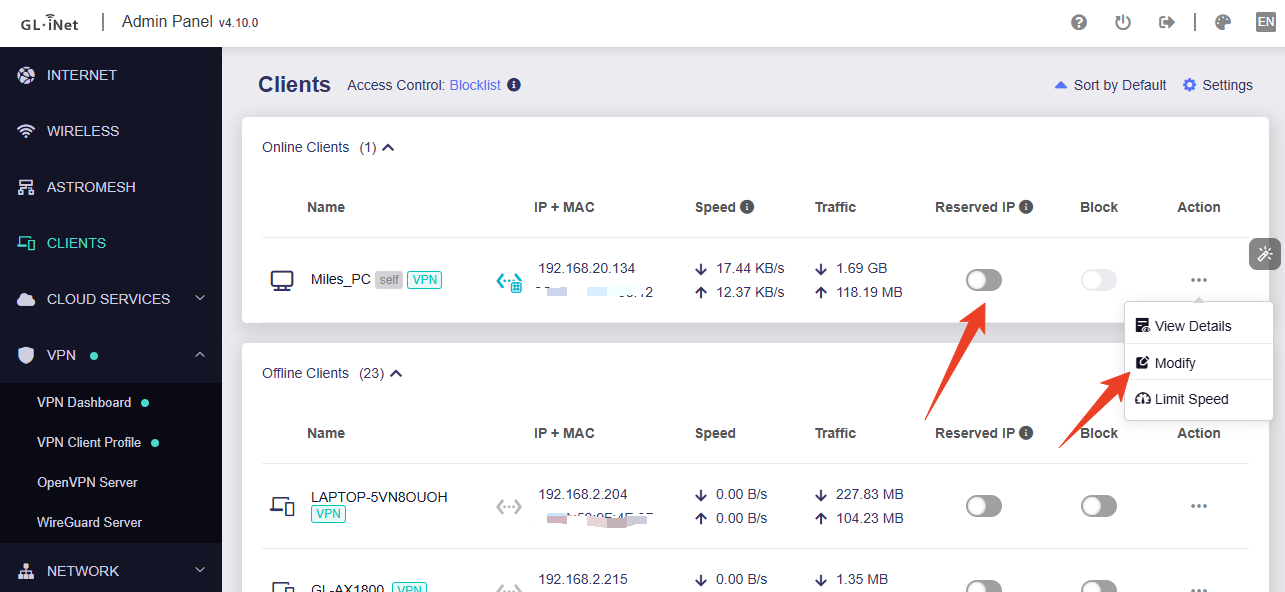
Do you want to configure address reservations for devices on a VLAN? Currently, v4.10 only supports address reservations on the main LAN. Other subnets are not yet supported. We will improve this in subsequent firmware updates.
If you need to change the name of a client device on a VLAN, you can do so on the Clients page. You can also click on Reserved IP to fix the IP address of the VLAN client device.
this looks cool
however the relatively high cost of the GL.iNet GL-BE3600 makes it prohibitive for deployments that need more the one node
vs something like the tp-link deco and asus ai mesh systems that deliver 4x4 across 3 devices
the BE3600 tops out at 2x2 … fast but not the full fat wifi 7 experience
Hopefully gl-i will someday release a astro-node hardware device that’s just a Astro-node in a box …. with hopefully more attainable price for those of use that need 3 units working together for total high speed coverage
astro is a novel Idea but it gives me the hibijebis with the potential for any device that gets connected to your home network to have carte blac access wire guard or tail scale are more secure solutions especially with the BE3600s nasty problem of just allowing anybody in sight of the touchscreen to get connected …..
1 Like
OK then it is a current limitation of VLANs. I would like to set a custom static IP for some devices.
I think I have worked out how to set the names. I thought in the first para said you cannot reserve the IPs on the VLANs or is that just you cannot set a custom IP?
I am not sure the way I am using a ethernet VLAN is working for me - I am using it for my entertainment devices, streaming devices, TV, PVR and a HDHR network FTA TV tuner which means that tuner is inaccessible to other devices on the network (I know this is the way VLANs work). IN general that works OK except for the inaccessibility of the network FTA TV tuner.
I guess I also need to evaluate whether or not there is any advantage in having the entertainment devices on a VLAN.
Thanks.
you can modify firewall rules to allow access to any device you want from any device, I have IoT devices on an IoT VLAN and I made a rule that allows my computer and home assistant VM to access the full subnet of IoTs and allowed access from the IoT subnet to my home assistant VM so they can speak to my MQTT broker, I’m probably gonna also allow my family member to access some of my homelab dockers instances like immich using firewall rules
1 Like
OK, thanks - I will need to research on how to do that.
I have been noticing these type of (highlighted) entries in my log :-
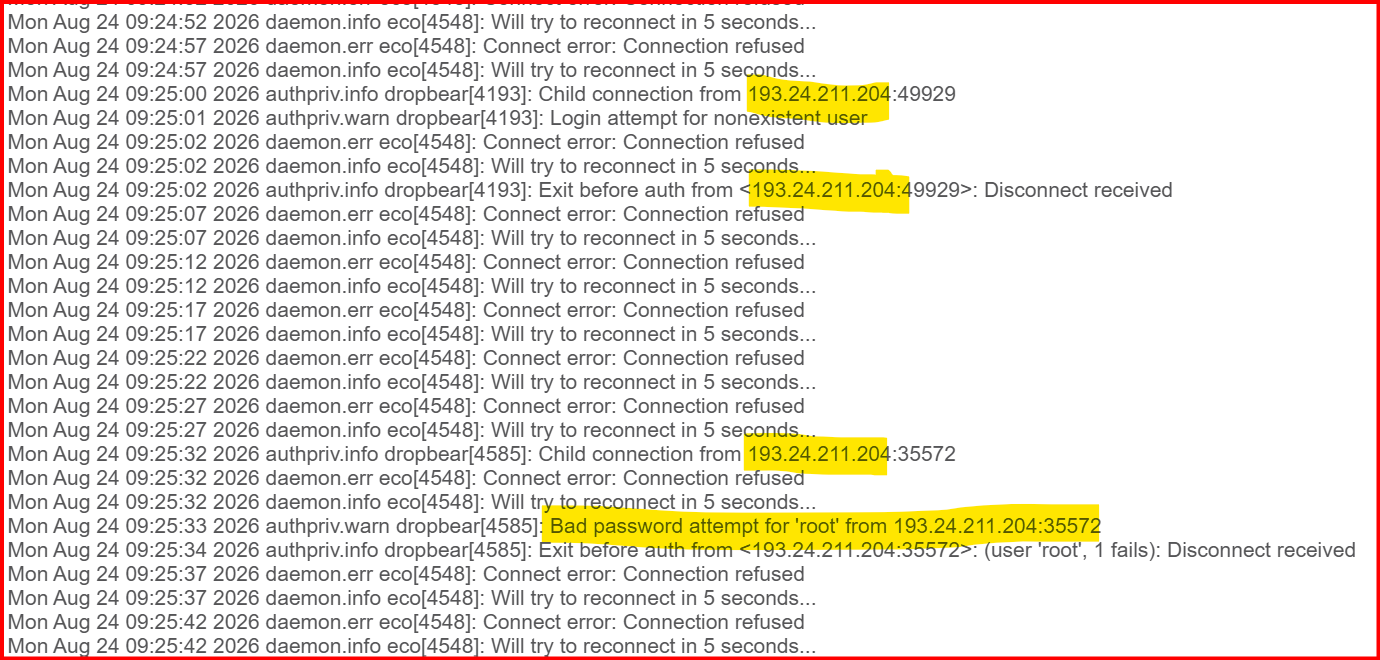
When I look up the IP address it shows :-
The IP address 193.24.211.204 is an IPv4 address actively flagged in threat intelligence databases like AbuseIPDB for malicious activities, including SSH brute-force attacks and port scanning. [1, 2]
Network and Threat Details
Country:* Bulgaria (frequently listed in global threat feeds)*
Activity:* SSH login attempts, brute-force attacks, and web bot scanning*
Should I be concerned by this activity? Does it mean the firewall is working well?
It seems to me a lot of processing time is being taken up the "connection error" type entries.
are you exposing any ports ? it shouldn’t have access to your router ssh
As far as I know, no.
And if I read the log correctly, it is not gaining access anyway?
it shouldn’t even have the ability to try a password if your ports are closed as they should be, especially the ssh port