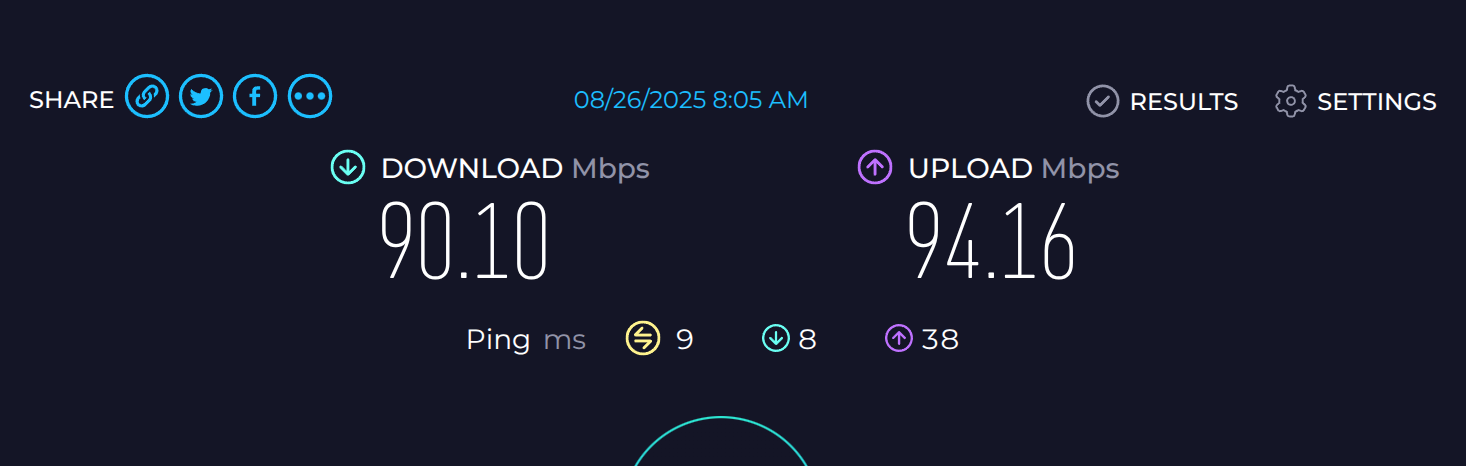
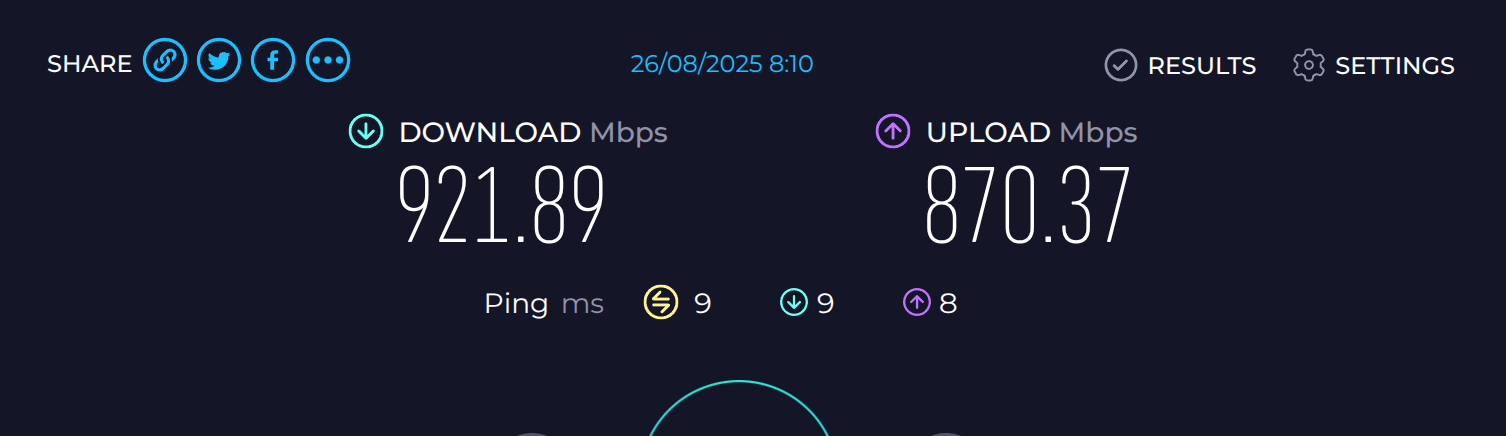
Internet access is very slow - according to the router not clients are using much bandwidth, rebooting the router fixes it for a while.
Log
...(boot seq)...
[   59.048897] mtk_soc_eth 15100000.ethernet eth1: Link is Down
[   59.480857] mtk_soc_eth 15100000.ethernet eth1: PHY [mdio-bus:01] driver [RTL8221B-VB-CG 2.5Gbps PHY]
[   59.490375] mtk_soc_eth 15100000.ethernet eth1: configuring for phy/sgmii link mode
[   59.506290] kmwan: Delete node:wan
[   61.866301] mtk_soc_eth 15100000.ethernet eth1: Link is Up - 1Gbps/Full - flow control rx/tx

...(more boot seq ends at 766.457698 and then notting until )...

[ 1105.943565] mtk_soc_eth 15100000.ethernet eth1: Link is Down
[ 1106.375842] mtk_soc_eth 15100000.ethernet eth1: PHY [mdio-bus:01] driver [RTL8221B-VB-CG 2.5Gbps PHY]
[ 1106.385359] mtk_soc_eth 15100000.ethernet eth1: configuring for phy/sgmii link mode
[ 1106.405044] kmwan: Delete node:wan
[ 1108.740888] mtk_soc_eth 15100000.ethernet eth1: Link is Up - 1Gbps/Full - flow control rx/tx
[ 1108.749345] IPv6: ADDRCONF(NETDEV_CHANGE): eth1: link becomes ready
[ 1109.694231] mtk_soc_eth 15100000.ethernet eth1: Link is Down
[ 1110.191823] mtk_soc_eth 15100000.ethernet eth1: PHY [mdio-bus:01] driver [RTL8221B-VB-CG 2.5Gbps PHY]
[ 1110.201351] mtk_soc_eth 15100000.ethernet eth1: configuring for phy/sgmii link mode
[ 1112.616869] mtk_soc_eth 15100000.ethernet eth1: Link is Up - 1Gbps/Full - flow control rx/tx
[ 1112.625352] IPv6: ADDRCONF(NETDEV_CHANGE): eth1: link becomes ready
[ 1113.565987] mtk_soc_eth 15100000.ethernet eth1: Link is Down
[ 1114.071817] mtk_soc_eth 15100000.ethernet eth1: PHY [mdio-bus:01] driver [RTL8221B-VB-CG 2.5Gbps PHY]
[ 1114.081339] mtk_soc_eth 15100000.ethernet eth1: configuring for phy/sgmii link mode
[ 1116.453914] mtk_soc_eth 15100000.ethernet eth1: Link is Up - 1Gbps/Full - flow control rx/tx
[ 1116.462374] IPv6: ADDRCONF(NETDEV_CHANGE): eth1: link becomes ready
[ 1117.176562] mtk_soc_eth 15100000.ethernet eth1: Link is Down
[ 1117.903796] mtk_soc_eth 15100000.ethernet eth1: PHY [mdio-bus:01] driver [RTL8221B-VB-CG 2.5Gbps PHY]
[ 1117.913298] mtk_soc_eth 15100000.ethernet eth1: configuring for phy/sgmii link mode
[ 1119.481187] mtk_soc_eth 15100000.ethernet eth1: Link is Up - 100Mbps/Full - flow control rx/tx
[ 1119.489817] IPv6: ADDRCONF(NETDEV_CHANGE): eth1: link becomes ready
Not sure why it's "constantly" pulling down the wan connection I have a static IP ( that I must obtain via DHCP because of stupid ISP ) but there should be absolutely no reason to re-query DHCP post boot ( or lease expiry )
Questions
So what is going on? and how do I stop it?
Is it the router choosing to re-query DHCP or is my ISP cutting the link repeatedly?
100 Mbps? Dafuq is this?! That is not right at all. Do you have a different (read: 'known good') Category 5E or better cable to test? That's the very first & easiest thing to check for something like that: a bad cable.
It's the same cable I've been using for 6 years, cable tester says it's good.
The only thing I've changed in the setup in recently is swapping out my old asus router with this one - and it's been running fine till about a week ago
I'm kind of expecting it's the my ISP crappy fiber modem that they are either tampering with or is dying - but unless I can somehow prove that it's not the router they will demand I replicate the problem on their crappy nokia beacon
Well cable testers still have a fault margin, I'm used into making patch cables and I used various pass through rj45 connectors (yes there are some downsides on this aswell, like faster oxidation of the cable).
But believe it or not, I managed to buy crappy rj45 passthrough connectors with lose plates, even when it look perfectly normal on the outside, the cable tester I used was a cheap one with wider space on its ports, and it accepted this as good wire on all cores.... though in reality the ethernet ports on a switch or router are much thighter and it instantly failed.
It took me 3 days reterminating wires, checking equipment only to find out cable testers showed me the wrong result, and made me believe they where good, in my case there was no data at all only PoE, instead I used a switch leds to detect cable failure some have one led for data (a little weird but that worked for me😋)
Better try a different cable especially one with a different connector in case you make them as well
From the logs, this issue does not appear to be related to DHCP.
It may be associated with the Ethernet physical layer.
We recommend testing with several different network cables, including the one supplied with the MT6000 if available.
Please note that many basic cable testers only check wiring sequence and connectivity, but do not account for other potential issues.
Unless you are using a professional tool such as a Fluke tester, some problems may go undetected.
If the issue persists after trying different cables, kindly export the logs and send them to us via PM. We will furtch check.
It seems that the Wi-Fi checksum is detecting some packets error in reception side.
However, if your connection is working normally and you are not experiencing any real issues, these messages can be safely ignored.