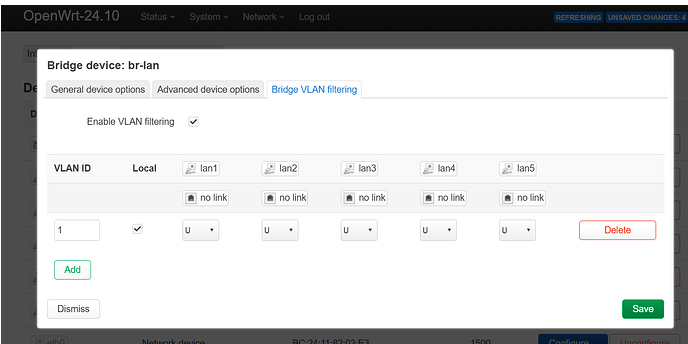
I’m trying to setup vlan for my IoT devices I have all on wifi and one zigbee gateway on port lan4 every time I try to do it something is wrong. I lost connection from my lan ports or my IoT wifi devices lost connection when I create a new wifi network connected to vlan. Have no idea why this is so hard
without the configuration I could not know what the issue would be.
Without the flavour of OpenWrt I also don't know what is going on for wifi.
Please check:
And use this with winscp to get files on protocol scp with same login as tutorial, I want:
/etc/config/dhcp
/etc/config/firewall
/etc/config/network
Tl;dr:
Usually OpenWrt doesn't handle interfaces so well not on gracefully but often should work because it auto starts wifi when a underlaying change was comitted for network interfaces or DSA.
But if you are on a sdk with a much older OpenWrt base, not OP24 then there are interoperability issues within the luci wireless section and it's drivers, I know for the MTK sdk, you are required to restart the router if the network interface was changed in the wireless settings, or connection fails, and there could also be broken features in luci which do nothing like mac whitelisting/blacklisting or fast roaming, imo I'm always walking with the expectation with these sdks only the minimum basic functionality works, the other things likely not in luci, but often with CLI tools like iw it is possible.
About the symptoms it is not possible for me to conclude a miss configuration because there are many different factors into this scenario which can cause the same symptoms, I need evidence to understand what the issue could be.
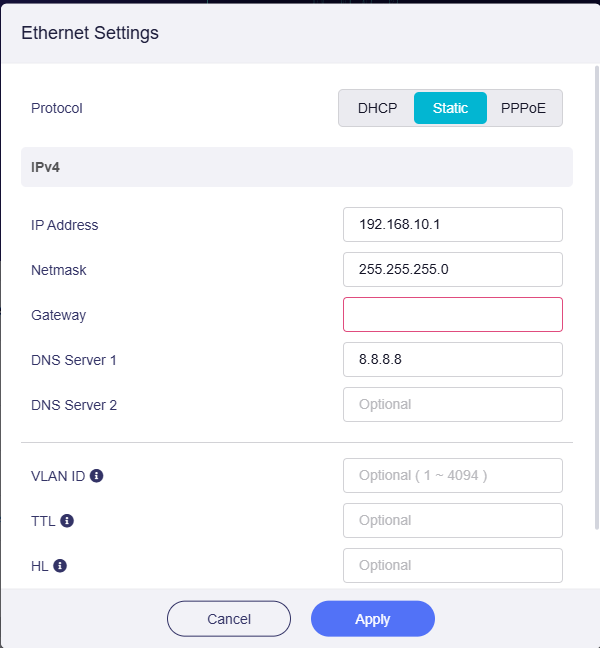
So I got all the way thru and had all the VLANS setup and most of the firewall stuff working and suddenly nothing works. In fact, I cannot even get my router to give me internet any longer. I’ve gone back to the beginning, reset the MT6000 and hooked it up via WAN port to the Xfinity (ISP) gateway. I fire it up, get DHCP address and log into the admin. There I try changing the IP to a static, just like before, but it says the interface is working but there is no access to the internet. When using DHCP it works, when I try to make it static, it does not. I surmise maybe it’s the gateway setting I put in however I don’t recall what I used before. I’ve tried the IP address of the Xfinity gateway to no avail. I’m sure I’m brain-dead and doing something stupid but…
Xfinity gateway says it’s at 174.178.27.235
MT6000 in DHCP receives IP 192.168.8.1
PC plugged into MT6000 receives 192.168.8.220
Simply trying to make the router 192.168.10.1 just like I had it before. What on earth am I doing wrong here??
if that is true, leave gateway empty, otherwise you tell the interface to create a default route as a gateway, it has similarities to the default gateway checkbox in advanced settings, but this specifies a differ default route, you don't want this
Let gets this clear for me because I start to get confused
So you got a xfinity modem from your isp, gateway is your public ip which should be redacted since it is private.
Then the lan clients of xfinity get serverd 192.168.8.1/24, as you have confirmed with the Flint 2 on wans dhcp.
However the standard settings by Flint 2 for lan also use 192.168.8.1/24, this is a ip conflict and you need to change this so that the lan won't overlap with the other lan, you can do that on the left menu in gl ui, and then in the settings lan ip.
Now there are three things I don't understand:
where does 192.168.11.1/24 come from is this your created vlan on the flint 2?
since you also mess with the gateway option... Why?, you told earlier you want access on 192.168.8.1 subnet as before, do you mean that the flint 2 functions as a bridge are there devices on the xfinity you want to reach?, or was it this connectivity issue that let you tried that?
if for reachability, wont it be easier to configure flint 2 as dhcp on wan?, then devices on the flint 2 network can reach upstream ip, the only issue is clients on the xfinity router lack the necessary nat translation to your clients on the flint 2 they are unable to make a direct connection which the clients on flint 2 can, you can fix that with a port forward on flint 2, or if xfinity hands out also vlan to lan, you can use a vlan so that your flint 2 can also use it, then clients can be encapisulated like they are part of the xfinity network, though maybe taking out the flint 2 and just using a switch would be a better thought if that is the reason behind it.