MT3600BE (Beryl 7) EAP support and LuCi

I’m at a WeWork location now that uses EAP for authenticating to their WiFi. I came here the first time with my MT3600 (Beryl AX) and had to upgrade to the beta firmware (after some troubleshooting this was the solution) OpenWrt 24 and after that had no issues connecting to the WiFi as a Repeater.

With Beryl 7 (MT3600BE) there is no such firmware and I’ve also come to understand that LuCi (which seems to have been an option for MT3600) isn’t an option here as the router is with the MediaTek (MTK) WiFi stack and doesn’t have the Network / WiFi menu in LuCi, instead it’s under MTK / WiFi configuration which doesn’t seem to be the same as the other guides online.

I’ve also tried to manually enter in the SSID from the Repeater via setting "Join other network" and picking WPA/WPA2/WPA3 Enterprise, enter in the SSID, my username and password and it just doesn’t want to connect. I've made sure (and double sure) that the SSID is the same (lower/upper caps etc) and it just doesn't want to connect. I hit connect and basically instantly I get this error message " Connection failed, will retry later… Could not find the network, please check the SSID and security type you entered..."

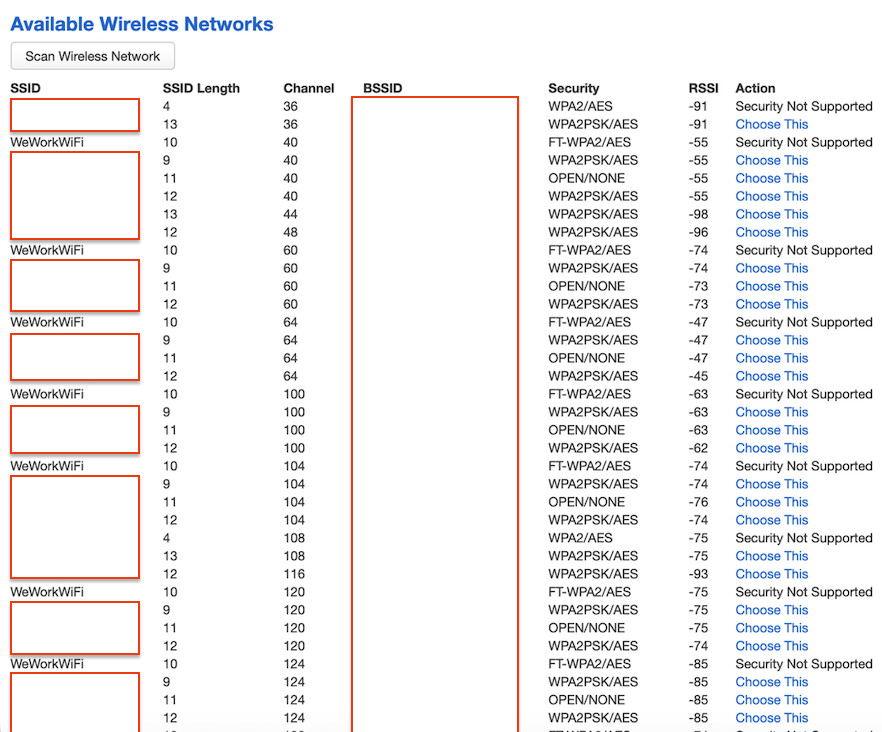
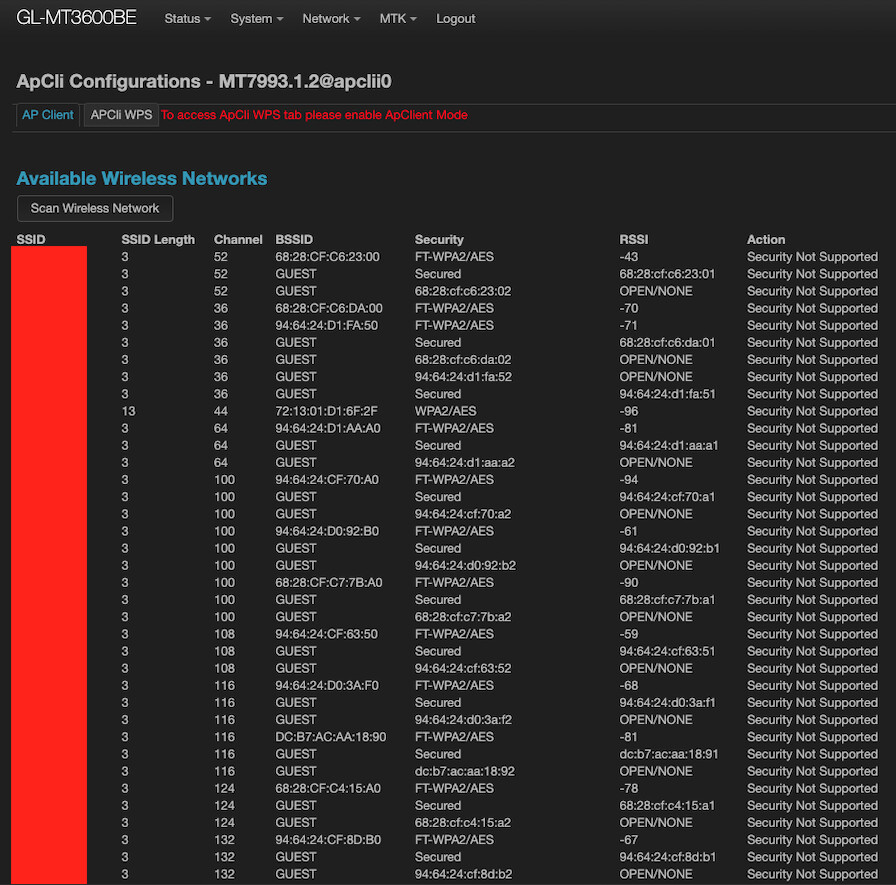
When checking the environment with LuCi via ..cgi-bin/luci/admin/mtk/wifi/apcli_cfg_view/MT7993.1.2/apclii0 (via the MTK / WiFi Settings and hitting config on apclii0 (5G band)) I can see that the network is listed as (as I'm typing this now, I have very hard time getting this information again) FT-WPA2/AES followed by Security Not Supported, but it even says WPA2/AES is Security Not Supported so not sure what this means.

So with all this, is there no way today that we can connect to EAP networks with Beryl 7 on the GL iNet firmware? I’m guessing one solution here would be to upgrade to OpenWRT but I rather not do that for the one offs when I go here. Thanks for your time!

What encryption method does your upstream EAP WiFi use?

Can your other devices connect to this EAP WiFi?

Besides entering the username and password, are there any other steps required for a successful connection?

Could you export the router connection failure logs and send them to us for review?

What encryption method does your upstream EAP WiFi use?

When I scanned with LuCi it said: FT-WPA2/AES

Can your other devices connect to this EAP WiFi?

Yeah I had no issues connecting iPhone or my Mac to the WiFi, there were probably 80-90 ppl at the WeWork and didn’t see anyone complaining about not having internet :slight_smile: So no faults there.

Besides entering the username and password, are there any other steps required for a successful connection?

That’s all you need, username and the password

Could you export the router connection failure logs and send them to us for review?

I have the logs from that day but only from when I upgraded to the beta 4.8.6. Not sure how you want me to send them, via email or share them here?

Again I want to point out that with Beryl AX (MT3000) after installing the OpenWrt 24 firmware v. 4.8.3 there were no issues to connect to this same network. What stands out here for me is that many manuals mention WiFi settings in Network tab of LuCi, but Beryl 7 (MT3600BE) doesn’t have that, instead the MTK menu is there with other options:
<screenshot removed, only 1 supported for new users>

<screenshot removed, only 1 supported for new users>

<screenshot removed, only 1 supported for new users>

It was the last interface apclii0 that I was trying to connect to the network but it said SSID (WeWorkWiFi) - FT-WPA2/AES - Security Not Supported. As you can see on the screenshot there are a few of those:

Just for the sake of it, this is how LuCi looks on my Beryl AX:

<screenshot removed, only 1 supported for new users>

The options there are also very different and gives me a Scan option on radio0 which provides better results and easier (and supported) networks to join:

<screenshot removed, only 1 supported for new users>

<screenshot removed, only 1 supported for new users>

OK.

Having connection failure logs might be helpful for problem analysis.

If you'd like, you can send the logs to support@gl-inet.com along with a link to this post.

Thank you.

Thanks!

I’ve sent the logs I have via email.

I’m experiencing the same thing testing at my work location. EAP is showing security not supported; following the guide here, it’s also failing. Connect to EAP network - GL.iNet Router Docs 4

What logs do you need, or do you know of a fix already in the works? – Slate 7 works fine..

What encryption method does the upstream EAP WiFi use?

You can connect normally on your Slate 7. Is it just a matter of setting a username and password? Are there any other parameters you need to configure?

Could you export the connection failure logs from your MT3600BE and the successful connection logs from your Slate 7 and send them to us for review?

I’ll collect both logs on Monday. Checking ClearPass, I’m not seeing any authentication failures, so this doesn’t appear to be a username/password issue. There are no certificates or anything additional required either — just username and password.

Looking at Aruba Central, I also don’t see any connection attempts around the time I was testing. That makes me suspect the router may not even be attempting to connect to the network.

I’ll get both systems up and running Monday and send over the logs. In the meantime, here’s the additional configuration information from the network I was testing with:

Key Management: WPA3-Enterprise (CCM 128)
Authentication Method: EAP-PEAP, EAP-MSCHAPv2

Connecting with Slate7:

Behavior is different from the start from Beryl, the SSID shows as connectable in the “Switch Networks” section of repeater, and allows me to select it, enter the Username/Password, and connects right away like any other network. In LuCI, I’m unable to scan for wireless networks (none found for whatever reason, unlike Beryl 7 where it shows unsupported).

Slate 7 Repeater + WIreless Logs:
Mon May 11 12:06:36 2026 daemon.info gl-repeater\\\\\\\\\\\\\\\[4199\\\\\\\\\\\\\\\]: (repeater.lua:1456) using random macaddr: 02:18:BA:5A:90:E8Mon May 11 12:06:36 2026 daemon.info gl-repeater\\\\\\\\\\\\\\\[4199\\\\\\\\\\\\\\\]: (repeater.lua:1633) switch in 1 seconds...Mon May 11 12:06:37 2026 daemon.info gl-repeater\\\\\\\\\\\\\\\[4199\\\\\\\\\\\\\\\]: (repeater.lua:1157) switch to Mon May 11 12:06:37 2026 daemon.info gl-repeater\\\\\\\\\\\\\\\[4199\\\\\\\\\\\\\\\]: (repeater.lua:1048) connecting to bss: 68:28:cf:c6:23:00 52 wpa2Mon May 11 12:06:37 2026 daemon.notice netifd: wifi1 (24979): WARNING: Variable 'mld' does not exist or is not an array/objectMon May 11 12:06:38 2026 user.warn kernel: \\\\\\\\\\\\\\\[ 2513.254304\\\\\\\\\\\\\\\] CALLER: /usr/bin/lua/usr/sbin/qca-wifi-configurator, PID: 4110 arg: disable multi_upMon May 11 12:06:39 2026 user.warn kernel: \\\\\\\\\\\\\\\[ 2514.429682\\\\\\\\\\\\\\\] CALLER: /usr/bin/lua/usr/sbin/qca-wifi-configurator, PID: 4110 arg: enableMon May 11 12:06:39 2026 daemon.info gl-repeater\\\\\\\\\\\\\\\[4199\\\\\\\\\\\\\\\]: (repeater-nl80211.lua:108) ATTACH /var/run/wpa_supplicantglobalMon May 11 12:06:40 2026 daemon.err insmod: module is already loaded - ecm-wifi-pluginMon May 11 12:06:41 2026 daemon.info hostapd: wlan12: STA 36:7d:f2:40:58:95 IEEE 802.11: disassociatedMon May 11 12:06:41 2026 daemon.info hostapd: wlan02: STA 36:7d:f2:40:58:95 IEEE 802.11: authenticatedMon May 11 12:06:41 2026 daemon.info hostapd: wlan02: STA 36:7d:f2:40:58:95 IEEE 802.11: associated (aid 2)Mon May 11 12:06:41 2026 daemon.info hostapd: wlan02: STA 36:7d:f2:40:58:95 WPA: sending 1/4 msg of 4-Way HandshakeMon May 11 12:06:41 2026 daemon.info hostapd: wlan02: STA 36:7d:f2:40:58:95 WPA: received EAPOL-Key frame (2/4 Pairwise)Mon May 11 12:06:41 2026 daemon.info hostapd: wlan02: STA 36:7d:f2:40:58:95 WPA: sending 3/4 msg of 4-Way HandshakeMon May 11 12:06:41 2026 daemon.info hostapd: wlan12: STA 5a:f9:8a:59:85:1f IEEE 802.11: disassociatedMon May 11 12:06:41 2026 daemon.info hostapd: wlan02: STA 36:7d:f2:40:58:95 WPA: received EAPOL-Key frame (4/4 Pairwise)Mon May 11 12:06:41 2026 daemon.info hostapd: wlan02: STA 36:7d:f2:40:58:95 RADIUS: starting accounting session 24B20B57A14DE70FMon May 11 12:06:41 2026 daemon.info hostapd: wlan02: STA 36:7d:f2:40:58:95 WPA: pairwise key handshake completed (RSN)Mon May 11 12:06:42 2026 daemon.info hostapd: wlan12: STA 42:ed:af:da:e2:7b IEEE 802.11: disassociatedMon May 11 12:06:44 2026 daemon.notice netifd: Wireless device 'wifi1' is now upMon May 11 12:06:46 2026 daemon.info hostapd: wlan02: STA 36:3f:17:99:35:22 IEEE 802.11: associated (aid 1)Mon May 11 12:06:46 2026 daemon.info hostapd: wlan02: STA 36:3f:17:99:35:22 WPA: sending 1/4 msg of 4-Way HandshakeMon May 11 12:06:46 2026 daemon.info hostapd: wlan02: STA 36:3f:17:99:35:22 WPA: received EAPOL-Key frame (2/4 Pairwise)Mon May 11 12:06:46 2026 daemon.info hostapd: wlan02: STA 36:3f:17:99:35:22 WPA: sending 3/4 msg of 4-Way HandshakeMon May 11 12:06:46 2026 daemon.info hostapd: wlan02: STA 36:3f:17:99:35:22 WPA: received EAPOL-Key frame (4/4 Pairwise)Mon May 11 12:06:46 2026 daemon.info hostapd: wlan02: STA 36:3f:17:99:35:22 RADIUS: starting accounting session A31863672620D52BMon May 11 12:06:46 2026 daemon.info hostapd: wlan02: STA 36:3f:17:99:35:22 WPA: pairwise key handshake completed (RSN)Mon May 11 12:06:49 2026 daemon.info gl-repeater\\\\\\\\\\\\\\\[4199\\\\\\\\\\\\\\\]: (repeater-nl80211.lua:185) add device sta1 to network.interface.wwanMon May 11 12:06:49 2026 daemon.info gl-repeater\\\\\\\\\\\\\\\[4199\\\\\\\\\\\\\\\]: (repeater.lua:599) connected to 68:28:cf:c6:23:00Mon May 11 12:06:49 2026 daemon.info hostapd: wlan12: IEEE 802.11 driver had channel switch: iface->freq=5220, freq=5260, ht=1, vht_ch=0x0, he_ch=0x0, eht_ch=0x0, offset=1, width=3 (80 MHz), cf1=5290, cf2=0, puncturing_bitmap=0x0Mon May 11 12:06:51 2026 daemon.info gl-repeater\\\\\\\\\\\\\\\[4199\\\\\\\\\\\\\\\]: (repeater.lua:1897) interface “wwan“ upMon May 11 12:06:51 2026 daemon.info gl-repeater\\\\\\\\\\\\\\\[4199\\\\\\\\\\\\\\\]: (repeater-portal.lua:660) portal detecting...Mon May 11 12:06:51 2026 daemon.info gl-repeater\\\\\\\\\\\\\\\[4199\\\\\\\\\\\\\\\]: (repeater-portal.lua:683) not found portalMon May 11 12:06:57 2026 daemon.info hostapd: wlan02: STA 5a:f9:8a:59:85:1f IEEE 802.11: associated (aid 3)Mon May 11 12:06:57 2026 daemon.info hostapd: wlan02: STA 5a:f9:8a:59:85:1f WPA: sending 1/4 msg of 4-Way HandshakeMon May 11 12:06:57 2026 daemon.info hostapd: wlan02: STA 5a:f9:8a:59:85:1f WPA: received EAPOL-Key frame (2/4 Pairwise)Mon May 11 12:06:57 2026 daemon.info hostapd: wlan02: STA 5a:f9:8a:59:85:1f WPA: sending 3/4 msg of 4-Way HandshakeMon May 11 12:06:57 2026 daemon.info hostapd: wlan02: STA 5a:f9:8a:59:85:1f WPA: received EAPOL-Key frame (4/4 Pairwise)Mon May 11 12:06:57 2026 daemon.info hostapd: wlan02: STA 5a:f9:8a:59:85:1f RADIUS: starting accounting session FD364EE483162169Mon May 11 12:06:57 2026 daemon.info hostapd: wlan02: STA 5a:f9:8a:59:85:1f WPA: pairwise key handshake completed (RSN)Mon May 11 12:07:00 2026 daemon.info hostapd: wlan12: STA 36:7d:f2:40:58:95 IEEE 802.11: authenticatedMon May 11 12:07:00 2026 daemon.info hostapd: wlan12: STA 36:7d:f2:40:58:95 IEEE 802.11: disassociatedMon May 11 12:07:01 2026 daemon.info hostapd: wlan12: STA 36:7d:f2:40:58:95 IEEE 802.11: authenticatedMon May 11 12:07:01 2026 daemon.info hostapd: wlan12: STA 36:7d:f2:40:58:95 IEEE 802.11: associated (aid 1)Mon May 11 12:07:01 2026 daemon.info hostapd: wlan12: STA 36:7d:f2:40:58:95 WPA: sending 1/4 msg of 4-Way HandshakeMon May 11 12:07:01 2026 daemon.info hostapd: wlan12: STA 36:7d:f2:40:58:95 WPA: received EAPOL-Key frame (2/4 Pairwise)Mon May 11 12:07:01 2026 daemon.info hostapd: wlan12: STA 36:7d:f2:40:58:95 WPA: sending 3/4 msg of 4-Way HandshakeMon May 11 12:07:01 2026 daemon.info hostapd: wlan12: STA 36:7d:f2:40:58:95 WPA: received EAPOL-Key frame (4/4 Pairwise)Mon May 11 12:07:01 2026 daemon.info hostapd: wlan12: STA 36:7d:f2:40:58:95 RADIUS: starting accounting session A4C9AF509BB84326Mon May 11 12:07:01 2026 daemon.info hostapd: wlan12: STA 36:7d:f2:40:58:95 WPA: pairwise key handshake completed (RSN)Mon May 11 12:07:19 2026 daemon.info hostapd: wlan12: STA 42:ed:af:da:e2:7b IEEE 802.11: authenticatedMon May 11 12:07:20 2026 daemon.info hostapd: wlan12: STA 36:3f:17:99:35:22 IEEE 802.11: disassociatedMon May 11 12:07:21 2026 daemon.info hostapd: wlan12: STA 36:3f:17:99:35:22 IEEE 802.11: authenticatedMon May 11 12:07:21 2026 daemon.info hostapd: wlan12: STA 36:3f:17:99:35:22 IEEE 802.11: associated (aid 2)Mon May 11 12:07:21 2026 daemon.info hostapd: wlan12: STA 36:3f:17:99:35:22 WPA: sending 1/4 msg of 4-Way HandshakeMon May 11 12:07:21 2026 daemon.info hostapd: wlan12: STA 36:3f:17:99:35:22 WPA: received EAPOL-Key frame (2/4 Pairwise)Mon May 11 12:07:21 2026 daemon.info hostapd: wlan12: STA 36:3f:17:99:35:22 WPA: sending 3/4 msg of 4-Way HandshakeMon May 11 12:07:21 2026 daemon.info hostapd: wlan12: STA 36:3f:17:99:35:22 WPA: received EAPOL-Key frame (4/4 Pairwise)Mon May 11 12:07:21 2026 daemon.info hostapd: wlan12: STA 36:3f:17:99:35:22 RADIUS: starting accounting session 3BCA61ACC3C4CAFAMon May 11 12:07:21 2026 daemon.info hostapd: wlan12: STA 36:3f:17:99:35:22 WPA: pairwise key handshake completed (RSN)Mon May 11 12:11:02 2026 daemon.info hostapd: wlan12: STA 5a:f9:8a:59:85:1f IEEE 802.11: authenticatedMon May 11 12:11:03 2026 daemon.info hostapd: wlan12: STA 5a:f9:8a:59:85:1f IEEE 802.11: disassociatedMon May 11 12:11:03 2026 daemon.info hostapd: wlan12: STA 5a:f9:8a:59:85:1f IEEE 802.11: authenticatedMon May 11 12:11:03 2026 daemon.info hostapd: wlan12: STA 5a:f9:8a:59:85:1f IEEE 802.11: associated (aid 3)Mon May 11 12:11:03 2026 daemon.info hostapd: wlan12: STA 5a:f9:8a:59:85:1f WPA: sending 1/4 msg of 4-Way HandshakeMon May 11 12:11:03 2026 daemon.info hostapd: wlan12: STA 5a:f9:8a:59:85:1f WPA: received EAPOL-Key frame (2/4 Pairwise)Mon May 11 12:11:03 2026 daemon.info hostapd: wlan12: STA 5a:f9:8a:59:85:1f WPA: sending 3/4 msg of 4-Way HandshakeMon May 11 12:11:03 2026 daemon.info hostapd: wlan12: STA 5a:f9:8a:59:85:1f WPA: received EAPOL-Key frame (4/4 Pairwise)Mon May 11 12:11:03 2026 daemon.info hostapd: wlan12: STA 5a:f9:8a:59:85:1f RADIUS: starting accounting session DA49BA6254EC3418Mon May 11 12:11:03 2026 daemon.info hostapd: wlan12: STA 5a:f9:8a:59:85:1f WPA: pairwise key handshake completed (RSN)Copyright © 2026 GL.iNet. All Rights Reserved

Beryl 7:

Doesn’t show under the “Available Networks” when searching… If I type it in manually, with the username and password, selecting “WPA/WPA2/WPA3 Enterprise” as the security, it doesn’t connect. It shows grey and not blue/connectable on refresh. On the Beryl 7 within LuCI, selecting MTK → Wi-Fi Config → [Config] on 5GHz STA → [Scan Wireless Network] → the SSID shows security as “FT-WPA2/AES“ and action “Security Not Supported“. Likewise our guest network that

Beryl 7 all logs:

Mon May 11 12:39:32 2026 daemon.info gl-repeater\[15865\]: (repeater.lua:1453) using random macaddr: 92:B1:6D:E1:A2:4CMon May 11 12:39:32 2026 daemon.info gl-repeater\[15865\]: (repeater.lua:1630) switch in 1 seconds...Mon May 11 12:39:33 2026 daemon.info gl-repeater\[15865\]: (repeater.lua:1154) switch to Mon May 11 12:39:33 2026 daemon.info gl-repeater\[15865\]: (repeater.lua:1163) not found matched bss for Mon May 11 12:39:33 2026 kern.warn kernel: \[ 1328.355456\] -->update_qos_map(), update qos map config.Mon May 11 12:39:33 2026 daemon.info gl-repeater\[15865\]: (repeater.lua:1630) switch in 30 seconds...

Let me know if you need additional details, or if the logs I provided aren’t what you’re looking for…

Thanks!

Thank you for your update.

We'd like to know if there are other networking options available in your environment?

For example, Ethernet or Tethering, etc.

Could you bind the MT3600BE to GoodCloud and share it with us so we can remotely check the repeater issue?

Technical Support via GoodCloud - GL.iNet Router Docs 4

If possible, could you please send me the router's MAC address and management password privately?

Thank you.

Unfortunately with it being my workplace, I won’t be able to provide unmonitored remote access to the device like that.

I’d be happy to do a working session over a Zoom Meeting or Microsoft Teams. I’d also be open to working through it asynchronously if there’s commands or logs you’d like me to run? Also happy to switch to communicating through email if that’s easier.

OK.

If your BE3600 is working fine, please connect the BE3600 to the upstream EAP WiFi via repeater, then access the BE3600's SSH and send us the contents of /etc/config/wireless and /var/run/wpa_supplicant-sta1.conf.

Then, using the MT3600BE, connect to the upstream EAP WiFi and send us the contents of /etc/config/wireless and /var/run/wpa_supplicant/wpa_supplicant-apclii0.conf.

Thank you.

1 Like

Hi, I sent the files I could over to the support email you mentioned previously.

I want to reiterate that the Beryl7 does NOT connect at all to the EAP Wi-Fi. So, some of the files were unavailable to pull. I provided what I could, and some additional that might help or be useful?

Thanks in advance for your time and support!