Nice feature updates, like how it doesn’t turn on by default when you charge it. Wireguard to my VPN provider didn’t connect (on Mudi7), I had to enable IPV6 but that may be an issue with Tmobile in US.
1 Like
Hi,
Thank you for sharing your feedback on Mudi 7 and firmware 4.10.0.
Regarding the VPN issue you mentioned, could you please help us check the following?
- Whether the cellular Internet connection itself works normally when WireGuard is disabled.
- If possible,could you please import the same WireGuard configuration into a phone or computer using the same Internet connection and check whether it can connect successfully.
- Please also try another WireGuard server/node from the same VPN provider and checl whether the result is the same.
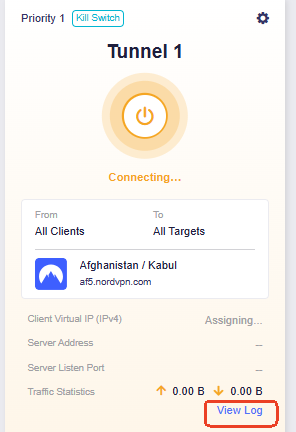
If the same configuration works normally on another device but still cannot connect on Mudi 7, could you please share a screenshot of the VPN Dashboard and the corresponding VPN log with us.
2 Likes
where do you find the info on the updates? im still on shipped firmware. i use tmobile but proton vpn which has been working swell.
Hi,
- I have 2 Mudi 7, only one was upgraded to 4.10.0! Seems it’s the same issue with both. WG0 file works just fine (it was created by my VPN provider) on other devices (linux etc).
- Ive had issues with IPV4 with TMO and wire guard in the past because TMO is IPV6 only
- I have attempted to use Mudi 7 VPN profile creation with Surfshark with different servers, same problem.
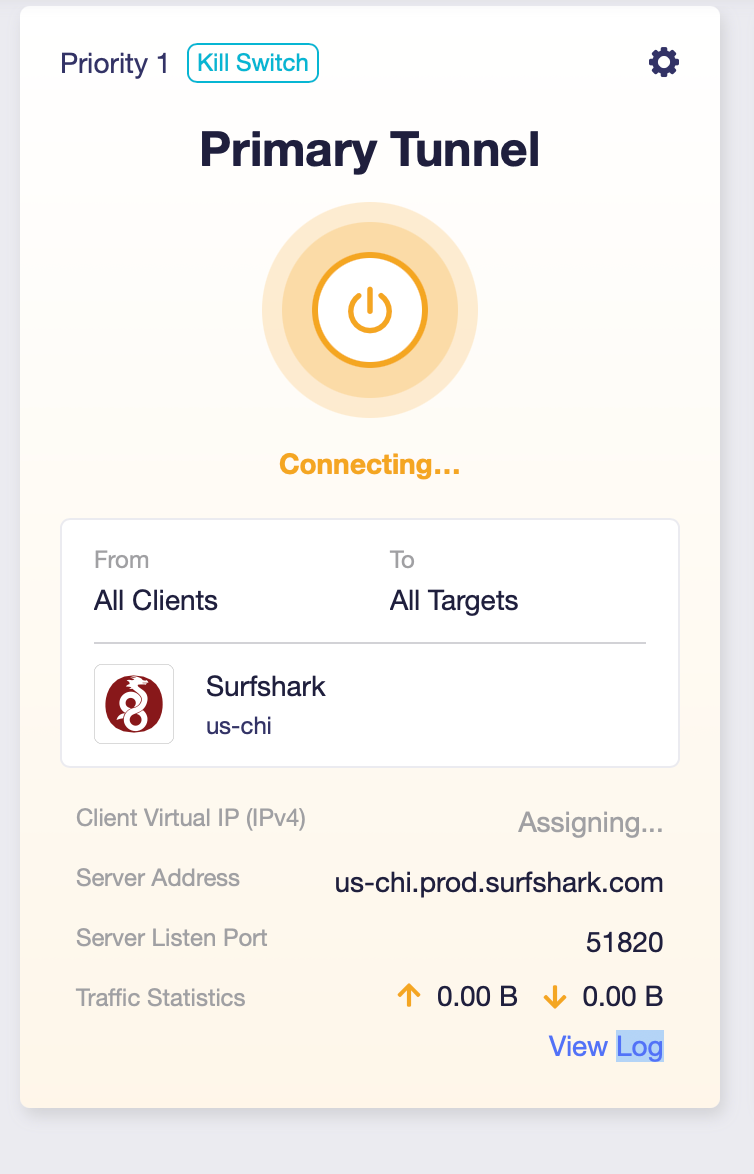
see logs:
Wed Sep  2 09:07:23 2026 daemon.info dnsmasq[1]: read /tmp/hosts/dhcp.wgclient1 - 6 names
Wed Sep  2 09:07:53 2026 user.notice vpn-failover-watcher: action=trigger iface=wgclient1 source=setup-timeout reason=startup-connecting-timeout elapsed=30
Wed Sep  2 09:07:53 2026 user.notice vpn-failover-trigger: action=schedule iface=wgclient1 source=setup-timeout reason=startup-connecting-timeout tunnel_id=10 delay=0s pid=12582
Wed Sep  2 09:07:53 2026 user.debug tunnel_id_10: (tunnel-switch.sh:633) section=cfg0492bd, iface=wgclient1, via_type=wireguard, group_id=7748, shared_count=1
Wed Sep  2 09:08:01 2026 user.info tunnel_id_10: (tunnel-switch.sh:562) interface wgclient1 still down after 8s, proceeding with failover
Wed Sep  2 09:09:08 2026 user.notice wireguard-debug: ql_cdt_board_id=0x02010022 eipv6= ql_pcie_ssc=0 USER=root ifname=wgclient1 ACTION=REKEY-GIVEUP SHLVL=1 HOME=/ data_interface=[0,0] ql_switch_usb=0 HOTPLUG_TYPE=wireguard ql_pcie_mode=1 LOGNAME=root DEVICENAME= TERM=linux ethmac=000000000000000000000000 SUBSYSTEM=wireguard PATH=/usr/sbin:/usr/bin:/sbin:/bin eqos= ql_overlay_rootfs=1 ql_pcie_id=[0x0000,0x0000,0x0000,0x0000,0] PWD=/ eipv4=
Wed Sep  2 09:09:15 2026 user.notice firewall: Reloading firewall due to ifdown of wgclient1 ()
Wed Sep  2 09:09:18 2026 user.notice vpn-failover-trigger: action=schedule iface=wgclient1 source=hotplug reason=ifdown tunnel_id=10 delay=0s pid=17435
Wed Sep  2 09:09:18 2026 user.notice QCMAP: hotplug-iface event: ql_cdt_board_id=0x02010022 eipv6= ql_pcie_ssc=0 USER=root ACTION=ifdown SHLVL=1 HOME=/ data_interface=[0,0] ql_switch_usb=0 HOTPLUG_TYPE=iface ql_pcie_mode=1 LOGNAME=root DEVICENAME= TERM=linux ethmac=000000000000000000000000 PATH=/usr/sbin:/usr/bin:/sbin:/bin eqos= ql_overlay_rootfs=1 INTERFACE=wgclient1 ql_pcie_id=[0x0000,0x0000,0x0000,0x0000,0] PWD=/ eipv4=
Wed Sep  2 09:09:18 2026 user.debug tunnel_id_10: (tunnel-switch.sh:633) section=cfg0492bd, iface=wgclient1, via_type=wireguard, group_id=7748, shared_count=1
Wed Sep  2 09:09:19 2026 user.notice vpn-failover-watcher: action=exit iface=wgclient1 source=setup-timeout reason=startup-connecting-timeout result=not_eligible
Wed Sep  2 09:09:26 2026 user.info tunnel_id_10: (tunnel-switch.sh:562) interface wgclient1 still down after 8s, proceeding with failover
Log in the admin page and do an upgrade from the device admin page or go here: https://dl.gl-inet.com
1 Like
Hi,
Thank you for the additional information and logs.
The logs show that wgclient1 does not complete the connection within the expected time and eventually reaches REKEY-GIVEUP , after which the interface is brought down.
If possible, could you temporarily connect the Mudi 7 to another Internet connection, for example by using Repeater to connect to another Wi-Fi network or hotspot, and then test the same WireGuard profile again?
And when testing through T-Mobile, could you also run the following commands via SSH and send the output to us via private message?
nslookup us-chi.prod.surfshark.com
wg show
ip -4 route
ip -6 route
Thank you for your support and understanding.