Mudi 7 - Cisco VPN fails with DNS error over 5G router, but works when another VPN is active

I'm using a Windows work laptop with Cisco Secure Client / AnyConnect.

When connected to the internet through my Mudi 7 5G router, Cisco VPN fails to connect and reports a DNS-related error.

However, if I first establish a Wireguard VPN connection on the Mudi 7 5G router itself, and then start Cisco VPN on the laptop, Cisco connects successfully without any DNS errors.

So the sequence is:

:cross_mark: Windows → 5G Router → Internet → Cisco VPN = DNS error

:white_check_mark: Windows → 5G Router → Router VPN → Internet → Cisco VPN = works

This makes me suspect one of the following:

  • DNS resolution issue with the mobile provider's DNS servers? WIth Cloudflare DNS or Google DNS settings in Mudi, same issue.

  • IPv6-related problem? Switched completely to IPv4 and issue persists.

  • MTU/packet size issue on the 5G network

  • Carrier-grade NAT (CGNAT) or routing issue on the mobile network

Has anyone seen a similar situation where Cisco VPN only works when traffic is first tunneled through another VPN? Any ideas on how to identify whether this is a DNS, routing, MTU, IPv6, or mobile carrier issue?

Sim Card: o2 , Location: Germany

If I use my Deutsche Telekom Simcard, I do not have this issue. So it has something to do with o2. Same Issue wih another Telekom Simcard :frowning:

Hi,

Since the same Cisco VPN works normally with the Telekom SIM, while the issue occurs with O2 and disappears when the traffic is routed through another VPN, this may be related to the network path through the O2 mobile network.

To check this further, could you please keep the WireGuard VPN Client on the Mudi 7 disabled, and provide the following information?

  1. With the O2 SIM , please run the following commands on the Windows PC:
nslookup <Cisco-VPN-server-domain>
curl.exe -vk https://<Cisco-VPN-server-domain>/
  1. Please repeat the same two commands with the Deutsche Telekom SIM , so we can compare the failed and working network paths.

If the Cisco VPN hostname or IP address is sensitive, you may send the results to us via private message.
Thank you again for your assistance with the testing.

How to send private messages:

Apologies, I made a mistake. The Telekom simcard also has the same issue like the o2 Simcard! However, if I put the simcard into my XE3000 5G router, both simcards have no issues.

o2:
C:>nslookup vpn.company.net
Server: console.gl-inet.com
Address: 192.168.8.1

Nicht autorisierende Antwort:
Name: vpn.company.net
Address: 111.xx.xxx.xx

C:>curl.exe -vk https://vpn.company.net/

  • Host vpn.company.net:443 was resolved.
  • IPv6: (none)
  • IPv4: 111.xx.xxx.xx
  • Trying 111.xx.xxx.xx:443...
  • schannel: disabled automatic use of client certificate
  • ALPN: curl offers http/1.1
  • ALPN: server did not agree on a protocol. Uses default.
  • Established connection to vpn.company.net (111.xx.xxx.xx port 443) from 192.168.8.192 port 53954
  • using HTTP/1.x

GET / HTTP/1.1
Host: vpn.company.net
User-Agent: curl/8.21.0
Accept: /

  • Request completely sent off
    < HTTP/1.1 200 OK
    < Content-Type: text/html; charset=utf-8
    < Transfer-Encoding: chunked
    < Cache-Control: no-store
    < Pragma: no-cache
    < Connection: Keep-Alive
    < Date: Tue, 22 Sep 2026 11:57:18 GMT
    < X-Frame-Options: SAMEORIGIN
    < Strict-Transport-Security: max-age=31536000; includeSubDomains
    < X-Content-Type-Options: nosniff
    < X-XSS-Protection: 1
    < Content-Security-Policy: default-src 'self' 'unsafe-inline' 'unsafe-eval' data: blob:; frame-ancestors 'self'; base-uri 'self'; block-all-mixed-content
    < Cross-Origin-Opener-Policy: same-origin-allow-popups
    < Set-Cookie: webvpn=; expires=Thu, 01 Jan 1970 22:00:00 GMT; path=/; secure
    < Set-Cookie: webvpnc=; expires=Thu, 01 Jan 1970 22:00:00 GMT; path=/; secure
    < Set-Cookie: webvpn_portal=; expires=Thu, 01 Jan 1970 22:00:00 GMT; path=/; secure
    < Set-Cookie: acSamlv2Token=; expires=Thu, 01 Jan 1970 22:00:00 GMT; path=/; secure
    < Set-Cookie: webvpnlogin=1; path=/; secure
    < Set-Cookie: webvpn_as=; expires=Thu, 01 Jan 1970 22:00:00 GMT; path=/; secure
    < Set-Cookie: webvpnSharePoint=; expires=Thu, 01 Jan 1970 22:00:00 GMT; path=/; secure
    < Set-Cookie: samlPreauthSessionHash=; expires=Thu, 01 Jan 1970 22:00:00 GMT; path=/; secure
    < Set-Cookie: acSamlv2Error=; expires=Thu, 01 Jan 1970 22:00:00 GMT; path=/; secure
    <

              document.cookie = "tg=; expires=Thu, 01 Jan 1970 22:00:00 GMT; path=/; secure";
    
          document.cookie = "sdesktop=; expires=Thu, 01 Jan 1970 22:00:00 GMT; path=/; secure";
          document.location.replace("/+CSCOE+/logon.html");
      </script>
    
    * Connection #0 to host vpn.company.net:443 left intact

Telekom:

Telekom:
C:>nslookup vpn.company.net
Server: console.gl-inet.com
Address: 192.168.8.1

Nicht autorisierende Antwort:
Name: vpn.company.net
Address: 111.xx.xxx.xx

C:>curl.exe -vk https://vpn.company.net/

  • Host vpn.company.net:443 was resolved.
  • IPv6: (none)
  • IPv4: 111.xx.xxx.xx
  • Trying 111.xx.xxx.xx:443...
  • schannel: disabled automatic use of client certificate
  • ALPN: curl offers http/1.1
  • ALPN: server did not agree on a protocol. Uses default.
  • Established connection to vpn.company.net (111.xx.xxx.xx port 443) from 192.168.8.192 port 56620
  • using HTTP/1.x

GET / HTTP/1.1
Host: vpn.company.net
User-Agent: curl/8.21.0
Accept: /

  • Request completely sent off
    < HTTP/1.1 200 OK
    < Content-Type: text/html; charset=utf-8
    < Transfer-Encoding: chunked
    < Cache-Control: no-store
    < Pragma: no-cache
    < Connection: Keep-Alive
    < Date: Tue, 22 Sep 2026 13:25:07 GMT
    < X-Frame-Options: SAMEORIGIN
    < Strict-Transport-Security: max-age=31536000; includeSubDomains
    < X-Content-Type-Options: nosniff
    < X-XSS-Protection: 1
    < Content-Security-Policy: default-src 'self' 'unsafe-inline' 'unsafe-eval' data: blob:; frame-ancestors 'self'; base-uri 'self'; block-all-mixed-content
    < Cross-Origin-Opener-Policy: same-origin-allow-popups
    < Set-Cookie: webvpn=; expires=Thu, 01 Jan 1970 22:00:00 GMT; path=/; secure
    < Set-Cookie: webvpnc=; expires=Thu, 01 Jan 1970 22:00:00 GMT; path=/; secure
    < Set-Cookie: webvpn_portal=; expires=Thu, 01 Jan 1970 22:00:00 GMT; path=/; secure
    < Set-Cookie: acSamlv2Token=; expires=Thu, 01 Jan 1970 22:00:00 GMT; path=/; secure
    < Set-Cookie: webvpnlogin=1; path=/; secure
    < Set-Cookie: webvpn_as=; expires=Thu, 01 Jan 1970 22:00:00 GMT; path=/; secure
    < Set-Cookie: webvpnSharePoint=; expires=Thu, 01 Jan 1970 22:00:00 GMT; path=/; secure
    < Set-Cookie: samlPreauthSessionHash=; expires=Thu, 01 Jan 1970 22:00:00 GMT; path=/; secure
    < Set-Cookie: acSamlv2Error=; expires=Thu, 01 Jan 1970 22:00:00 GMT; path=/; secure
    <

              document.cookie = "tg=; expires=Thu, 01 Jan 1970 22:00:00 GMT; path=/; secure";
    
          document.cookie = "sdesktop=; expires=Thu, 01 Jan 1970 22:00:00 GMT; path=/; secure";
          document.location.replace("/+CSCOE+/logon.html");
      </script>
    
    * Connection #0 to host vpn.company.net:443 left intact

Hi,

Thank you for the additional test results.

Since DNS resolution and the HTTPS connection to the Cisco VPN server over TCP 443 appear to be working normally, and both SIM cards can work normally on the XE3000.

Could you please help to check the following?

  1. Could you please let us know the current Mudi 7 firmware version.
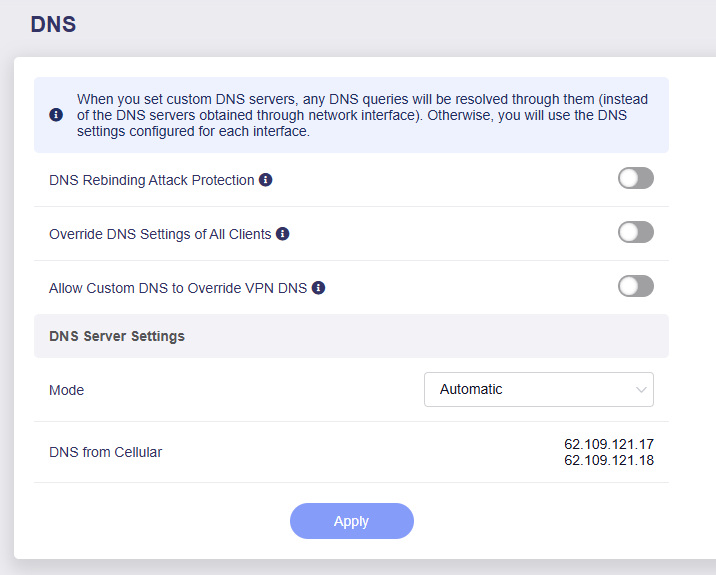
  2. Is AdGuard Home currently enabled? Please also provide screenshots of the current DNS settings pages.
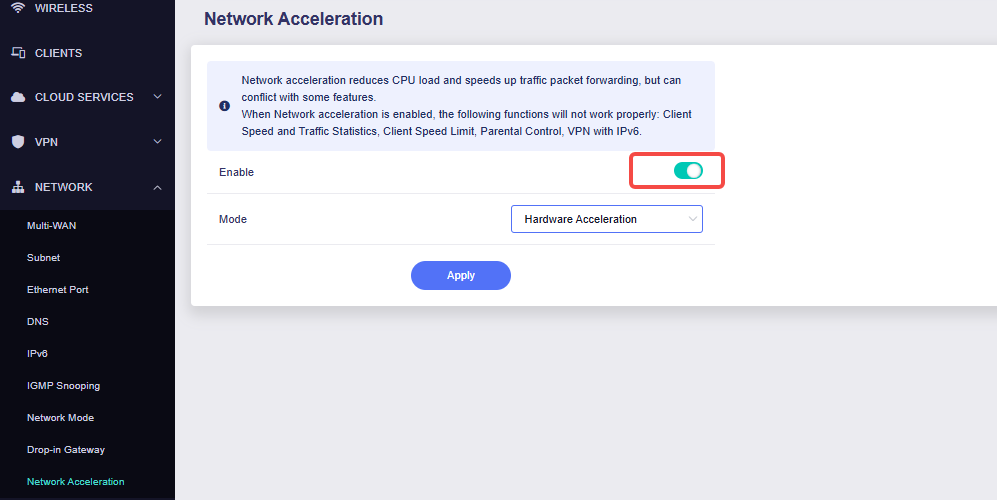
  3. Please temporarily disable Network Acceleration on the Mudi 7, and then try connecting with Cisco Secure Client again.
  4. If the issue still occurs, please export the System Log, then send them to us via private message.

Thank you for your support and understanding.

How to export logs:

How to send private messages:

  1. Mudi firmware: Latest, 4.0 - 1000release. With the version before it was the same issue.
  2. I do not use AdGuard. Here is the DNS Screenshot. I had also used other DNS settings like Google and Cloudflare here, didnt help either.
  3. Network Acceleration was enabled before. I disabled it. Did not help.
  4. Sent you the logs.