Hi Mudi 7 users
I cant get to bind the Mudi 7 app to the Mudi 7 router. I receive a MQTT disconnect. I checked out luci but its ok. MQTT is enabled by default and I also installed an additional MQTT thinking this might help enable the error. It does not.
Another issue is the 2.4 mhz. I enable this and it’s active for a few minutes, then it dissapears, i check the network and surely enough, its gone. No wonder all my iot devices that only work on 2.4 are flashing all the time. Why cant I get 2.4 to stay put? 5 mhz is fine, works all the time. no disconnections but what i am experiencing is a slowwwwwwwwwww connection. I spoke to three my sim isp and they asked me to try another device, which i did, and works perfectly fine on my home 5g router.
wtf is going on…anyone getting these same issues or am i missing something i need to install or fix or what? I have reset the entire router settings to default but still get disconnections on 2.4 and the mqtt bind to cloud
Hi
Regarding the MQTT issue, could you please clarify the exact problem you are experiencing and provide some logs (if available) so we can better understand the situation?
Regarding the 2.4MHz and 5MHz issue, are you referring to the Mudi 7’s 2.4GHz and 5GHz SSIDs?
Please note that by default, both bands use the same SSID name, so you may only see a single SSID on other devices. If you would like to distinguish them, you can rename them with different SSID names.
However, if you have already assigned different names, or if you have confirmed that the 2.4GHz SSID is indeed not functioning, could you please export the device logs and send them to us via private message for further inspection?
Regarding the slow connection issue, could you also provide information about the SIM card carrier you are currently using so we can investigate further?
If possible, could you please follow the guide and share your device with us via GoodCloud so we can check these issues remotely?
Kindly note to send us the MAC address and the router password via private message so we can access the device.
How to export logs:
How to send private messages:
Hi there, sorry for the late reply. The 2.4 mhz has a different SSID. But my TV and other IOT’s need 2.4 to work. I have to keep resetting the router each time TV goes offline or my indoor cameras go offline. I think there is a bug or i have a defective router mudi 7. I sometimes disable the 2.4 mhz for a few seconds then turn it back on to get the 2.4 to work again, but this lasts for about 15-20 minutes until i have to restart or reboot the router again. I shouldnt have to keep doing this all the time though.
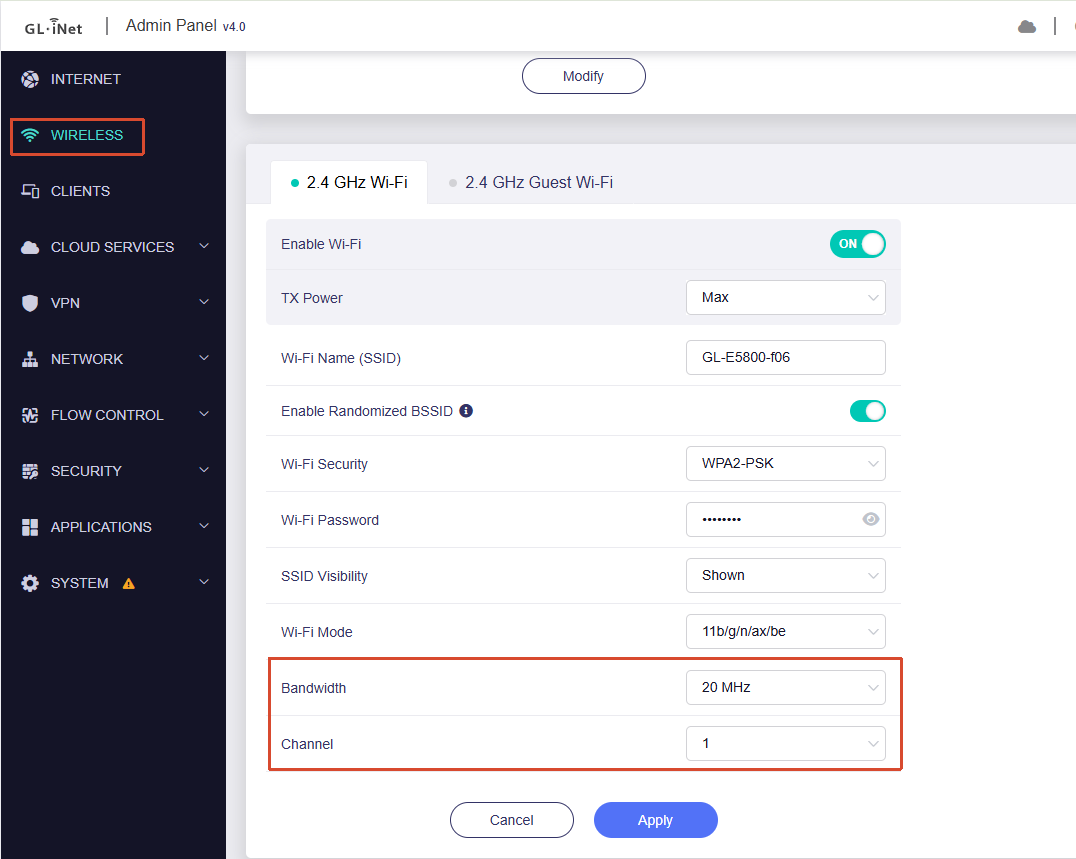
If 2.4GHz Wi-Fi was working normally before but stopped working after some time, it may be because the 2.4GHz channel is set to Auto by default and has switched to a channel that your TV or IoT devices do not support.
We recommend setting the 2.4GHz configuration to a fixed channel (1/6/11) and a fixed bandwidth of 20MHz to see whether this improves the situation.
Please also note that the Guest network on the Mudi 7 cannot be used while Repeater mode is enabled. If you need to use the Repeater function, please avoid enabling the Guest network, as it may cause interruptions.
If the issue persists after making these changes, or if these settings are already configured, please export the device logs and send them to us via private message as mentioned previously so we can analyze them further.