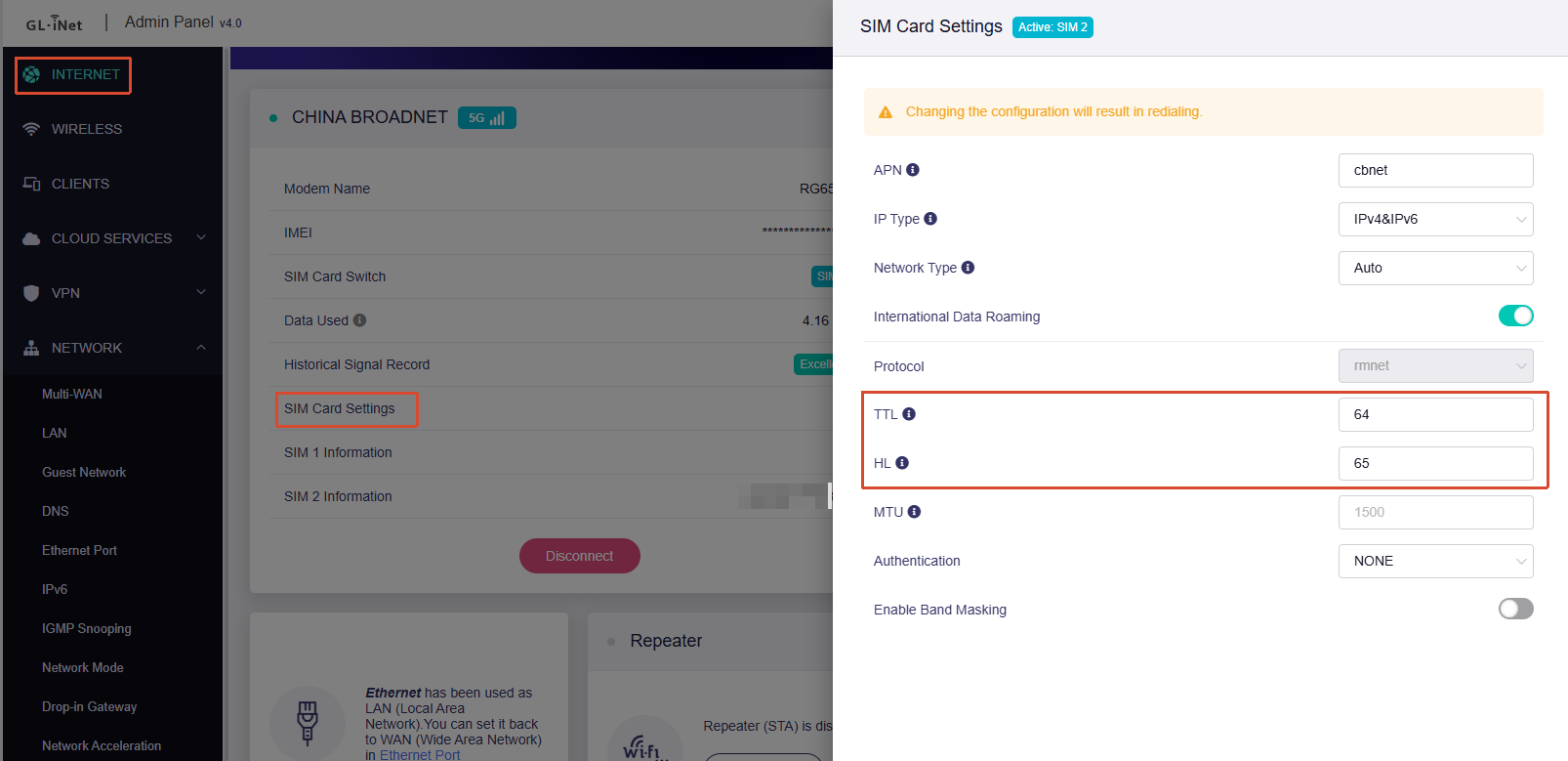
Mudi 7 TTL not working

Hello. I'm having issues with my Mudi 7. I just received it today and it's not letting me apply the TTL. I tried 64, 65 and it's not working. I have a Nighthawk MR1100 and the MR6500 where I use the TTL value of 64 and they work without issues. I used to know how to add the custom rule on the firewall via LuCi, but now with the newer OpenWRT, I can't find that option anymore. I did updated it to the latest firmware. I tried the following but nothing is working even after a reboot on each attempt:

TTL:65

HL:65

TTL:64

HL:64

TTL:64

HL:65

Also, I tried changing to IPv4 only rather than leaving it on auto, but still no luck. My carrier is called Liberty (it used to be AT&T but it got sold here in Puerto Rico). Liberty behaves exactly the same as AT&T did, in regards of TTL values and other mods available. And like I mentioned at the beginning, I currently own/use the MR6500 with the TTL on 64 without issues. They don't do any DPI or video speed throttling.

I forgot to add the current version it's using. It's version 4.0 and the firmware is 0803release

Update!!! Following the suggestion from a user called RVer made on August 2024, turns out it's the Network Acceleration that's interfering with the TTL override. This is something that should get checked out. But I ended up disabling network acceleration and the TTL finally started working. Kudos to the user RVer for the suggestion!

https://forum.gl-inet.com/t/gl-x3000-using-hotspot-data/36111/10

1 Like

Hi,

That behavior sound like unusual, as Network Acceleration should not interfere with TTL modification.

We tested this locally on a Mudi 7 running v4.8.3 firmware. In our environment, packet TTL modifications applied successfully regardless of whether Network Acceleration was enabled or disabled.

Here are our local verification results showing the packets updating correctly:

To help us isolate what is happening on your device, could you verify a few details?

  1. Configuration Method: Did you modify the TTL/HL values directly through Admin Panel → Internet → SIM Card Settings?

  2. Remote Diagnostics: If the issue persists, do you have an alternative internet source for the Mudi 7 (such as connecting via Wi-Fi Repeater or an Ethernet WAN link)? This would allow the router to connect to GoodCloud so we can review the low-level remotely.

If you are open to remote troubleshooting, please follow our guide on Enabling Technical Support via GoodCloud and send us your MAC address and temporary router password via private message.

  1. Yes, I did modified there.
  2. Yes, I'm open for remote troubleshooting, since I'm now experiencing other issue with it. When can we arrange this?

If this is not urgent and your Mudi 7 is currently idle, please follow the GoodCloud guide we shared earlier to enable remote access.
Once connected, private message us your MAC address and router password so we can have our development team investigate directly.

Regarding the new issue you mentioned, please let us know the specific symptoms or error messages you are encountering.
We will investigate that accordingly as well.

I previously used a Netgear Nighthawk M6 (MR6500) and I used to get constant and stable speeds. With this modem, when I do a speed test, it does a big speed burst and then it lowers down for a while. You can see how it stops sending data basically and then kicks back up, but still speeds are lower than the initial burst, which is the real speed. I have a 5G tower nearby and speeds are always high. There's no congestion here. My phone gives me faster, stable speeds, along with a lower latency, than the Mudi 7. Upload speeds are above 60Mbps all the time. The Mudi struggles to reach those numbers, which is odd, keeping in mind that the cell reception should be much higher, compared to my phone (Samsung Galaxy S26 Ultra), and the MR6500.

Also, when doing a bufferbloat test, I get graded F or F+ on the Mudi. It creates an internal buffer ranging at 200ms on download, and around 700ms on upload. That's horrible. With the MR6500, I get graded A. Sometimes it's A+ but most of the time, it's on A. Latency is very low and the modem itself is stable. I wanted the Mudi 7, due to a lot of features that the MR6500 lacks, and to be able to use dual sim cards on it. But so far this experience is not great at all.

I tried out turning off Network Acceleration and I also tried to set up the SQM but its not gonna work, since I'm unable to specify a number for DL/UL since speeds are variable. I tried setting the WiFi to 5Ghz only and 6Hhz only, tried different wifi channels and nothing. Still the same behavior.

After that, I did a factory reset and it improved at first, but then it started doing it again. I have a friend who's also having the same issues as me. We both got it at about the same time.

It seems that changing the MTU to 1430, reduced the bufferbloat for now but I can't seem to reduce the latency. Latency is much higher on the Mudi, compared to my phone when they're side by side. On the MR6500, latency is the same as in my phone. Speeds are getting stable but latency is higher. Can't seem to find anything online yet on how to reduce it.

As for the TTL issue, it's on SIM1 (Carrier: Liberty), when connected remotely. SIM 2 (Carrier: Claro) , is fully unlimited and doesn't require TTL. I have video recording on the odd behavior it had before changing the MTU. I tried that because I read it online that some users saw improvements on it. But on my MR6500, I haven't had to change anything to get a good experience.


Thank you for providing remote access.
We’ll ask our development team to investigate the TTL issue further.

Regarding the new issues you reported, we would like to confirm a few additional details with you. Could you please help check and provide the following information:

1. Bufferbloat (Latency Under Load)

  • What specific bufferbloat grades or download/upload latency increases (+ms) are you seeing on the Mudi 7 versus the MR6500?
  • If possible, please run tests on both devices a few times via Waveform's Bufferbloat Test and share screenshots of the results.

2. Speed Fluctuations

  • How severe are the speed swings? What are the typical highest and lowest throughput speeds (Mbps) you observe on each device?
  • Do these drops happen erratically within a single test session, or do they fluctuate over longer periods?
  • Please provide 3–4 consecutive test screenshots from Cloudflare Speed Test for both routers.

3. Idle Latency (Ping)

  • Under identical conditions, what are the baseline, idle ping values (ms) to a standard endpoint (like 8.8.8.8 or 1.1.1.1) on the Mudi 7 versus the MR6500?

Please try to keep the network environment as consistent as possible when testing the Mudi 7 and MR6500 — for example, by using the same SIM card and connecting to the same base station/band whenever possible.

Greetings and thanks for your reply. Turns out the bufferbloat improved a lot after adjusting the MTU and changing the mode to 4G, rather than leaving it on auto mode. Now I'm finally getting good performance! The only thing left to check, is why the network acceleration is affecting the TTL value. When it's enabled, the TTL doesn't apply and my connection gets throttled. If disabled, the TTL works great and speeds are not throttled.