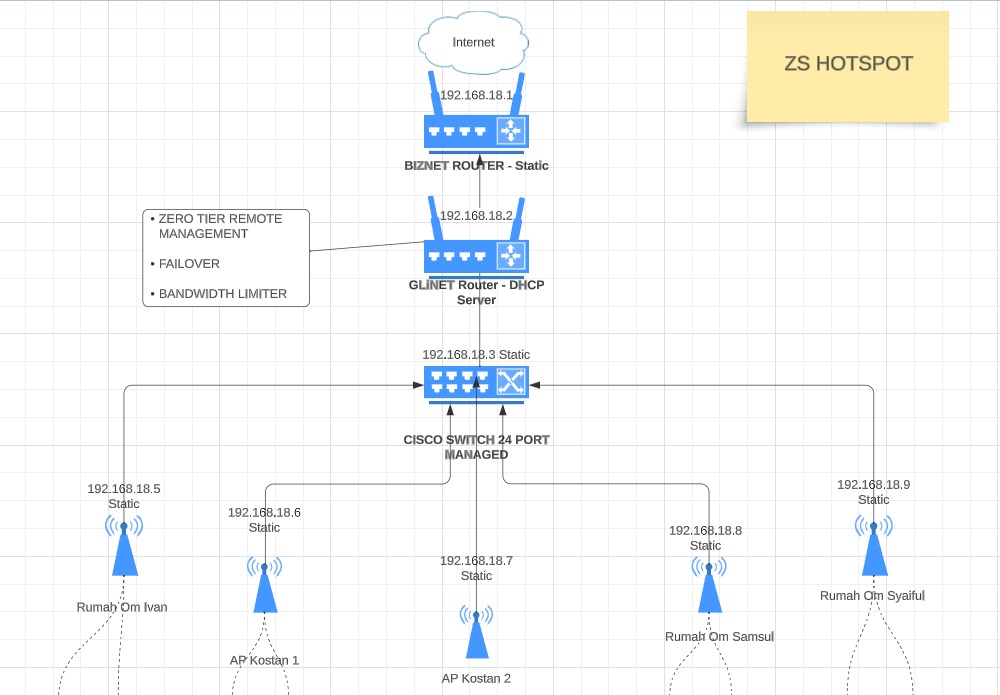
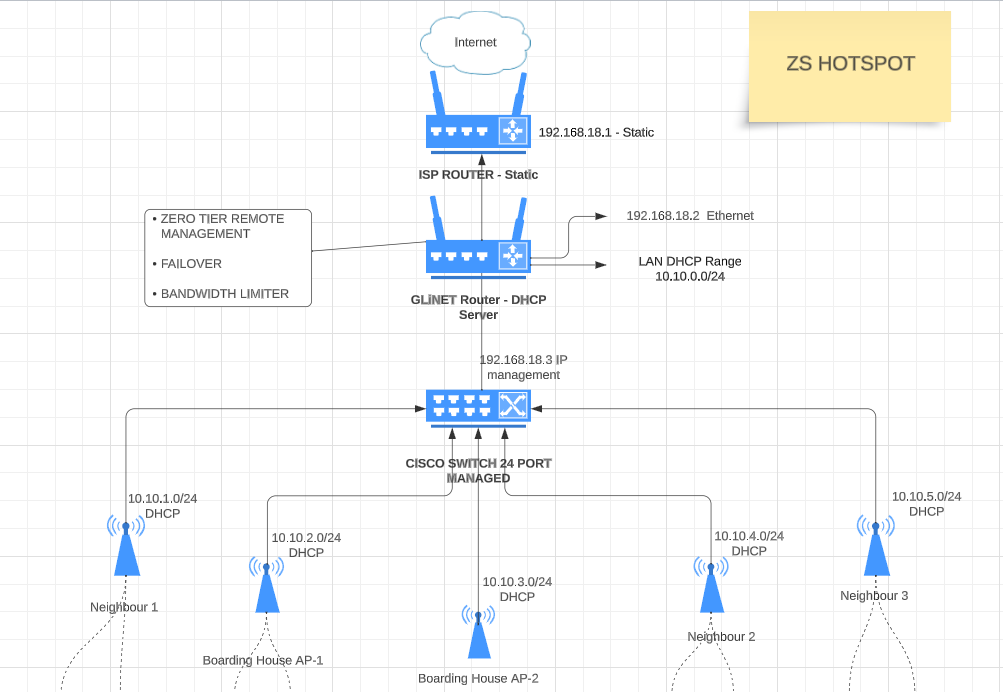
In the case your ISPs modem supports bridge mode, I would activate it and use the GL.iNET as the main router for everything. This depends on your type of connection, of course. If you are using DSL don’t forget to enter the PPPoE details on the GL.iNET then.
Failover needs at least two ISPs, currently there is only one? In any case stuck with failover only, don’t go with distribution traffic over different connections - it’s not really reliable with consumer hardware.
I would think about replacing the static IPs by DHCP reservations - but this is a question of your personal favor.
Access Points should use meshed network if it’s possible with them.
Edit:
You could try to use bandwidth limiting on the Cisco switch for each AP port. So the general available bandwidth would be better distributed across all APs
I forgot to add image into the topology, I will be using a 4G USB Modem for failover. (tested)
The purpose of using static IP on each routers and access points is for easy access whenever I need to separately restart the device by remote
for exmaple if I want to restart AP Kostan 1 only.
I am not using mesh Access point, I am using used ISP’s router as an access point.
I am not yet familiar with the UI on Cisco switch for bandwidth limitation while I can do it easily on MT-3000 Clients section.
You are not allowed to do that.
Within your network and all subnetworks, all IP addresses must be unique.
Misusing used routers as access points is usually a bad idea if they do not support pure access point mode. They start using NAT then and … this is just bad.
Edit: If they don’t support pure AP mode, you have to give them all different DHCP ranges. But let me be honest: This is not ideal. Replace them with APs instead.
Edit²: “Not ideal” means: If the APs are next to each other, then it’s pretty bad. If there are distributed over different buildings, it’s mostly fine.
The reason you’re getting an ip conflict with the gli is because you have it set as the only authoritve dhcp server when it isn’t. The dhcp server is the point of entry, the isp router. That’s because you’re using the same pool.
Also with that setup it won’t be long before you run out of ip addresses and devices get kicked off the network. You are best having the GLI running it’s own pool and dhcp server. Have the gli do all the work as that is what it was built for.
Wired backhauls are the best. If you mean the APs should be setup to know each other and have proper configured 802.11k/r/v to assist roaming between APs, I agree.
@zlebors, your switch would be better in the 10.10.0.0/24 range I believe. What are you trying to do? Do you want 6 different networks (different houses/buildings having their own network) or do you want 1 big network with 6 wifi-access points (5 AP + MT-3000)?
In that case, this probably is getting close to the best you can do.
If you were an OpenWRT guru, you could have the ISP router setup in bridge mode (if possible) and setup all networks on the MT-3000 and use VLAN-trucking from the MT-3000 to the switch and assign the different VLANs to ports on the switch, but that’s likely above what you can do. The lower routers would then be just simple APs. That would prevent multiple NAT.
Your setup will very likely work fine for most usual cases.