Nefarious port open on gl-x3000. Cannot close

Long story but I've been getting targeted for some reason or another.

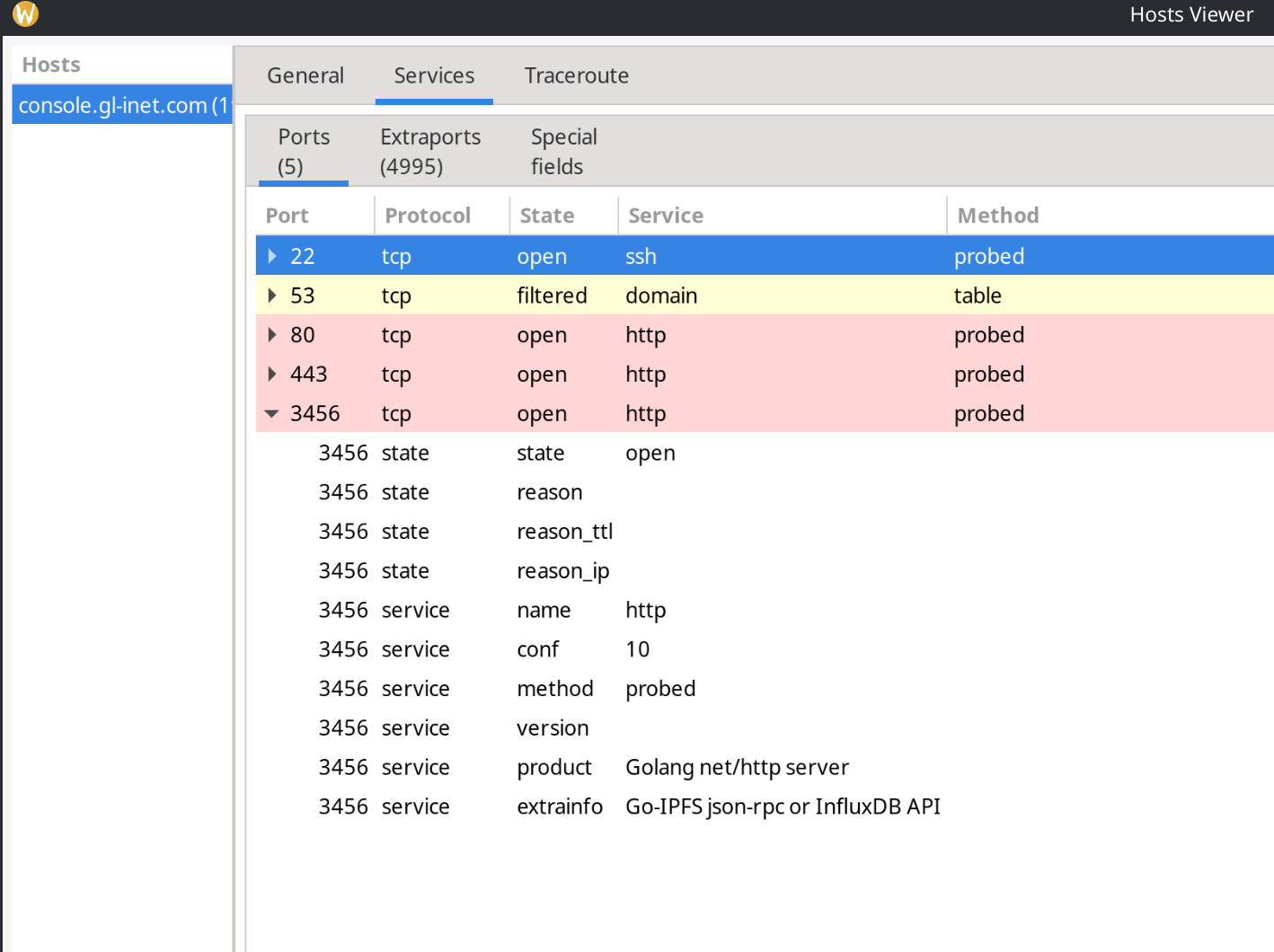
Anyway my router originally had two ports open, other than the regular 22, 53, 80, 443; these were 2000 and 3456.

I bought the router in March 2025 but the pepetrators got the leap on me at some point and it's been a nightmare as I'm not a computer wizard by any means. I thought updating via UBoot would be sufficient to remove any viruses but it seems not.

As soon as I could upgrade I did but I think I downloaded an infected .bin probably as they had poisoned my DNS. I downgraded from latest beta to v4.04 and then upgraded again to the latest beta. I managed to remove the open port 2000 but 3456 still remains open. I am on the latest UBoot, having just today updated, I then downgraded again to openwrt-x3000-4.0-0413r2.bin, still no change (i.e. port 3456 still open) and am now back on openwrt-x3000-4.8.0-0714-1752496086.bin.
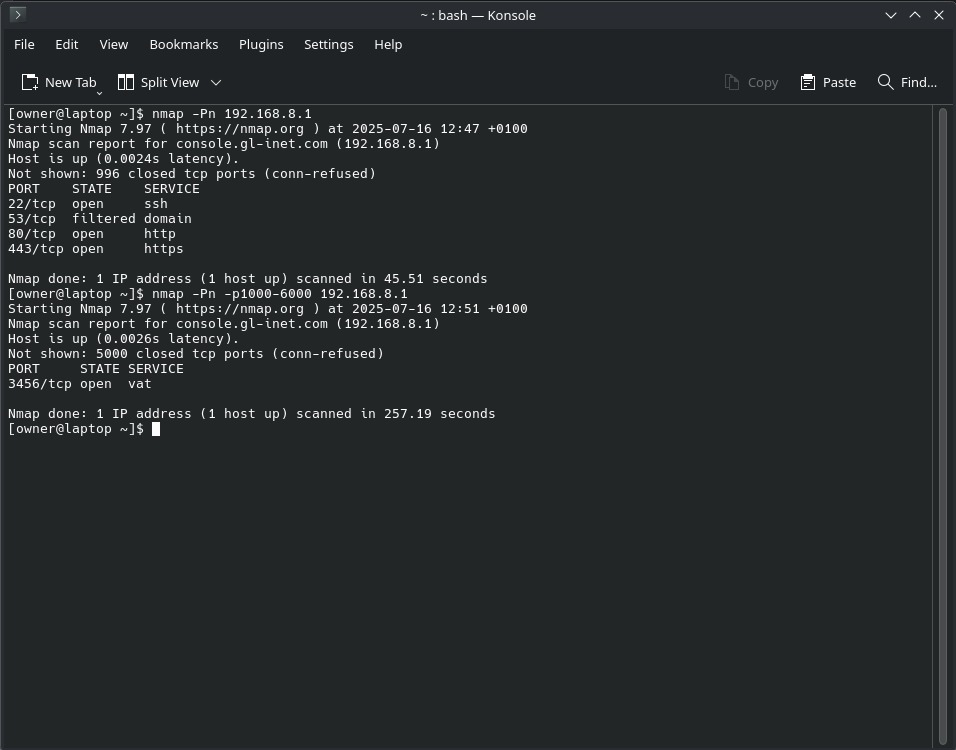
How do I remove this?

I'm not ignoring the possibility this could be a supply chain attack but deleting all data and a number of firmware updates via UBoot have not got rid of this backdoor into my router.

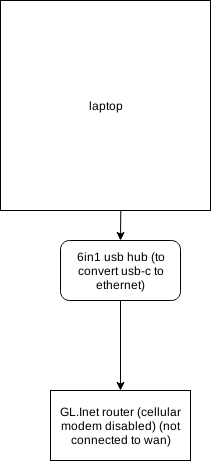
first I need to understand your network topology first, please use draw.io

It is normal within the lan realm that this port is open, 192.168.8.1 is scanned at lan scope?

how a firewall works this is very important:

When a local device initiates as first contact, the firewall always allows source to destination, this means the device on the other side of the internet automaticly is allowed to respond on the same line and gets the green card, this also opens the port from outside only for this remote device.

But when the first initiator was not you, but the remote device then the firewall blocks it and thus all connections which are unsolicitated never would reach your local devices, unless you explicity told the router to allow that i.e portforwarding.

IPV6 is a little bit different since it doesn't have a firewall, but in many situations you would use IPV6 NAT which makes it the same but is not often the default.

In order to find out wether the real port is open, you have to visit whatismyip.com or look to the ip from wwan/wan and then do a port scan on this ip, please don't share this ip here.

note that alot of ports might be looking open, but OpenWrt uses by default Reject as input chain action for the firewall zone wan this means it will sent a icmp reply back but the port is still closed, GL-iNet uses Drop this means 0 response is being sent back basicly timing out the connection, which gives the evil person no clue if the ip is online.

Also on tcp ports vs udp, tcp also always replies with icmp replies this is also how port scanners work and detect ports, but alot of udp ports do not reply, but depends on the application behind that port, Wireguard as example does not respond which means the port appears to look closed :slight_smile:

now the question more is how the attack happened was it on local scope or remotely?

1 Like

Hi, OK my network is as simple as it could be.

So here is a drawing

It is normal within the lan realm that this port is open, 192.168.8.1 is scanned at lan scope?

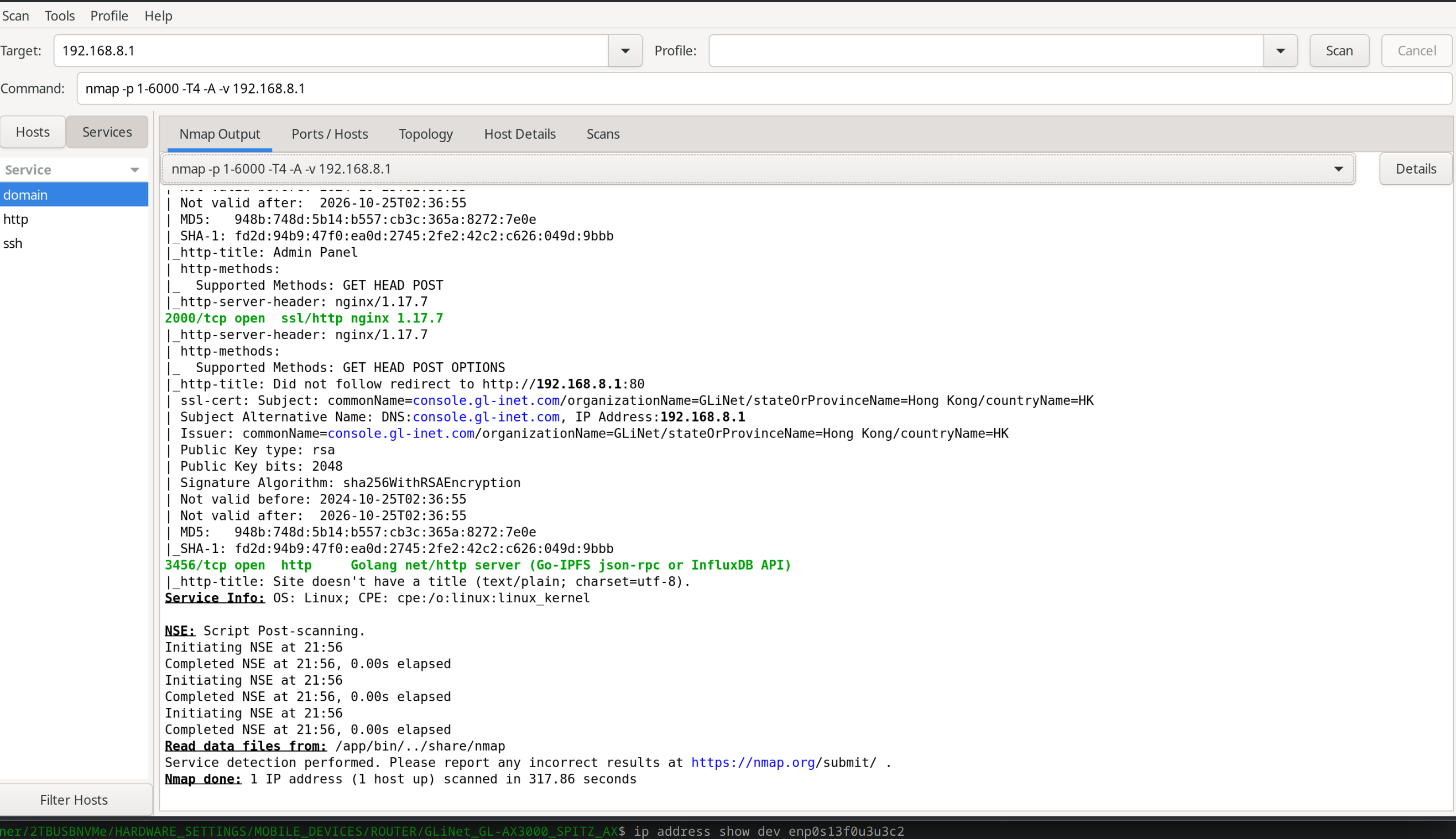
I run zenmap to scan ports from 1 to 6000. The usual ports 22, 53, 80 and 433? (can't remember precisely) however 2000 was open and 3456 was open. The scan is run from my laptop with the IP number for the router targetted, i.e. 192.168.8.1.

Port forwarding is disabled.

Update to my original post. I have obtained a brand new GL-x3000. I carried out the same scan on this. Port 2000 again is open, so this is open from new, and port 3456 is not open. So port 3456 is definatley a trojan of some sort but it seems impossible to remove.

So first question is why is port 2000 open on the new (box sealed) gl-x3000, bearing in mind when I updated to the latest beta firmware on my original router port 2000 is closed, i.e. doesn't appear in nmap after a scan.

Question 2 is how do I remove the Trojan and close port 3456. This remains after uboot updates and downgrades. It is highly persistent!

The attack may have happened via suspect software; I use arch Linux but am not that adventurous in trying new software. It could also have happened via a cell site simulator and due to the extent of targeting I, personally, have been getting for many years prior to buying this router, this is plausible. This then leads on to a mitm attack which I have definitely been getting. Another possibility was an attack on my phone which when connected to the Ethernet of my router, the virus then pivoted from phone to router.

I have only used this for cellular use and connect either the phone or laptop to Ethernet. Never used the wifi on the router.

Hi,

In the LAN side, you can scan open ports 2000 or 3456, it may not have a big impact on security, since they are not open on the WAN side.
You can use the tcpdump tool to capture the network packets to check what services or IPs are using ports 2000 and 3456.

  1. Please let me know which firmware version of X3000 to scan to port 3456 open?
  2. Which firmware version of new X3000 you received, to scan to port 2000 open?

We would like to reproduce the above issues.

Did you use nmap [router LAN IP] on arch Linux to scan?

Hi, I'm reluctant to use the hacked router at all which, presumably I would need to if I were to use tcpdump.

  1. I am using openwrt-x3000-4.8.0-0714-1752496086.bin currently, but I hasten to add you will find neither ports 2000 nor 3456 appear as open on this firmware. I think the open port 3456 is only appearing on my router due to a trojan, unless it was a supply chain attack. It is persistent across Uboot updates. I cannot remember if my original router was in a sealed box or not.

  2. If you want to test for port 2000 then try openwrt-x3000-4.0-0413r2.bin. I'm not sure which version is on the new router so I'll advise in a follow-up post.

If you look at the first picture of the nmap results I posted within the first post it shows the command I used, i.e. nmap -Pn -p1000-6000 192.168.8.1

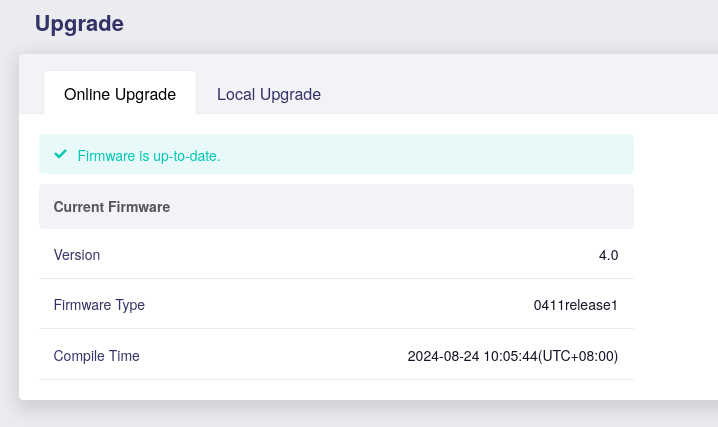
EDIT...ok just looking at the firmware of the new (sealed box router) scanned with port 2000 open is 4.0-0411r1

I don't see any indication that your router is hacked in the information that posted. You are scanning the internal network port with nmap, ports open there are not accessible from the internet. If you want to scan for open ports accessible from the internet, you need to scan your external IP, not the internal one. You could use one of the many online portscanners on internet, like this one: GRC | ShieldsUP! — Internet Vulnerability Profiling  

Hi thanks for the link. I shall try that shortly.

I would like the inconsistencies explained. Internal port or not port 2000 appears open from day one on my original router but then when upgraded to the latest beta appears closed. It also appears open on a brand new unpackaged router.

Inconsistency two is port 3245 appears open on my original router, and will not appear closed despite a UBoot firmware update, a UBoot update, and deletion and resetting of settings, and, on top of all that does not appear open using the same nmap scan on a brand new version of this router.

You may be correct in that they do not appear open externally. I haven't tried a scan from an external site, but if an open source application became compromised in some way and port 3245 was a target port for a RAT to announce its availability then perhaps this wouldn't need to appear open externally. I don't know how these things work. I just know I have been hacked a number of times in the past and that these inconsistencies exist.

Right I have just re-scanned the brand new router and port 2000 does not appear as open so perhaps when I last scanned it I had some artifact on my computer that had caused it to appear as open.

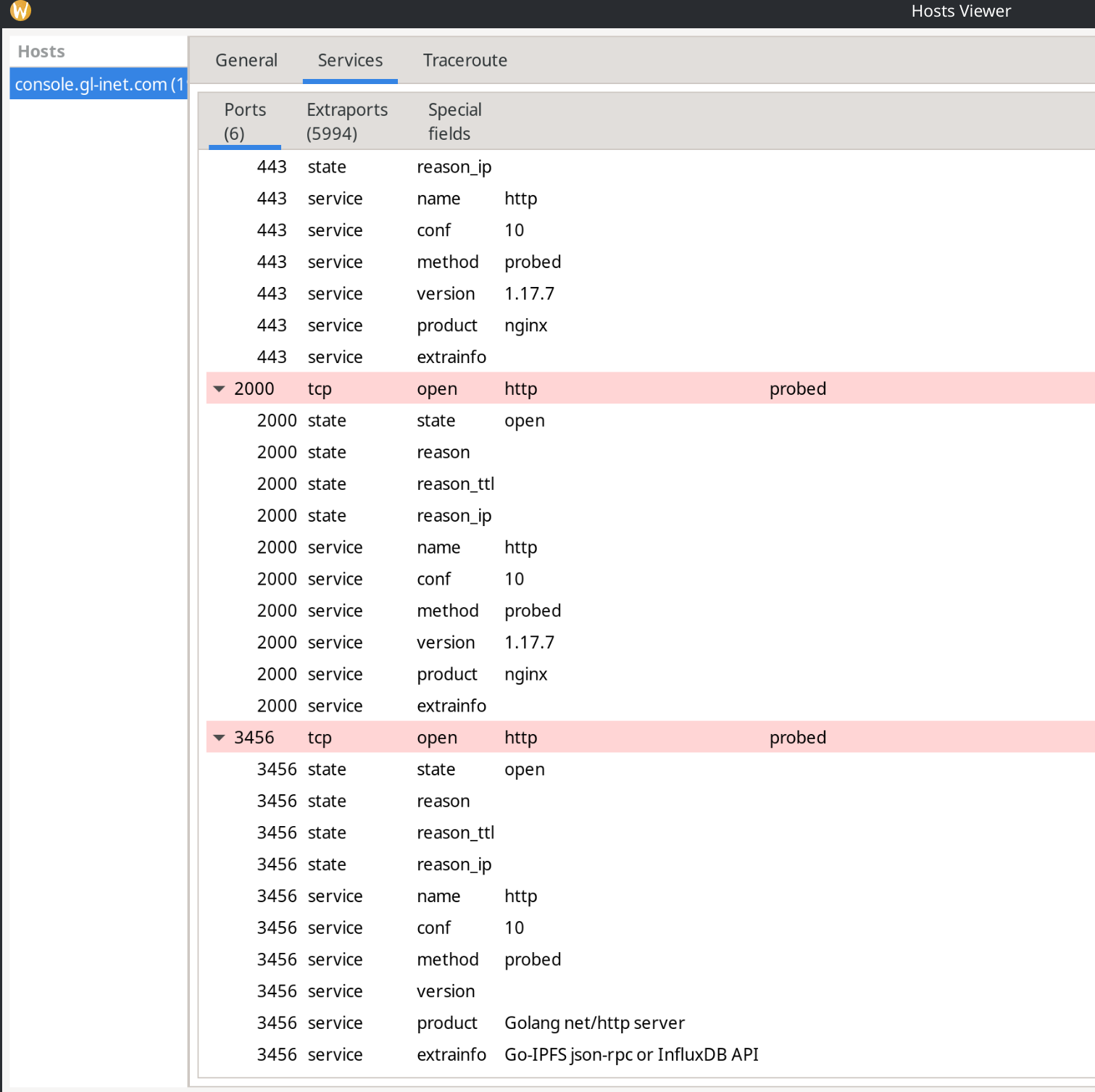
However I've re-scanned the old router and I'm learning a little more about zenmap and have discovered some sort of server keeping port 3456 open (tested on the lan side) not tested externally. Older firmware change via Uboot still reports port 3456 open and port 2000 also appears open. Why doesn't a Uboot update remove the virus?

Nmap scan on Firmware version
openwrt-x3000-4.8.0-0714-1752496086.bin


Nmap scan after downgrade (via Uboot) to Firmware version
openwrt-x3000-4.0-0413r2.bin


Well, you've got something transmitting out on port 3456, that's for sure. Assuming that scan isn't reporting false positives whatever it is happens to be written in the Go programming language chances are more likely than not that's coming from your laptop.

(One really has to go out of their way to get a Golang 'app' to run on a SBC).

You can see what the router's processes are using ports on the router itself via netstat -natp. Eg:

root@slate-ax:~# netstat -natp
Active Internet connections (servers and established)
Proto Recv-Q Send-Q Local Address           Foreign Address         State       PID/Program name    
tcp        0      0 0.0.0.0:2222            0.0.0.0:*               LISTEN      2084/sshd -D [liste
tcp        0      0 0.0.0.0:443             0.0.0.0:*               LISTEN      2159/uhttpd
tcp        0      0 0.0.0.0:22              0.0.0.0:*               LISTEN      1605/dropbear
tcp        0      0 192.168.8.1:53          0.0.0.0:*               LISTEN      3455/dnsmasq
tcp        0      0 127.0.0.1:53            0.0.0.0:*               LISTEN      3455/dnsmasq
tcp        0      0 0.0.0.0:80              0.0.0.0:*               LISTEN      1971/lighttpd
tcp        0    132 192.168.8.1:22          192.168.8.10:55528     ESTABLISHED 3520/dropbear
tcp        0      0 192.168.8.1:22          192.168.8.10:48168     ESTABLISHED 3509/dropbear
tcp        0      0 :::2222                 :::*                    LISTEN      2084/sshd -D [liste
tcp        0      0 :::443                  :::*                    LISTEN      2159/uhttpd
tcp        0      0 :::22                   :::*                    LISTEN      1605/dropbear
tcp        0      0 :::80                   :::*                    LISTEN      2159/uhttpd
tcp        0      0 ::1:53                  :::*                    LISTEN      3455/dnsmasq

Here's how to close those particular ports on your LAN. ssh into your device & execute via copy & paste:

uci -q batch <<- __EOF
	add firewall rule
	rename firewall.@rule[-1]='port2000'
	set firewall.port2000.name='Block Unknown Connection'
	set firewall.port2000.dest_port='2000'
	set firewall.port2000.src='lan'
	set firewall.port2000.target='REJECT'
	set firewall.port2000.enabled='1'
	add firewall rule
	rename firewall.@rule[-1]='port3456'
	set firewall.port3456.name='Block Another Unknown Connection'
	set firewall.port3456.dest_port='3456'
	set firewall.port3456.src='lan'
	set firewall.port3456.target='REJECT'
	set firewall.port3456.enabled='1'
__EOF
uci commit firewall
service firewall restart

You can see them at LuCI -> Network -> Firewall -> Traffic Rules.

But really it looks like there's something(s) on your laptop that's sending the traffic. I'd install Portmaster ASAP... btw.

Hi,

Confirmed the port 3456 in GL firmware is used for the eSIM management feature.
15fbc5c9f706e2981df1a5ee42f56432

This port only open/listen on the LAN side, and is not open/listen on the WAN side, external from WAN cannot attack the device through this port.

About the port 2000 on LAN, I found the v4.4.13 is open/listen in first time initiations, but it is disabled in v4.8.0.

Please upgrade the firmware to v4.8.0.
The port 3456 is used for GL firmware feature, it is only on LAN, not WAN, please feel free to use.

If you don't use eSIM, you can disable port 3456 for the LAN:

You can disable the blocks in the firewall in my example by:

uci set firewall.port2000.enabled='0'
uci set firewall.port3456.enabled='0'
uci commit firewall && service firewall restart
1 Like

Reassuring to know that these are either errors or intentional and not the result of hacks. Very useful tips on firewall configuration too so many thanks for everyone's help.

2 Likes

This topic was automatically closed 30 days after the last reply. New replies are no longer allowed.