Model: GL-BE9300 (Flint 3) Firmware: Version 4.10.0 Firmware Type beta2
Symptom
When connected through a VPN client tunnel, video playback in Facebook, Instagram, and Threads regularly freezes permanently mid-stream, the spinner never resolves and the stream never recovers. Switching to a non-VPN SSID on the same router immediately resolves it. This happens on every attempt, not intermittently.
Reproduction steps
Connect to a router SSID that routes through a VPN client tunnel (ProtonVPN)
Open Facebook, Instagram, or Threads and start playing a video/Reel. (also happens on random fb posts)
Playback stalls within seconds to a couple of minutes and does not recover.
What I ruled out first
MTU — tested a wide range on the VPN client's MTU setting, including well below the WireGuard default (down past 1340). No change in behavior.
VPN exit server — tested two different ProtonVPN servers on separate exits. Identical freezing on both.
VPN protocol — tested both a WireGuard client tunnel and an OpenVPN client tunnel on the router. Identical freezing on both.
Bypassing the router entirely — connecting via the ProtonVPN app directly on the client device (same VPN service, same account) works perfectly. This isolated the fault to something in the router's own handling of VPN traffic, not the VPN service itself.
What fixes it
Network Acceleration. With it set to either Hardware or Software mode, the freeze reproduces reliably on both WireGuard and OpenVPN. Setting it to Disabled fixes it completely on both. This is a clean two-protocol A/B result: same router, same symptom, same fix, independent of which VPN client is active.
Supporting diagnostic evidence
While the freeze was happening, I captured /proc/net/nf_conntrack for the affected client on a 2-second loop. One UDP flow to a Meta CDN IP (57.144.216.141:443) climbed normally (buffering) and then flatlined at exactly 49068 bytes for the rest of a ~50-second capture window, never resuming. Checking it afterward, the entry had disappeared from conntrack entirely — consistent with the tracking entry expiring/being dropped while the app still expected it to be live.
I then cross-referenced that same flow's ID in ecm_dump.sh output. For transparency: this specific flow showed accel_mode=0 (never accelerated) with zero recorded drops — so at the ECM level it doesn't show the exact "accelerated flow silently dies" signature I was hoping to catch. It's possible the actual video-carrying flow in that same session was a different, higher-throughput connection that I didn't isolate before it also died, or the mechanism differs from the PPE/ECM stats-sync issue described elsewhere on this forum. I'm including this data point honestly rather than overstating what it proves — the behavioral fix (Network Acceleration on/off) is solid and repeatable; the exact low-level mechanism I could not fully confirm.
We’ve reproduced the issue internally and confirmed that it can affect Wi-Fi clients routed through the VPN on the GL-BE9300 and GL-BE3600 running v4.10.0 beta 2 or release. Our development team is treating this as a high priority, and we expect to release firmware with a fix by the next week .
For now, please use either of these workarounds:
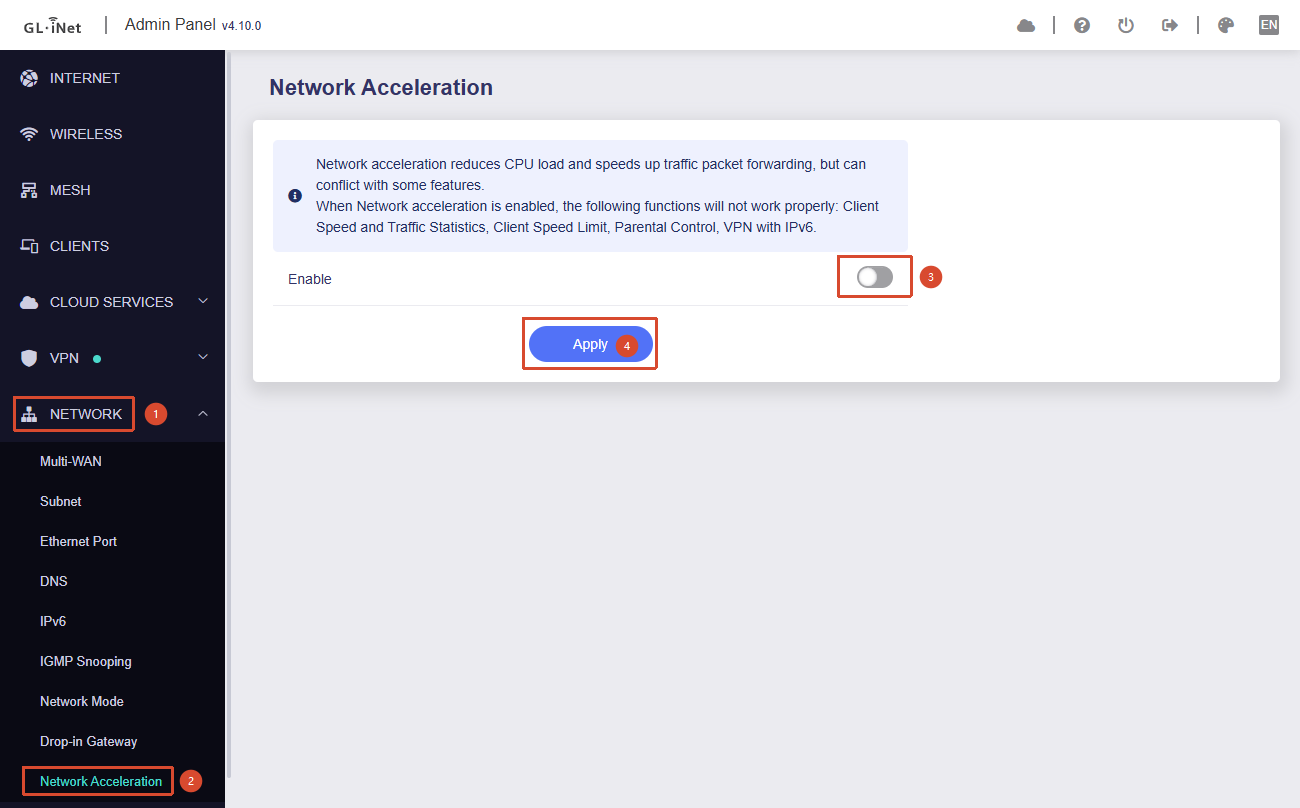
Disable Network Acceleration when using the router’s VPN. Go to Admin Panel → Network → Network Acceleration, select Disabled, and click Apply.
Temporarily downgrade to an official v4.9.x firmware from our download center. We recommend backing up your configuration first and downgrading without keeping settings to avoid compatibility issues. You can import the backup or may need to reconfigure the router afterward.
Update — September 21, 2026: Firmware v4.10.1 is now available for the GL-BE9300 and GL-BE3600 to improve this issue. If you’re affected, please update to v4.10.1 and let us know if the issue persists.
Hello same issue on GL-BE3600 FW 4.10.0. I was having issues with tailscale, download at 20Mbps Upload at .10Mbps, after turning off network acceleartion increased 10x and upload 1000x. Tried wireguard as alternative same issue, until I tired turning off network acceleration and everything works now
As noted in our earlier update, we’ve confirmed the issue internally, and our development team is working on a fix. In the meantime, please follow the temporary workarounds in that post.
Just to add to this, I installed 4.10.1 on my Flint 3 yesterday to try and add the mesh functionality, and it’s killed my NordVPN private IP connection, trying to work out what was going on has led me here with the help of ChatGPT.
Disabling hardware acceleration doesn’t work. The VPN works fine on the default Nord servers which are using Wireguard but for dedicated IP (which requires TCP or UDP and does not yet work with Wireguard) it says it’s connected but then doesn’t allow any traffic through from any devices. It worked perfectly on the previous firmware which was 4.9.0 I think.
So there is still a problem even with 4.10.1 when it comes to installing a Nord private IP using TCP or UDP (both have the same problem).
Since the issue occurs with the NordVPN Dedicated IP OpenVPN profile after upgrading to 4.10.1, could you please help to perform the following tests?
Please test the same NordVPN Dedicated IP OpenVPN profile on a PC or another device under the same network environment, and let us know whether it can access the Internet normally.
When the Dedicated IP OpenVPN profile shows Connected on the Flint 3, please test Internet access from both the router and a LAN client:
ping 8.8.8.8
ping www.google.com
Please export the System Log while the Dedicated IP OpenVPN profile is connected and the problem is present, and send it to us via private message together with the above test results.