This may have been answered previously but i've been googling and cannot find anything specific.
Im about to go on holiday, I want to take some content with me on a sata ssd that i wanted to plug into my Beryl 7 (GL-MT3600BE). Its running firmware 4.9.0
I loaded my content onto the ssd and plugged it into the router but the router cannot see my content.
I've tried NTFS, ExFat, EXT4. All have the same effect. I have however noticed that i am able to create folders via the mobile app and those can be shared. If i plug the drive back into my PC after this (ubuntu 26.04) i cannot see the data written via the router share but the original content is still visible.
Here are my questions.
is it not possible to transfer data onto a usb disk externally and share those folders via Network Storage app?
If 1 isn't possible. Can i move the drive between different routers? Currently the data is stored on a network connected to a X3000. Could i setup the share and transfer the data via that router and then move the drive over to the Beryl 7?
Your intended usage should be possible: you can copy files to the SSD from Ubuntu first, then connect the SSD to the Beryl 7 and share the existing files through Network Storage.
The SSD can also be moved between the X3000 and Beryl 7. However, the shared folders, users, and access permissions may need to be configured separately on each router.
Please refer to our Network Storage guide to configure Samba and the shared folder:
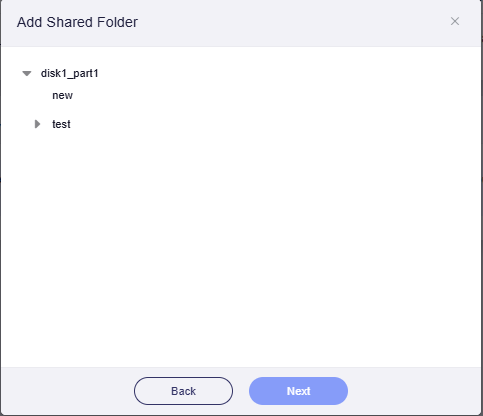
When using Quick Setup Share, please expand disk1_part1 and check whether the folders previously copied from Ubuntu are displayed. You can select an existing folder or select disk1_part1 directly to share the entire partition.
If the original folders are still not displayed, could you please send us screenshots of the Disk Management section and the expanded disk1_part1 directory via private message? This will help us confirm whether the Beryl 7 is detecting and mounting the expected SSD partition.
This may be an issue with GPT/MBR partition scheme…
@charles2 Does GL.iNet routers support GPT partition scheme? @VithurshanSelvarajah is your drive MBR or GPT? You might need to switch to MBR if GPT isn’t supported….
My laptop wasn't mounting the drive properly and was showing me cached files. I have since gotten this working. I'm using exfat instead of ext4. I'm sure there's a performance penalty somewhere but it should be minor.
We are glad to hear that you found the cause and that the drive is now working correctly.
Thank you for sharing the result. This may also help other users who encounter a similar situation.
Thank you for suggesting the GPT/MBR partition scheme as a possible troubleshooting direction.
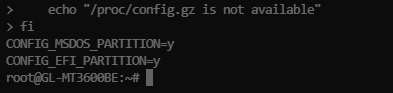
We checked the Beryl 7 kernel configuration, and support for both MBR and GPT partition tables is enabled.
Thank you again for your suggestion.