Hi, there seem to be an issue with the new Network Storage function introduced with one of the recent kernel update.
Not a single one of my USB flash drives are seen in the Disk Manager section. Clicking on the spinning icon to refresh does nothing. I’ve tried different file systems and even a powered external USB hub, still nothing. Not that it was an issue anyway: the internal LED of the flash drives turns on so I know that they do at least get power.
All the drives are correctly recognized and can be read and written without issues on any other device I own: linux laptop, windows computer, Android and iOS devices too.
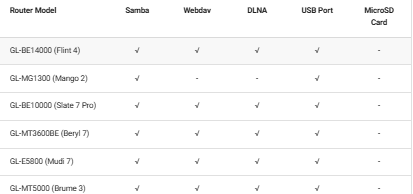
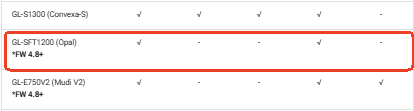
As per this table the Opal model should in theory be able to share a normal USB stick.
I am using a GL-SFT1200 Opal router running kernel version 4.14.90 and OpenWRT 18.06 (I don’t think it has anything to do with it).
How can I help with figuring this out? Share the logs after specific actions?
Thank you in advance for the assistance.