When op24 going to be out beta?
If you would like OP24, the best choice if going to Vanilla OpenWrt or pesa1234 Custom Build
It’s very clear that this version is not their priority.
If you need something that is available only on GL-iNet GUI, so stay on their non-op24 releases.
1 Like
My main reason at the moment to stay on op24 is the VPN setup. The fact you can really easily configure NordVPN wireguard is great. I always find openwrt VPN configuration much more complicated and trying to generate wireguard nord VPN config is problematic is Nord don’t officially release them, so you have to use 3rd party scripts, not ideal. Without this, I would probably go to openwrt.
2 Likes
I see OP24 4.8.3 has been released. Has anyone given this a test? Thanks.
The firmware still on beta1 but I had it running on my Flint2 for a week (edit) and everything it's running smoothly.
Word of advice : reset to factory defaults before the upgrade and after the upgrade (yeah 2 times) 
5 Likes
Any news about Brume 2? Is it true that version 4.8.2 is quite stable (with a few issues already reported)? Will we be getting a 4.8.3 or 4.8.4, or 4.8.99 with its improvements and fixes?
The beta v4.8.2 firmware of Brume2 is relatively stable, just for in the preview and experience in personal users, and there are no major issue with the main functions.
v4.8.99 is just a beta version for Flint2&3 preview DPI functions. Other models will not have this version firmware, including Brume2, and the DPI function will be supported later in v4.9 (or v5.0).
Is this the complete list of devices getting the 4.8 or only the beta list?
v4.8.99 Beta is hands down one of the most stable firmware versions I have ever tried on the Flint 2, notwithstanding the dual-WAN repeater issue I reported in the relevant thread.
2 Likes
Sorry, I don't quite know the question. I guess you are asking whether if other model routers support it?
The DPI function firmware (beta v4.8.99) is only previewed on Flint2 and Flint3, and the license will only be renewed until to December 28.
After expiration, the beta preview will end, DPI functions will not be workable.
DPI-related functions will be supported on v4.9 firmware in the future.
Hi,
I would like to ask whether GL.iNet routers support the following scenario, or if it is planned:
Using Multi-WAN in load balancing mode, where multiple WAN interfaces are active simultaneously, and each WAN interface establishes its own independent VPN client tunnel, so that all internet traffic from each WAN goes through its own VPN tunnel at the same time.
To clarify, I am not referring to WAN failover with VPN, where:
-
multiple WANs are configured,
-
but only one WAN is active for the VPN at a time,
-
and the VPN simply switches to another WAN when the primary WAN goes down.
What I am looking for is:
-
true load balancing across multiple WANs,
-
with one VPN tunnel per WAN interface, running in parallel,
-
so that no WAN sends traffic directly to the internet without a VPN.
In the past, as far as I know, GL.iNet firmware only supported VPN client usage on a single WAN at a time, even when Multi-WAN load balancing was enabled.
Is this functionality available now in recent firmware versions, or is it on the roadmap?
If not natively supported, is there an officially recommended OpenWrt-based workaround (e.g. PBR, mwan3, multiple VPN instances bound to specific WANs)?
Also — is it possible that this feature, which has been standard in many load-balancing routers (e.g., some TP-Link models) for over a decade, is simply not something anyone else has felt was missing until now in the GL.iNet ecosystem (2025)?
It’d be interesting to know if I’m the only one asking for this capability, or if others see the same use case.
Thanks in advance!
Hello @bruce , do you have an estimated timeline for the 4.8 release on the GL-B3000 Marble?
Im currently using the latest snapshot version because the images not loading issue on facebook, which seems to be dns related; it’s still present in this beta, the current stable and the op24 versions. Whatever you guys did in snapshot dec19 is perfect just port over your SQM/QoS and whatever else to that version to prevent any bugs from carrying over. Happy Holidays 
I think this scene is in 2B. And please let me know what your scenario is. Why do you need VPN1 over WAN1 and VPN2 over WAN2 activity at the same time?
I’m not sure for now.
Hello, I would like to know what model of router it is. And will try to reproduce and troubleshoot this issue.
My scenario is very simple:
Security first: I always connect to the Internet through a VPN tunnel (with a kill‑switch enabled).
Redundant broadband: I have Internet connections from two different providers, and they are treated as equals—not a primary link with a backup, but two peer links.
To make use of the bandwidth and data caps offered by both ISPs, I need true load‑balancing. A fail‑over‑only setup does not meet my requirements.
The feature I’m asking about—having a separate VPN client per WAN in load‑balancing mode—has been available on routers for more than ten years. Indeed, the router I previously used could only connect using the L2TP protocol.
What strikes me as odd is that GL.iNet routers already support both WireGuard and OpenVPN for Internet connectivity, and they also support load balancing, yet they cannot combine the two (i.e., run a distinct VPN instance on each WAN simultaneously). I hope the new firmware will finally allow this, and I also hope that the Spitz Plus (GL‑X2000) router I’m using will gain this capability after a firmware update.
Could you please explain what “2B” means in this context? Additionally, could you confirm whether a stable release that includes this “2B” functionality is scheduled, and whether it will be rolled out to the Spitz Plus (GL‑X2000) devices?
Thank you in advance for your assistance.
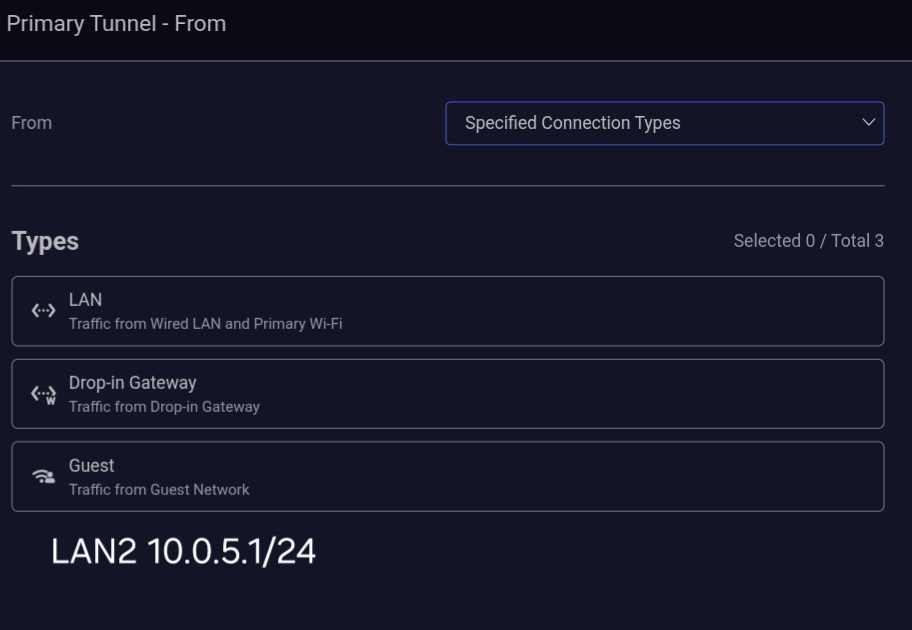
Is it possible to add a fourth option here? Because there's only 3 options is available in Specified Connetion Type and you can't add manually here.
Very doable with mwan3 in openWRTYou can bind different VPNs to two separate wan ports,Use mwan3 and set both ports, weighted identically, and bind them to the host router.
from shell, something like this: *GUIDE ONLY* not a cut and paste, values are just examples, all commands run in shell.
/etc/iproute2/rt_tables edit add these lines
100 wg1
200 wg2
uci set network.wg_wan1='interface'
uci set network.wg_wan1.proto='wireguard'
uci set network.wg_wan1.private_key='YOUR_KEY'
uci set network.wg_wan1.listen_port='51821'
uci set network.wg_wan1.table='100'
uci set network.wg_wan1.mtu='1420'
uci add network wireguard_wg_wan1
uci set network.@wireguard_wg_wan1[-1].public_key='PEER_KEY'
uci set network.@wireguard_wg_wan1[-1].endpoint_host='vpn1.example.com'
uci set network.@wireguard_wg_wan1[-1].endpoint_port='51820'
uci set network.@wireguard_wg_wan1[-1].allowed_ips='0.0.0.0/0'
uci set network.@wireguard_wg_wan1[-1].persistent_keepalive='25'
uci set network.wg_wan2='interface'
uci set network.wg_wan2.proto='wireguard'
uci set network.wg_wan2.private_key='YOUR_KEY'
uci set network.wg_wan2.listen_port='51822'
uci set network.wg_wan2.table='200'
uci set network.wg_wan2.mtu='1420'
uci add network wireguard_wg_wan2
uci set network.@wireguard_wg_wan2[-1].public_key='PEER_KEY'
uci set network.@wireguard_wg_wan2[-1].endpoint_host='vpn2.example.com'
uci set network.@wireguard_wg_wan2[-1].endpoint_port='51820'
uci set network.@wireguard_wg_wan2[-1].allowed_ips='0.0.0.0/0'
uci set network.@wireguard_wg_wan2[-1].persistent_keepalive='25'
IP tables route
ip route add default dev wg_wan1 table 100
ip route add default dev wg_wan2 table 200
Mark all lan traffic for mwan3 (use actual lan values)
uci add firewall rule
uci set firewall.@rule[-1].name='mark-lb-host'
uci set firewall.@rule[-1].src='lan'
uci set firewall.@rule[-1].src_ip='10.10.10.10'
uci set firewall.@rule[-1].proto='all'
uci set firewall.@rule[-1].target='MARK'
uci set firewall.@rule[-1].set_mark='0x100'
Setup mwan3 interfaces
uci set mwan3.wg_wan1='interface'
uci set mwan3.wg_wan1.enabled='1'
uci set mwan3.wg_wan1.family='ipv4'
uci set mwan3.wg_wan1.track_ip='1.1.1.1'
uci set mwan3.wg_wan1.interface='wg_wan1'

uci set mwan3.wg_wan2='interface'
uci set mwan3.wg_wan2.enabled='1'
uci set mwan3.wg_wan2.family='ipv4'
uci set mwan3.wg_wan2.track_ip='8.8.8.8'
uci set mwan3.wg_wan2.interface='wg_wan2'
Equal weight each port
uci set mwan3.wg1_m1='member'
uci set mwan3.wg1_m1.interface='wg_wan1'
uci set mwan3.wg1_m1.metric='1'
uci set mwan3.wg1_m1.weight='1'

uci set mwan3.wg2_m1='member'
uci set mwan3.wg2_m1.interface='wg_wan2'
uci set mwan3.wg2_m1.metric='1'
uci set mwan3.wg2_m1.weight='1'
set balancing
uci set mwan3.vpn_lb='policy'
uci add_list mwan3.vpn_lb.use_member='wg1_m1'
uci add_list mwan3.vpn_lb.use_member='wg2_m1'
bind to host (use actual values)
uci set mwan3.lb_host='rule'
uci set mwan3.lb_host.src_ip='10.10.10.10'
uci set mwan3.lb_host.use_policy='vpn_lb'
Commit and restart services
uci commit
/etc/init.d/network restart
/etc/init.d/mwan3 restart
Something along those lines should work in OpenWRT unsure if you can do this in the background of the Gl-inet firmware, it should* work
3 Likes
I see, understand that it is also to make better use of the bandwidth of the two ISPs and maximize the speed to use the VPN tunnel for LAN clients.
I think it make sense, but maybe not easy.
When establishing a tunnel, in addition to the possible need to specify the client (device, or the entire subnet main/guest), domain name/IP, etc., you also need to specify which WAN port the tunnel should take. In particular, increasing the choice of WAN port will undoubtedly increase the difficulty of development.
If one of the WAN links goes down, the client designated to use this tunnel will also be unable to use the Internet. And you mentioned that security comes first. With so many links, failover should not be considered.
2B here refers to To Business, I think this feature supported in the commercial router field. Business scenarios are more sensitive to link availability and need higher requirements.
Will collect your request and evaluate with the PM team. Thank you!