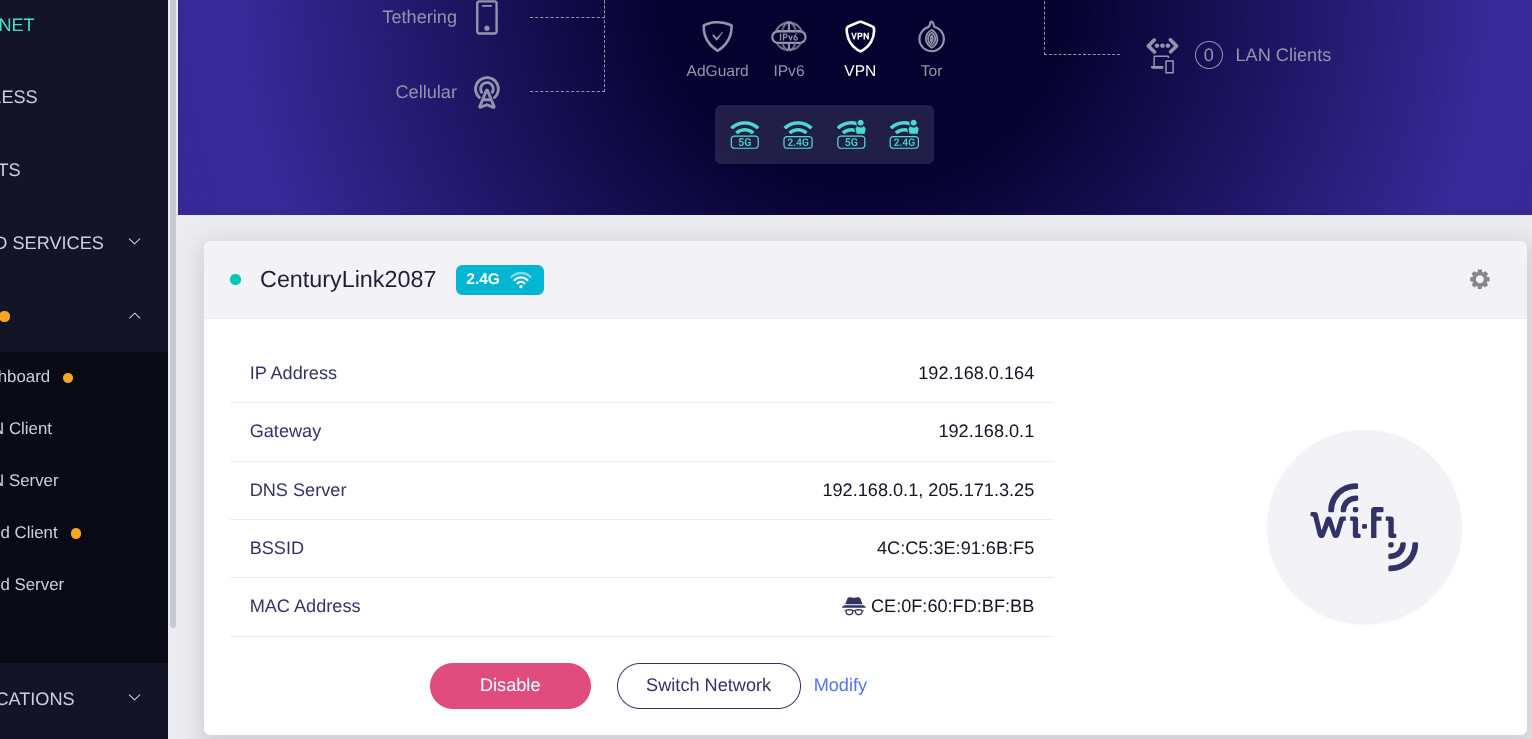
Which router (which model?) are you using? Gl-Inet Slate AX
Which firmware version is in use? 4.8.2
How is your router connected to the Internet? WiFi
By cable via the router of your Internet provider? (If yes, which router and which ISP?)
Via WLAN? (If yes, which network and which encryption?)
By cell phone? (If yes, which mobile provider?)
Which DNS server do you use? (The local one of your ISP? )
Do you use DHCP or static IP addresses? Using the default when setting up.
Have had to reset the router 3 times already. First issue was even seeing the 5G, just the 2.4. I can now connect to the 2.4 but the 5G, 5G guest and 2.4 Guest won’t connect. Set them all up because of having trouble finding them as an option.
I have everything set up, VPN set up and running, it’s connected to WI-FI ok. Connected to 2.4. I can’t get anything to connect. Shows it’s connected but no internet access. I have already looked to see if this has been answered anywhere, but maybe I’m just getting too tired. Also frustrated.
Regarding the Wi-Fi connection issues, could you please provide the following further information:
When your phone attempts to connect to the Main 5GHz SSID and Guest 2.4GHz & 5GHz SSIDs, is it completely unable to associate with the Wi-Fi, or does it connect to the Wi-Fi but show "No Internet"?
If the phone cannot connect to the Wi-Fi normally, please export the system logs and send them to us via private message so we can analyze the issue further.
Do devices using a wired connection encounter any problems?
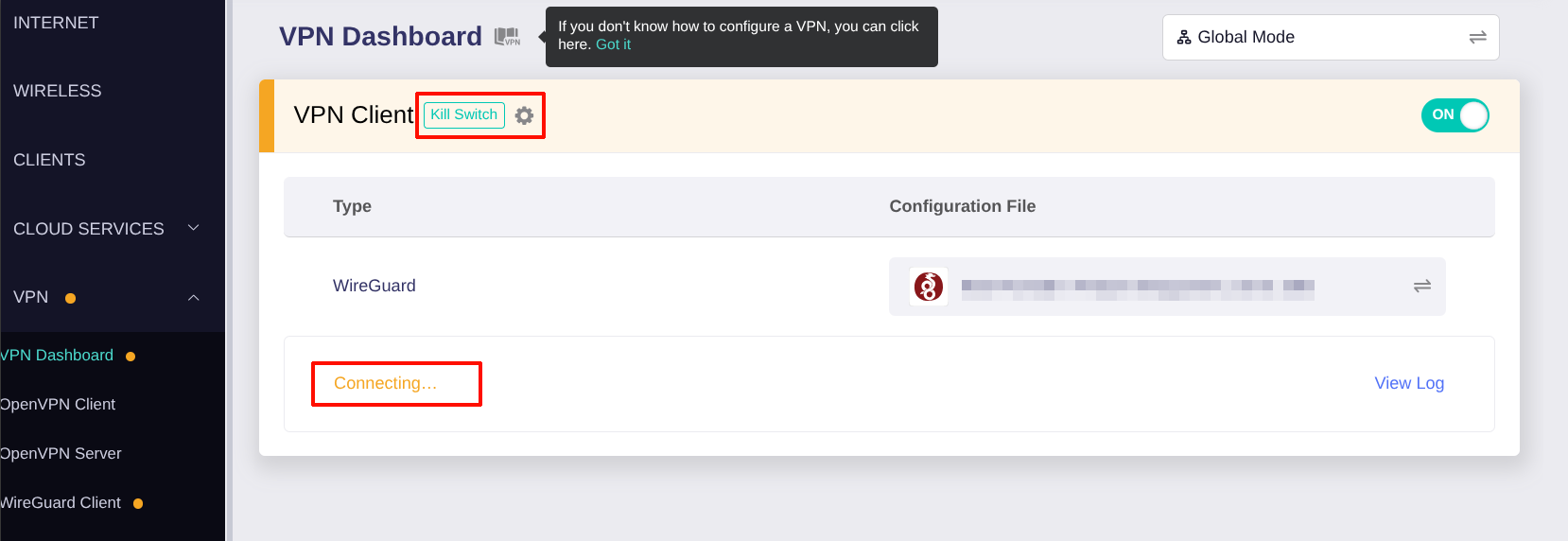
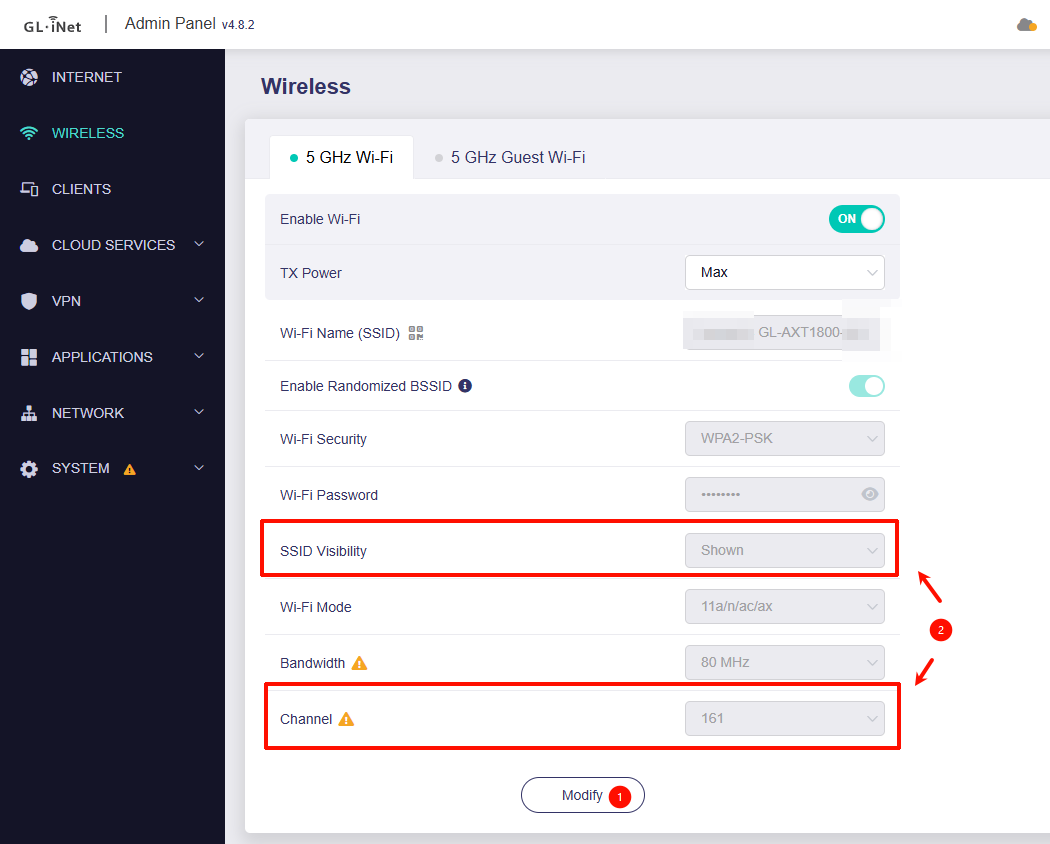
Could you provide screenshots of the Admin Panel - Internet, VPN - VPN Dashboard, and Wireless pages? This will help us understand your current configuration.
Please also let us know the model of your phone and its OS version.
When your phone attempts to connect to the Main 5GHz SSID and Guest 2.4GHz & 5GHz SSIDs, is it completely unable to associate with the Wi-Fi, or does it connect to the Wi-Fi but show "No Internet"?
Connects but shows “No Internet”
If the phone cannot connect to the Wi-Fi normally, please export the system logs and send them to us via private message so we can analyze the issue further.
done
Do devices using a wired connection encounter any problems?
1 Linux laptop and 2 linux desktops don’t see the MAIN 5GH. The windows laptop shows connected no internet.
Could you provide screenshots of the Admin Panel - Internet, VPN - VPN Dashboard, and Wireless pages? This will help us understand your current configuration.
Based on the screenshots you provided, it appears that the router currently has the VPN client feature and the Kill Switch feature enabled, but the VPN client has not successfully connected yet.
In this situation, all LAN clients will be unable to access the internet, which helps prevent any data leaks.
Try disabling the VPN client feature and check whether the LAN clients can access the internet normally.
If the LAN clients can access the internet, please try using the same WireGuard configuration profile on a LAN client. This will help determine whether the issue is caused by the network preventing the router’s WireGuard client from connecting properly, or by some other factor.
Regarding the issue where Linux cannot see the Slate AX main 5 GHz SSID:
Please go to Admin Panel → Wireless and confirm that SSID Visibility is set to Shown rather than Hidden.
Please check which Wi-Fi channel the main 5 GHz SSID is currently using, and whether the Linux client supports this channel.
If it is a DFS channel or auto, try changing the channel to 36 and see whether the Linux client can see it.
Please note that if the Repeater feature is currently in use and connected to another Wi-Fi network’s 5 GHz channel, you will not be able to adjust the Slate AX main 5 GHz SSID channel setting. You can temporarily disable the Repeater feature for further testing.
I’m not sure what you are asking on number 2. Can I get instructions on how to get the VPN to work and configure the killswitch?
All show SSID VIsibility to shown. Most of the computers/phones now see the 4 GL-Inet connections. I will go thru all LAN clients this afternoon to make sure everyone can see all 4 connections.
We would like to confirm whether the configuration file you imported into the router is usable on the current network.
Therefore, we would like you to help to test:
Connect the mobile phone to the same network that the router is connected to
Import the same configuration file into the mobile phone and check whether the mobile phone would be able to connect.
If it is also unable to connect on the mobile phone, then it may be an issue with the current network or with the configuration file itself.
You can try connecting your phone to a cellular network and check again.
If it connects normally after switching to the cellular network, then the issue is with the current network. You’ll need to try connecting the router to a different network or consult your service provider.
If it still cannot connect after switching to the cellular network, then there may be an issue with the configuration profile, and you’ll need to try obtaining a new, available configuration profile.
I’m sorry for not responding sooner, but got extremely busy trying to get ready to leave home for 3 weeks. Now at new location, and laptop and both phones see all GL-Inet options, and am connected to the 5G with VPN working. Which means my network at home is the issue for VPN not working. I will continue to learn about the GL-Inet and review the forum. Thank you for all of your help so far!