Hi,
I updated our MT6000 to the 4.8.2 FW.
The router has a Wireguard VPN (Client) configured to connect into our Business Intranet.
After the update I had to reenable the VPN but after that all looked good and I could access all devices within the LAN from the Intranet VPN.
Except the MT6000 itself. I can not access the GL-Gui or the OpenWRT-GUI from the Intranet VPN. Ping to the MT6000 also dont work.
All other devices in the LAN had no problems.
I found no rule or setting which blocks the access to the MT6000.
Set Firewal Rules to open Ports to the MT6000 also dont have any effect.
How to enable access to the MT6000 via a VPN tunnel. Which is in the same Firewall zone as LAN.
Hi
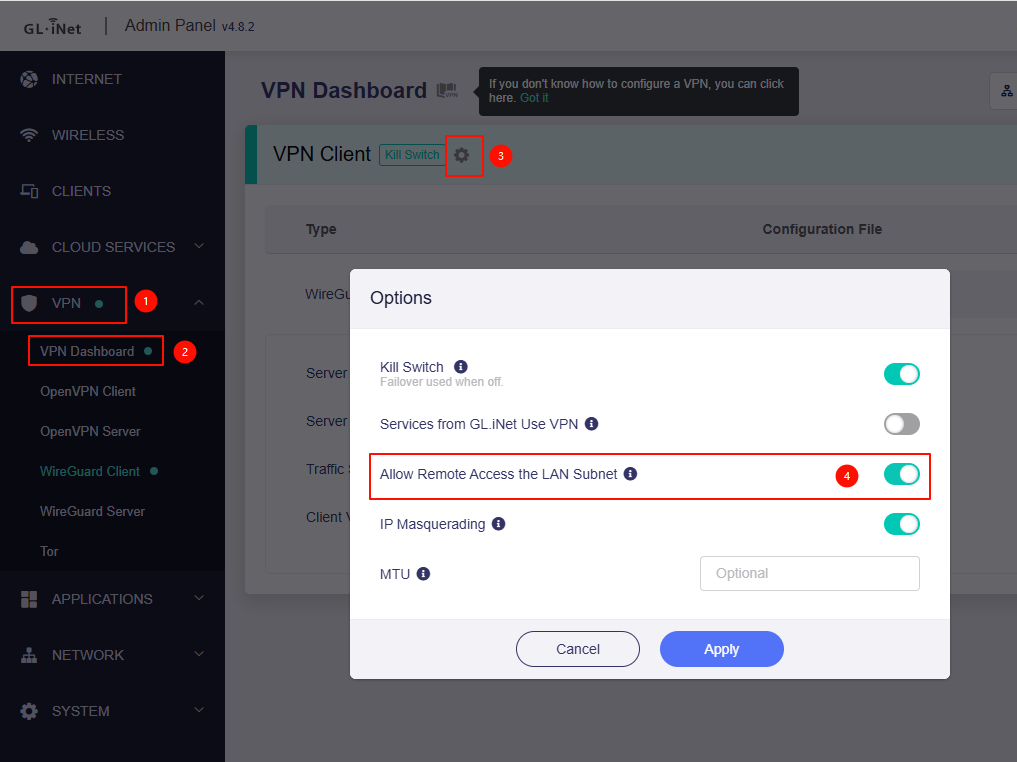
Could you let us know whether this option has been enabled?
If no, you may be unable to access the MT6000 and its LAN devices from the Intranet side.
But if it has been enabled, and you can access the LAN devices of MT6000, but cannot access to the MT6000.
Could you please keep ping MT6000 from the the Intranet side and then sniffer the packet on MT6000 to see what happens?
You can SSH into the router and run commands below to sniffer packets.
opkg update && opkg install tcpdump
tcpdump -i wgclient1 icmp
OR just keep ping from Intranet side and connect the MT6000 to GoodCloud then share it with us so that we can have a remote check.
Technical Support via GoodCloud - GL.iNet Router Docs 4
Hi,
the “Allow Remote Access the LAN Subnet“ is enabled.
Here is the output from the tcp dump:
listening on wgclient1, link-type RAW (Raw IP), capture size 262144 bytes
16:29:02.077167 IP 10.20.0.10 > 10.20.0.4: ICMP echo request, id 3222, seq 1, length 64
16:29:02.077259 IP 10.20.0.4 > 10.20.0.10: ICMP echo reply, id 3222, seq 1, length 64
16:29:17.636561 IP 10.20.0.10 > 10.20.4.1: ICMP echo request, id 3223, seq 1, length 64
16:30:06.181428 IP 10.20.0.10 > 10.20.4.10: ICMP echo request, id 3224, seq 1, length 64
16:30:06.182184 IP 10.20.4.10 > 10.20.0.10: ICMP echo reply, id 3224, seq 1, length 64
I did 3 pings from the intranet device (10.20.0.10)
- to 10.20.0.4 which is the VPN IP of the MT6000 → worked
- to 10.20.4.1 which is the LAN IP of the MT6000 → failed
- to 10.20.4.10 which is a LAN-Client (Printer) → worked
It looks like the MT600 received the packaged but dont send the answer out.
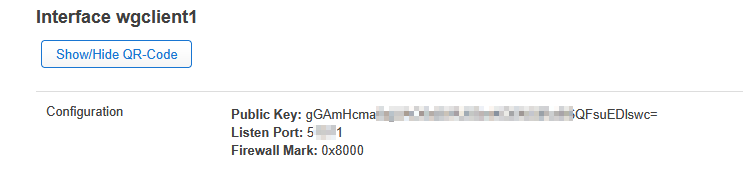
In the OpenWRT-Luci Gui i recognized a Firewall Mark: 0x8000 on the Wireguard Overview.
On our other Routers (AX1800) which are also connected to the same Intranet VPN, there is no Firewall mark.
Based on your description, it is likely that your Intranet VPN does not perform SNAT (Source Network Address Translation).
If this is the case, the router's own internal traffic may not be able to find a return path, as it will not be routed through the VPN tunnel by default.
While the LAN devices of MT6000 will always go through the VPN tunnel.
To resolve this, you have a few options:
-
Enable SNAT on the Intranet VPN: The most straightforward solution is to enable SNAT directly on your Intranet VPN server.
This will ensure that all traffic originating from the router is correctly translated and routed through the tunnel.
-
Add a Static Route: As an alternative, you can manually add a static route on your MT6000 to specify the path for the traffic.
You can do this by running the following command:
ip route add 10.20.0.0/x via 10.20.0.x dev wgclient1
(Note: 10.20.0.0/x is your Intranet's LAN address, and 10.20.0.x is the Intranet VPN IP.)
-
Access via VPN IP: You can also try to access the MT6000 via using the its VPN IP address directly.
I compared the static routes from our AX1800 with the one from the MT6000 and recognized, that the routes which should be created from the Wireguard Peer config (AllowedIPs Field) dont exist.
After I added them manually (Your 2. solution) I could access the device on its LAN IP and ping.
ip route add 10.20.0.0/16 dev wgclient1