I connect the cable to the WAN port (DHCP) - the settings page shows the message "No Internet Connection! Find a network to reconnect." and there is no internet connection.
The cable is working, the internet is available when connected to another router.
I tried switching a LAN port to WAN mode and connecting the cable to it - it didn't help.
I updated the firmware to the latest version, 4.8.1 - it didn't help.
This is a stupid question but did you power cycle the modem? Some modems hold the previous MAC until reboot. I'd power off the router until the modem is fully up & then try the Slate 7's default MAC & DHCP per usual.
These are even dumber questions but it'll save GL staff from asking at least: using another 'known good' network cable didn't help... included the in-box provide one, I take it, correct? You're using the provide AC adapter, yes?
GL staff are probably going to ask for your logs: GL GUI -> System -> Log -> [ Export Log ]. It's a tarball/archive so the contents are just a collection of UTF-8/LF text files. You should do that after a fresh/cold boot.
Wed Aug 20 06:51:16 2025 daemon.warn dnsmasq[1]: no servers found in /tmp/resolv.conf.d/resolv.conf.auto, will retry
That file should contain at least
root@slate-ax:~# cat /tmp/resolv.conf.d/resolv.conf.auto
# Interface wan
nameserver $upstreamIPHere
search $upstreamDomainHere
Wed Aug 20 06:51:16 2025 daemon.info dnsmasq-dhcp[1]: DHCP, IP range 10.0.0.100 -- 10.0.0.249, lease time 12h
Try reflashing stock v4.8.1 without keeping settings. Ideally use the 'U-boot debrick' method to ensure no traces. I'm thinking your deviation from 192.168.0.0/24 is tripping up something with GL's custom routing tables.
I replaced 192.168 with 10.0 in an attempt to get the router to work. It seems completely ridiculous to me that this would cause a problem.
I don't understand why I need to debrick it if I can access the router's control panel.
To be honest, I already regret buying this... I bought the device to plug two wires into it and forget about it for the next ten years, not to waste my time dancing around it.
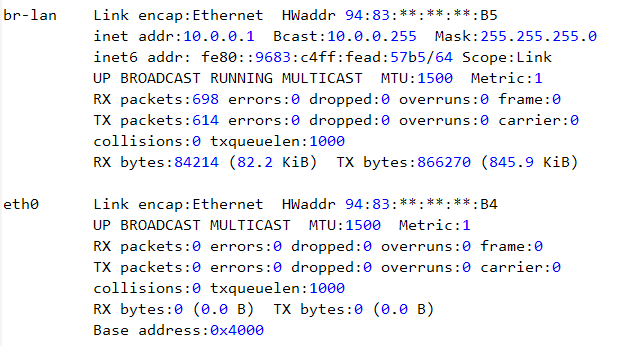
I checked the router syslog you attached, found that the WAN (eth0) port did not detect the plug-in cable, or the opposite end of the WAN port is not connected device (ISP modem/Primary router), or the network cable link (in wall) of this port is abnormal.
Do you have another router or PC?
You can directly connect it to this network port/cable to see if it is available, whether the DHCP IP is normal and the Internet is normal.
If the above tests are normal, please contact our CS team by email [email protected], cc this thread, and provide your purchase order and record.