That's strange as I don't recall having had this problem when trying this version…
That's what I thought too, on the weekend I'm gonna keep digging and see what happens 
Update: it was a user situation,  it happens the DDNS option it's there just it has to be selected front a drop-down menu it's all good now
1 Like
Same issue here.
When exporting the VPN profile, there is a drop-down menu in Address to select DDNS as Endpoint address.
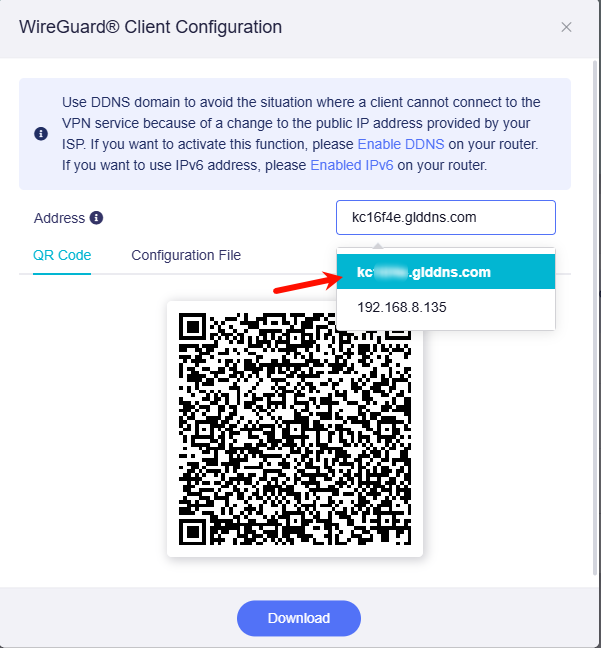
Yeah, it took me minute to figure it out, it's all good now
1 Like
Over a month with this release, everything running smoothly no issues at all, this release need to be switched to stable once for all @bruce
1 Like
Great!
And thanks for the feedback!
1 Like
Hi. I installed 4.8.3 op24 (deleting config) just after received my flint 2 router, I configured it with usteer for band steering but I noticed that some specific android devices (3 in my case, moto g54, moto 9 power 2022, Redmi pad) doesn’t change to 5G band even close to router. So I factory reset router, and config two separate ssids for each band (default config) and stopped usteer service. To my surprise, when I tried to connect these devices to 5G ssid, android devices reported that access point is temporarily full and refuse to connect… any other device can connect to 5G ssid without problem. I tried everything on these devices (factory reset router, forget ssid and reconnect, reboot devices) without success, so I tried to switch again to 4.8.3 op21 and those devices connected to 5G ssid at first attempt!
Interesting, I have no such a issue with my devices
Just tried upgrading to this firmware on my Flint 2, reset back to factory settings and reconfigured everything. A few minutes in, all my devices get disconnected. The only way in was to connect via ethernet cable and put in manual IP address details on my PC. I could then access the UI, but no internet. Think there’s some issues with DHCP / DNS on this firmware. Rolled back to 4.8.3 op21 and restored my backup and everything is good again.
1 Like
Did you updated discarding settings? If you have for example ppoe connection, you should reconfigure it. You also have to renew PC ip address (could be with release and renew IP address or rebooting). Sometimes you have also renew wan connection… you can try rebooting your modem.
1 Like
I reset to factory settings after upgrading so it was clean. My ISP uses DHCP so I configured that. It was working for a few minutes and then just stopped. I couldn’t renew my IP which is why i suspect DHCP was crashing on the router
Hi,
I’ve been keeping an eye on the OP24 releases . I read somewhere a month ago that if you don’t have a static IP you have to run a command to auto renew it daily, but this would be fixed in the next release.
I’ve been waiting for ages to upgrade to OP24 but keep getting put off by the issues encountered. GL-inet team, will you be releasing another version of OP24 (v24.10.5) or going to v25.10? Will the new release resolve the ISP changing the non static IP address issue and the issues mentioned above? I see the snapshot keeps getting lots of updates. Thanks.
2 Likes
I have op24 on my Flint2 since 4.6.6 and never looked back, right now 4.8.3 it’s been the best op24 yet (a least for me) so just go ahead more than likely you won't regret 
Ps. Do a clean wipe and setup from scratch
2 Likes
Thanks gfondeur. I’ve been waiting a loooong time to find a good firmware that isn’t based on OP21, since they rolled back from 23.
I just need to find that post where a gl-inet member gave a workaround for the OP24 when the ISP changed the public IP address, as I don’t have fixed and also have CGNAT (which isn’t an issue for me as no hosting).
When I do upgrade I will post in the forum. Just want to add BanIP on top of the bundled Adguard Home.
Not sure about CGNAT but I do have dynamic IP from my ISP too and I don’t have any problem went they renew the IP of my modem, not sure maybe the modem I'm using?  maybe
maybe
Hello all,
Also want to express my opinion, since I purchased this router, the main firmware has been the Op-op24 variant, I have also tested the other variants, but honestly it does not live up to the height of op24, stability and speed both wifi and cable, honestly again this is my opinion, with the other variants you are wasting your time!
I ask the GLiNet staff to take a look at the tomato64 firmware based on OpenWrt with the latest updates, it works very well on the gl-mt6000, why doesn't GLiNet do this to bring the routers up to date on a single firmware?
I'm currently running the Op24 version, I really like the original software but I'm tempted to try something else that's up to date, I'm not advertising to anyone!
I want to say that the snapshout variants on the wired side are a disaster in terms of speed, on the wifi side there is a noticeable difference for the better, here I am referring to the GLiNet software!
1 Like
This topic was automatically closed 90 days after the last reply. New replies are no longer allowed.