Opal VPN doesn't work

Hello, I recently bought an Opal Glinet travel router. Out of the box, after configuring VPN clients, VPN connects but can't access Internet through any of the clients. I got to know that VPN is broken in latest firmwares for this particular router, so I was forced to downgrade. VPN is working with first firmwares, but I am concerned about security. I didn't know about this issue with this router, otherwise I would have bought a different one.

I hope there is an update that fixing this issue very soon.

Thanks.

Hi

Could you please let us know what kind of VPN you are using now, and whether the latest firmware you mentioned is 4.3.25?

We have tested Opal with firmware 4.3.25 & beta 4.7.2 and did not reproduce the issue.

For both OpenVPN and WireGuard, the client devices can connect to the Internet normally.

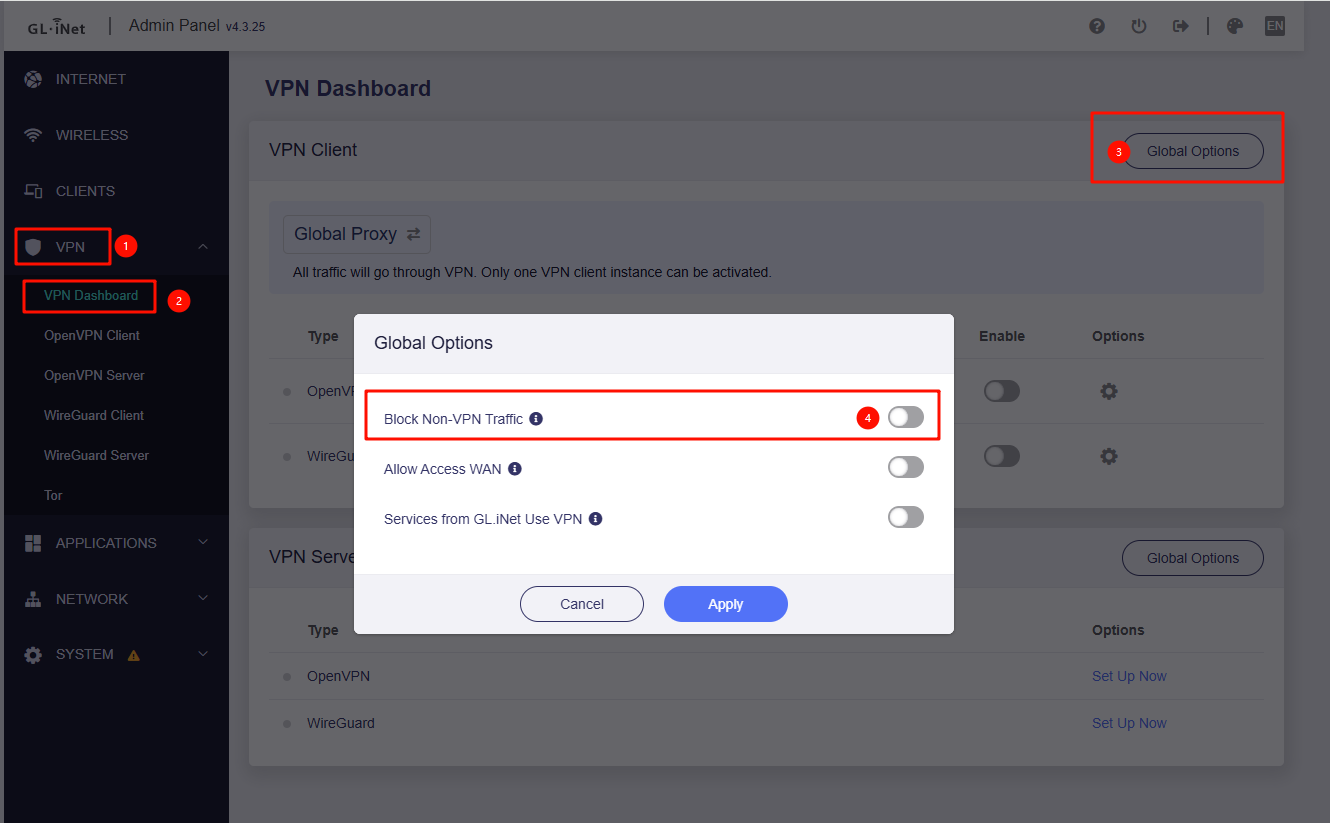
Please note, if you enable the “Block Non-VPN Traffic” option, then the client device cannot access to Internet is normal case if the VPN tunnel is connecting or disable.

Hello, thanks for your prompt response.

I have been using Surfshark and Azire VPN. I already have a Surfshark account, VPN works flawlessly everywhere and in every equipment I use it, either through the app or conf files. I have created conf files for router in the Surfshark web page and uploaded the conf.bin to the Opal. VPN connects, I get a green dot, but clients connected to router never get Internet, as soon as I disconnect VPN, everything goes back to normal.

I have created and paid for an Azire VPN account just to be used with the Opal, same results. I have created conf files and uploaded them. I have also used the internal way the Opal has to add this particular VPN, nothing works. Another thing is that if I try to edit the VPN conf already created by Surfshark, the system doesn't let me doit, always get a message that I need to restart the router. Something is broken there. I am sure to be doing the process right, because I have done it so many times before with other routers and systems.

Yes, I have use all versions firmwares 4. up…. Seeing none works, I definitely ended up using version 3. These ones work right using the exact same conf files I had used with 4. versions. I have also used the beta version, same results, no VPN access.

I have followed your suggestions about disabling non vpn traffic, same results…

I have searched the web for possible solutions and there seems to be no solution.

Azire VPN is included in the router options by default, it should have worked with this one, that's why I paid for it even though I didn't need it.

If you have any other suggestions, please ket me know.

Thanks again and have a wonderful day!
From your description, it appears you are using WireGuard.

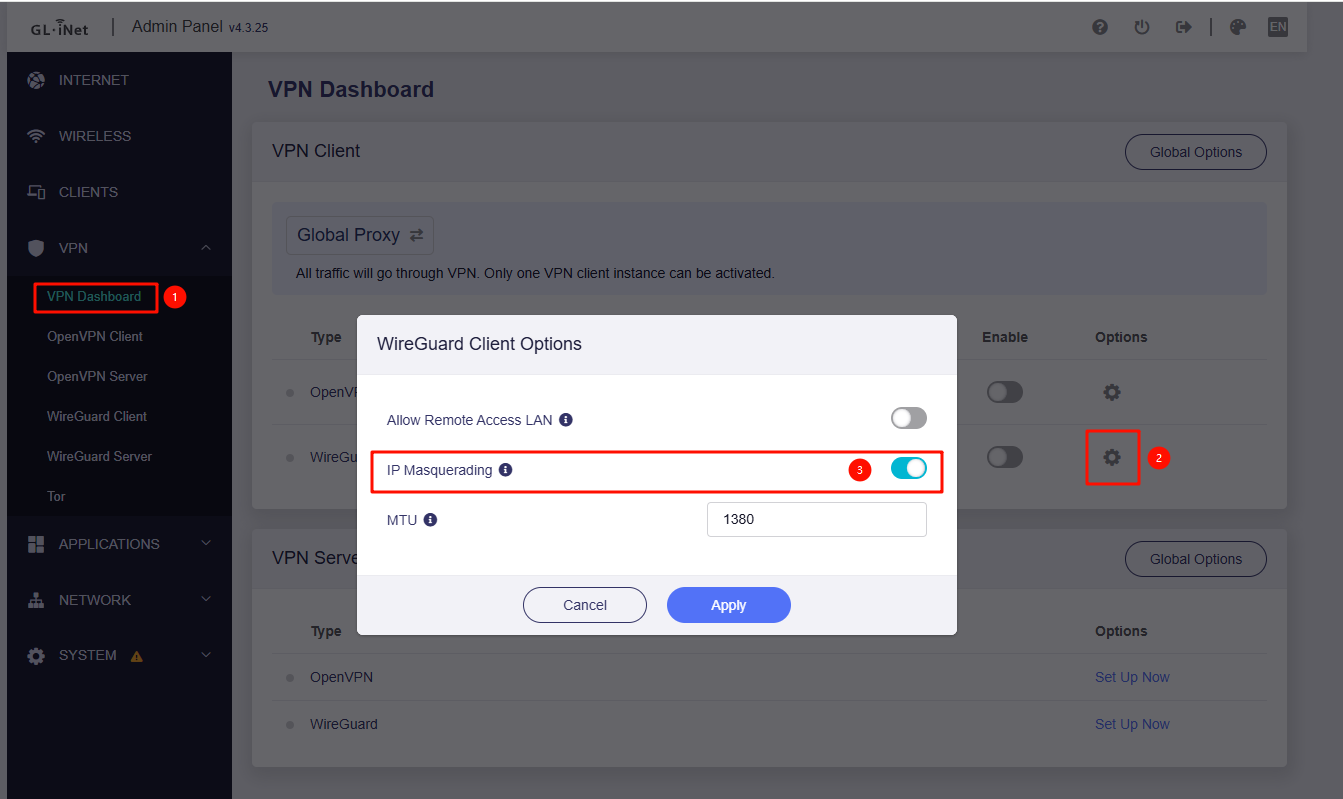
Could you please upgrade to the latest firmware version 4.3.25 and verify whether WireGuard's ‘IP Masquerading’ option has been enabled?

If the issue persists, please connect the device to GoodCloud and share it with us for further investigation.

Hello.

Issues persist. Yes, I am using Wireguard.

I have created a free Proton VPN account, copied the conf text to the router and this one is working fine for the first time, but Surfshark and Azire are not working.

I have added my router to GoodCloud.

Thanks for your help.

Hello again,

Just tested Surfshark again and this time it worked. I really don't understand why it didn't work before several times I tried. I didn't change anything in the conf of VPN and router as all has been correct as you suggested. It's really weird that I have used this router for some weeks with this same configurations it never worked.

Anyway, I appreciate all your prompt response and help!

1 Like

This topic was automatically closed 30 days after the last reply. New replies are no longer allowed.