Is there are a simple way to see a list of clients connected to the router’s OpenVPN server?
Model: Flint 3
Firmware: v4.8.4
Is there are a simple way to see a list of clients connected to the router’s OpenVPN server?
Model: Flint 3
Firmware: v4.8.4
Hi
Unfortunately, our firmware currently does not support displaying information about clients connected to the OpenVPN server.
Could you provide more details about this use case?
After that, we can discuss it with the product team and see whether this feature could be added in a future firmware release.
You may or may not know that the Wireguard server page shows Connected devices / Online clients. I tested the OpenVPN server and you can see what's going on via the logs but not as easy as the Wireguard server page (no dedicated online clients popup / list). I know you are asking about OpenVPN here but I thought it was worth mentioning about the Wireguard server having the feature you are requesting just incase you could switch and benefit.
@will.qiu couldn't you use similar logic to what's currently on the Wireguard server page? However I think the Wireguard connected devices needs a little more attention in terms of refreshing the data as it can say clients are connected well after they have disconnected.
Example from Wireguard Server
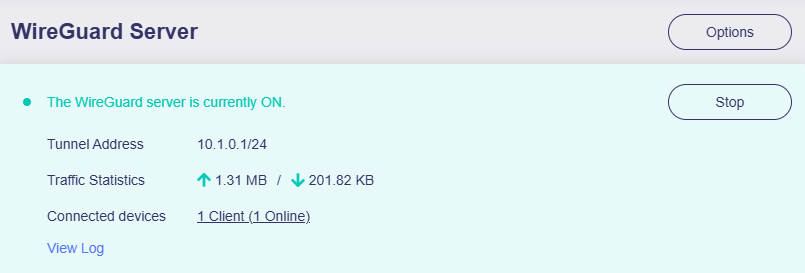
The situation with the OpenVPN Server is somewhat different from WireGuard.
For example, OpenVPN can allow multiple connections using a single configuration file, whereas with WireGuard, one configuration file only corresponds to one connection.
We’d like to better understand the requirements so we can design and integrate this feature more effectively.
WireGuard uses the UDP protocol, which is stateless, so it may not be able to reflect the connection status in real time.
It may be necessary to wait for certain timeouts or keepalive checks before determining that a client is offline.
Understood. I used the username/password method for OpenVPN so when looking through the logs I could see client / device entries that I had manually named. I guess using that logic it can be filtered to display certain clients but I understand it will need more work to cover all authentication types.
Thank you for your reply.
Our situation is pretty simple. The router is located at our main office. We have several remote sites with a handful of employees (1-5) at each one. The remote employees use OpenVPN to connect to the main office’s LAN in order to access our the enterprise system for their daily work. They are all using the same configuration file for simplicity. It’s working perfectly for us.
I just assumed it would be a simple matter of the OpenVPN server software keeping track of how many IP addresses it has assigned to connected clients via DHCP, and provide an list of clients & assigned IP addresses similar to the list on the main Clients page. No?
Interesting feedback. Thank you.
I suppose we could look into WireGuard, but we’re very pleased with the way the OpenVPN connections are working. They are SO much more stable and reliable than the old, clunky VPN configuration we were using with a different router. My employees might mutiny if I suggested any any changes to the OpenVPN setup – they like it that much more! I’m not sure I’d want to rock the boat at this point just to see a client list. I have other ways of accomplishing that, it just seemed a bit strange to me that the list wasn’t already part of the router’s UI. Apparently, it’s not as simple as it sounds.
You could consider setting up your server with username-as-common-name in its configuration. Then you could use the same config file with the same keys but still differentiate users. Or you could use a connect script. That might allow some form of differentiation.
Then, when an employee leaves, you delete that username/password combo. Not as good as having unique key combos.
Thanks for the clarification.
We’ll submit this as a feature request to the product team to see whether it can be implemented in the future.
Yes, OpenVPN appears to provide a management interface, so we should be able to use it to offer a client list in the GL UI.