Will persist
1 Like
Hey @steveitits what are the exact steps to make this change?
Which command displays that output?
He's using the vi or vim editor.
On which file?
Do you know how we update the YAML settings after running this command, my goal is to update the glinet composite device label shown below.
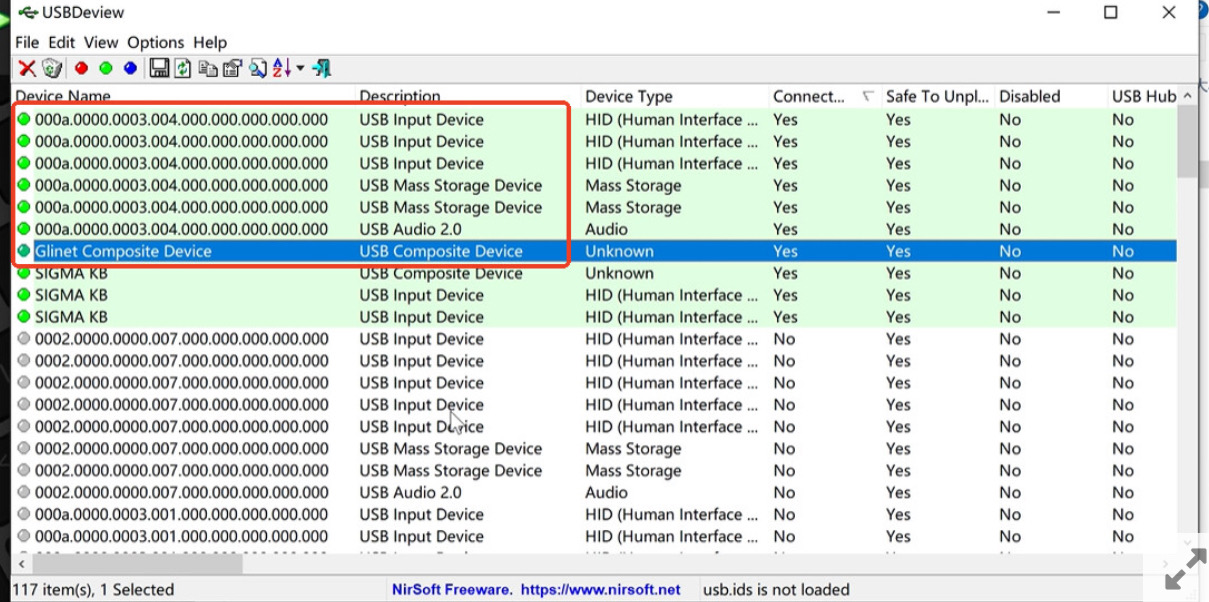
You're kidding, right?
2 Likes
First use the “Customize” option in the UI to set your own vid/pid/serial etc. I suggest copying them from an existing device that’s visible in USBTreeView. That way you’ll have a genuine serial number.
From there you’ll need some basic linux skills. Open the terminal, edit “/etc/kvmd/override.yaml” in your editor of choice, make it look like my screenshot (change the logitech string to match your source vid/pid/serial), then reboot.
If you’re stuck and don’t have any Linux experience paste this into chatgpt and have it give you a step by step.
I wasn’t.. I've had my Comet around a month now and still haven't touched the PiKVM so there is still a lot I don't know about them.
From the post above this one it is the override file which isn't what I want anyways.. I'm trying to find a way to display, specifically the EDID, on what is currently being ‘sent’. If the Comet doesn't like the manually entered EDID it falls back to its default without notification. Trying to figure out if that is the issue I've been having.
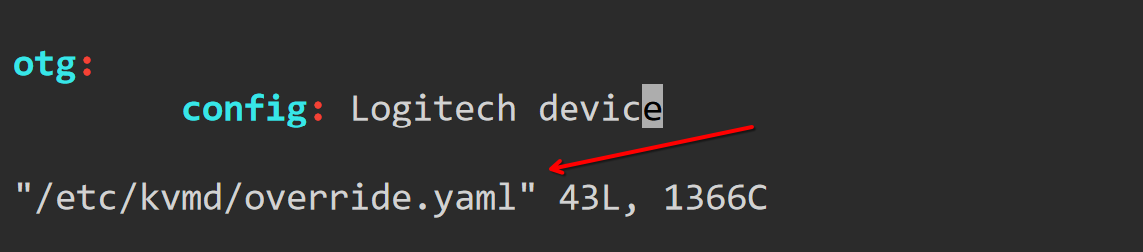
Yes, I figured that out from steveitis post.
Thank you for this.
I understand I need to amend the override as listed, but I’m a little confused on what should go after ‘config:’
You mention making it look like the screenshot but I don’t imagine we need to include the path to the file as that is what we are editing? So would I substitute the words Logitech Device, for the vid,pid and serial.
So for example it would be config: 6940, 6973
I understand I need to amend the override as listed, but I’m a little confused on what should go after ‘config:’
You would just put “Logitech device” or “Cheap Chinese Keyboard” or whatever it is you want in place of the “iConfiguration” option when it’s plugged in. I would just plug in whatever keyboard you have now to another PC and check to see what it shows up as in USBTreeView.
The file path is just the way vim looks. You can ignore it.
Thanks for the quick reply.
So I have a Logitech Keyboard, if I just copy the name and put it after config that should suffice after I have set a custom profile by copying the vendor and product id into the profile in the web interface?
Also, can you explain to me where the Gli Composte device is showing? I am using beta 1.50 and can’t seem to find any reference to it in USBDeview?
If I enable the Mass Storage I get the CAFEBABE serial number for storage but I wouldn’t have this enabled anyway.
I was wondering whether the fix is not needed with the latest FW?
The EDID is different from the USB config options. EDID comes in over HDMI. To view that you need a different tool. I recommend a tool called MonitorInfoView from Nirsoft. For the USB stuff it’s USBTreeView from Uwe Sieber.
Both tools let you see what the comet is outputting in it’s raw form, as well as compare that to your existing devices so you can copy/paste.
If this is a bit too complicated for you I don’t blame you. It is complicated. Still, I would suggest that you not risk playing with this someplace it wouldn’t be welcomed if you don’t understand what these things are (or even if you do, really).
1 Like
I’m using USBTreeView , and I made a mistake in the earlier post. It’s not from Nirsoft. It’s from Uwe Sieber. I’m not sure if it’s also visible in USBDeview.
It’s part of whats referred to as the iConfiguration options for the USB device. Specifically it’s included as the language and could be used to spot these by anyone who knows what they’re doing and is looking for them.
I can think of four or five other ways to spot them as well even after fixing that. If it’s important to you, I would just skip it for now. This device wasn’t designed to be stealthy, so if you’re planning to use this count on it being detected eventually.
Thanks again
I have used both USB Tree View and Usbdviewer but can find no reference to a Gli device liisted both when using a preset profile and custom, I copied my keyboard details and incremented the serial no so I could be sure both were seen and they were. I think 1.50 maybe has removed this naming convention without the need to do a file edit unless I am just missing it but I searched in both tools and they found no match for variations of gli.
I am using my own device for testing so no concerns re stealth although I would be interested to hear what other things you think may make iit traceable?
Hoping this is the case.
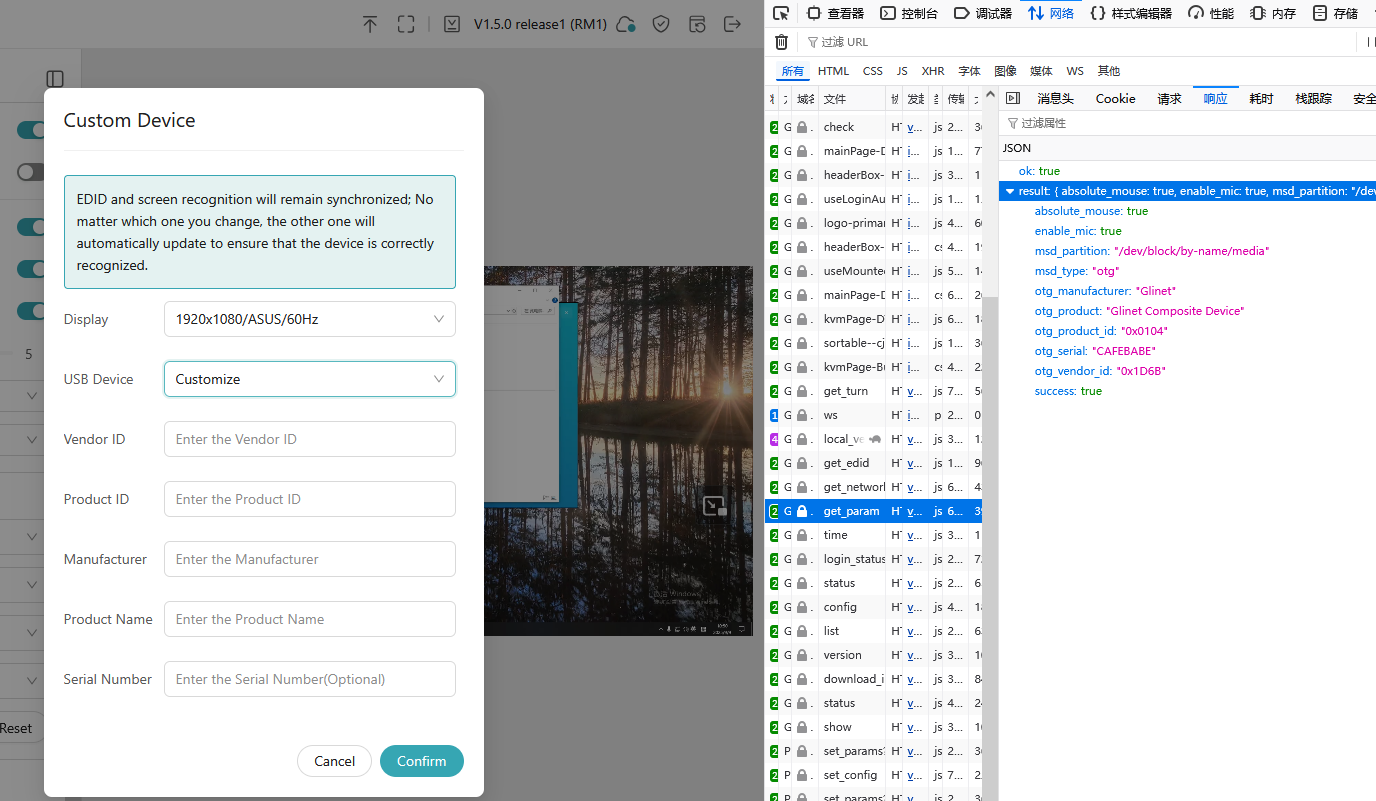
In future versions, we will automatically fill in the blanks here so that you won't have to guess what should be entered.
2 Likes
Thanks for this update.
So if the serial number is left blank does this result in the default of ‘CAFEBABE’ being populated in the present firmware?