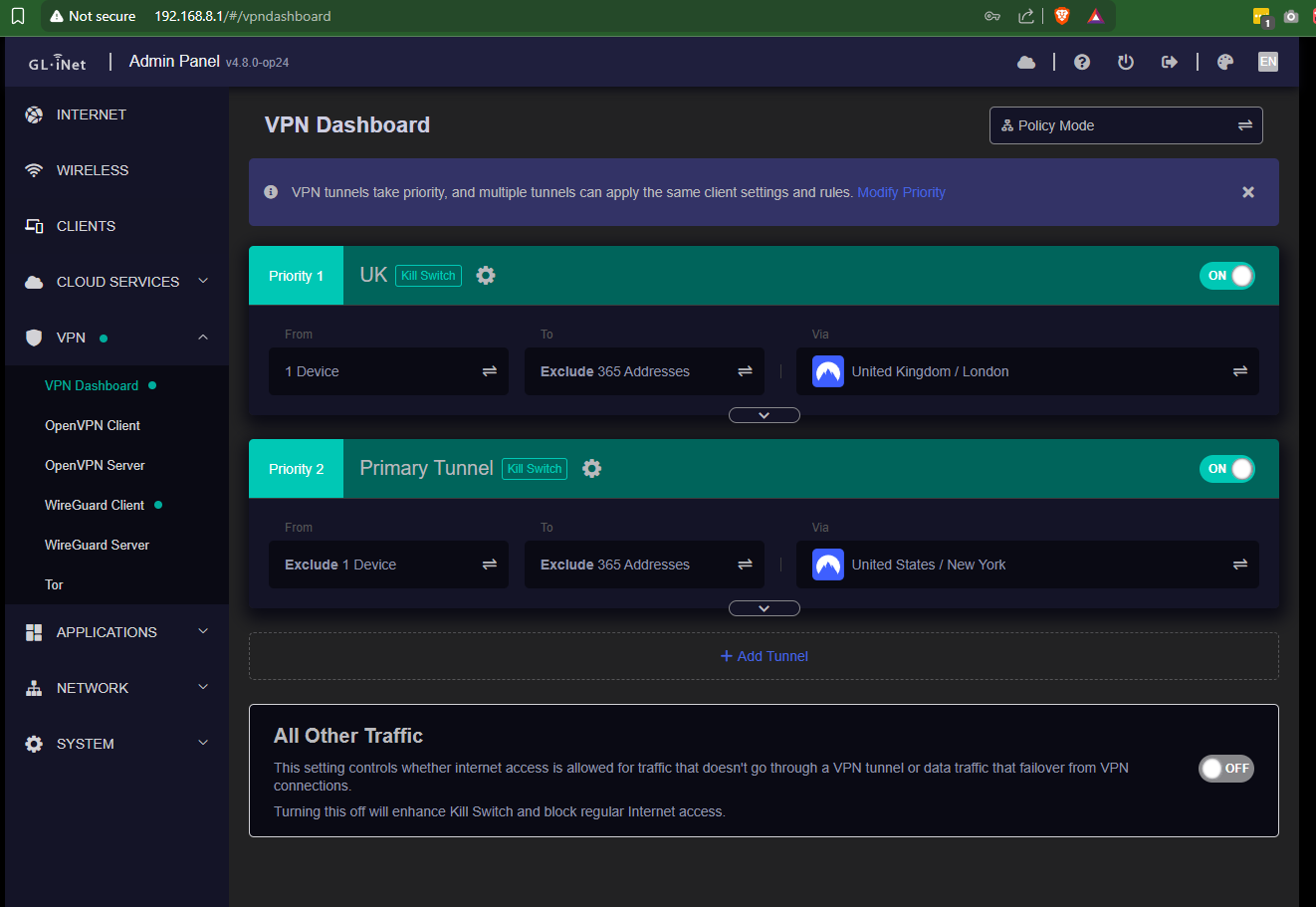
I am observing a strange behavior with my configuration, and I'm wondering whether it's a firmware bug or just my stupidity.
I am running v4.8.0-op24 (openwrt-mt6000-4.8.0-op24-0729-1753791445).
I have configured two Wireguard tunnels - one to the UK and another to the US, with both tunnels configured with the same exclusion list.
My laptop is connected to the router (Flint 2) via Ethernet.
I am seeing a situation where:
A host (by domain name) in the exclusion list is still being routed via the tunnel. [0]
Another host (by IP address) in the same exclusion list is not being routed at all. [1]
If I remove the IP host from the exclusion list, then it gets routed via the tunnel.[2]
This is very weird!
[0]
 C:\Users\odhiambo>tracert panafcon.net

Tracing route to panafcon.net [160.119.248.106]
over a maximum of 30 hops:

  1    <1 ms    <1 ms    <1 ms  console.gl-inet.com [192.168.8.1]
  2   181 ms   181 ms   180 ms  10.5.0.1
  3   181 ms   181 ms   180 ms  ^C
C:\Users\odhiambo>
[1]
C:\Users\odhiambo>tracert 62.169.28.150

Tracing route to eu.kictanet.or.ke [62.169.28.150]
over a maximum of 30 hops:

  1     *        *        *     Request timed out.
  2  ^C
C:\Users\odhiambo>
[2]
C:\Users\odhiambo>tracert 62.169.NN.150

Tracing route to eu.XXXX.or.ke [62.169.NN.150]
over a maximum of 30 hops:

  1     1 ms    <1 ms    <1 ms  console.gl-inet.com [192.168.8.1]
  2   181 ms   181 ms   181 ms  10.5.0.1
  3   182 ms   181 ms   191 ms  5.226.142.1
  4   182 ms   181 ms   181 ms  ae1.rt0-hex.ldn.as25369.net [5.226.136.11]
  5   182 ms   181 ms   182 ms  ldn-b2-link.ip.twelve99.net [62.115.146.214]
  6   182 ms   182 ms   182 ms  ldn-bb2-link.ip.twelve99.net [62.115.120.238]
  7     *        *        *     Request timed out.
  8   191 ms     *      194 ms  ddf-b3-link.ip.twelve99.net [62.115.135.147]
  9   195 ms   195 ms   192 ms  anonymous-ic-386520.ip.twelve99-cust.net [213.248.70.155]
 10   200 ms   200 ms   199 ms  contabofrance-ic-390813.ip.twelve99-cust.net [62.115.45.149]
 11     *        *        *     Request timed out.
 12     *        *        *     Request timed out.
 13   201 ms   200 ms   200 ms  eu.XXXX.or.ke [62.169.NN.150]
This is driving me crazy, although I believe I am still sane and something is wrong in the outer.
I have another router, running vanilla OpenWrt, configured with the same exclusions in PBR and it behaves the way I expect. So the problem definitely isn't in layer 8
192.168.69.1 is the router while 192.168.1.1 is the GW of this router on the WAN side as it is cascaded to my ISPs router. The same cascading is done for the Flint 2.
As you can see, the two hosts are routed via the WAN, while amazon.com is routed via the tunnel.
C:\Users\odhiambo>tracert 62.169.NN.150

Tracing route to eu.XXXX.or.ke [62.169.NN.150]
over a maximum of 30 hops:

  1     3 ms     2 ms     2 ms  DL-WRX36.wash.lan [192.168.69.1]
  2     3 ms     2 ms     2 ms  192.168.1.1
  3     5 ms     4 ms     4 ms  192.168.222.1
  4     *        *        *     Request timed out.
  5     *        8 ms     *     41.215.131.122
  6    11 ms    10 ms    11 ms  197.232.2.114
  7    61 ms    61 ms    61 ms  195.229.27.133
  8    62 ms    61 ms    62 ms  5.195.70.164
  9    64 ms    65 ms    63 ms  194.170.186.119
 10   187 ms   185 ms   185 ms  mei-b6-link.ip.twelve99.net [62.115.33.68]
 11   181 ms   181 ms   182 ms  ffm-bb1-link.ip.twelve99.net [62.115.136.248]
 12   181 ms   180 ms   180 ms  ddf-b3-link.ip.twelve99.net [62.115.135.151]
 13   195 ms   187 ms   224 ms  anonymous-ic-378570.ip.twelve99-cust.net [213.248.100.207]
 14   191 ms   191 ms   191 ms  contabofrance-ic-390813.ip.twelve99-cust.net [62.115.45.149]
 15     *        *        *     Request timed out.
 16     *        *        *     Request timed out.
 17   191 ms   190 ms   190 ms  eu.XXXX.or.ke [62.169.NN.150]

Trace complete.

C:\Users\odhiambo>tracert panafcon.net

Tracing route to panafcon.net [160.119.248.106]
over a maximum of 30 hops:

  1     2 ms     2 ms     2 ms  DL-WRX36.wash.lan [192.168.69.1]
  2     3 ms     2 ms     2 ms  192.168.1.1
  3     5 ms     5 ms     5 ms  192.168.222.1
  4     *        *        *     Request timed out.
  5     *        *        *     Request timed out.
  6     *        *        *     Request timed out.
  7     *        *        *     Request timed out.
  8     *        *        *     Request timed out.
  9    63 ms    62 ms    62 ms  80.84.20.150
 10    65 ms    66 ms    66 ms  102.221.176.217
 11    68 ms    66 ms    66 ms  102.221.177.207
 12    66 ms    67 ms    66 ms  102.221.176.166
 13    77 ms    92 ms    83 ms  102.218.212.18
 14     *        *        *     Request timed out.
 15     *     ^C
C:\Users\odhiambo>tracert amazon.com

Tracing route to amazon.com [205.251.242.103]
over a maximum of 30 hops:

  1     2 ms     2 ms     2 ms  DL-WRX36.wash.lan [192.168.69.1]
  2   238 ms   237 ms   237 ms  10.5.0.1
  3   238 ms   238 ms   238 ms  198.178.224.3
  4   238 ms   238 ms   239 ms  10.10.0.5
  5   239 ms   239 ms   239 ms  nyiix1-peering.amazon.com [198.32.160.244]
  6     *        *        *     Request timed out.
  7     *        *        *     Request timed out.
  8     *        *        *     Request timed out.
  9     *        *     ^C
C:\Users\odhiambo>
So I still think it's a bug in the Flint 2.
Back to the Flint 2, with the 2nd tunnel shutdown: Everything is still being routed via the tunnel despite the exclusion!
C:\Users\odhiambo>tracert amazon.com

Tracing route to amazon.com [52.94.236.248]
over a maximum of 30 hops:

  1    <1 ms    <1 ms     *     console.gl-inet.com [192.168.8.1]
  2   158 ms   159 ms   158 ms  10.5.0.1
  3   159 ms   158 ms   158 ms  no.rdns.ukservers.com [5.101.136.145]
  4   158 ms   158 ms   159 ms  199.245.24.170
  5   159 ms   164 ms   159 ms  ^C
C:\Users\odhiambo>tracert 62.169.28.150

Tracing route to eu.XXXX.or.ke [62.169.NN.150]
over a maximum of 30 hops:

  1     *        *        *     Request timed out.
  2     *        *        *     Request timed out.
  3  ^C
C:\Users\odhiambo>tracert panafcon.net

Tracing route to panafcon.net [160.119.248.106]
over a maximum of 30 hops:

  1     1 ms    <1 ms    <1 ms  console.gl-inet.com [192.168.8.1]
  2   159 ms   159 ms   158 ms  10.5.0.1
  3   159 ms   159 ms   159 ms  no.rdns.ukservers.com [5.101.136.145]
  4   159 ms   159 ms   158 ms  ae2.mx1.thw120.as42831.net [78.110.170.0]
  5   160 ms   159 ms   159 ms  ^C
C:\Users\odhiambo>
I decided to reset the Flint 2 to factory default. Then I configured 1 tunnel only and the result looks like a disaster to me. Look at these results after I enabled exclusions in the tunnel. panafcon.net is in the exclusion list, but is still being routed via the tunnel.
62.169.NN.150 is in the exclusion list and now getting routed, rightly, via the WAN.
C:\Users\odhiambo>tracert panafcon.net

Tracing route to panafcon.net [160.119.248.106]
over a maximum of 30 hops:

  1     1 ms    <1 ms     *     console.gl-inet.com [192.168.8.1]
  2   180 ms   180 ms   180 ms  10.5.0.1
  3   181 ms   181 ms   180 ms  ^C
C:\Users\odhiambo>tracert 62.169.NN.150

Tracing route to eu.XXXX.or.ke [62.169.NN.150]
over a maximum of 30 hops:

  1     1 ms    <1 ms    <1 ms  console.gl-inet.com [192.168.8.1]
  2     2 ms     1 ms     1 ms  192.168.1.1
  3     3 ms     3 ms     3 ms  ^C
C:\Users\odhiambo>
I use stangri's PBR on all my other routers and it works super!
On the Flint 2, I just want to stick to what they offer. I hope this will help them improve their implementation.
Stangri's PBR implementation is so much refined than what I am having on Flint 2.
Yes. Yes it does. Don't think I haven't been criticizing GL.iNet for the what they're trying to pass off as PBR.
I'm in a similar postion as I build out conf for my Slate AX running v4.8.0-beta9... but I'm going to flash back over to OWRT-SNAPSHOT when done as I'm not travelling ATM. There's no reason you can't flash back to GL firmware the next time they release a 'stable'. Just pull your confs thru a backup in LuCI & keep the 'pure' tarballs segregated from 'GL.iNet's'.
I use OWRT 'sysupgrade' images to get off GL thru the GL GUI -> Upgrade then Uboot's WebGUI to flash back whatever's the latest stable for a shakedown. It takes all of ~3 min to flip... including restoring the tarball.