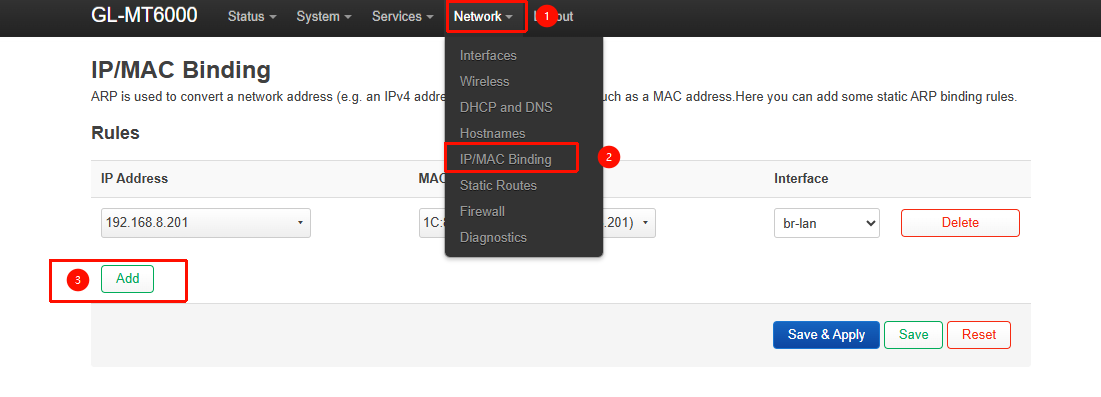
So i’ve recently bought a MT-6000 and I’ve pretty much set everything up except for wake on lan over internet/ wake on wan. Old router did this by with mac binding, which I later found is called static arp on OpenWRT.
Now, by using ip neigh replace 192.168.0.100 lladdr 68:05:ca:7f:10:c2 dev br-lan nud permanent it works the way i want it but only until the first restart, where it gets removed and starts going through the states all the way to FAILED, in the span of 30 minutes.
So i was thinking, would a script that checks the ARP table for Reachable or Stale and do the command if it’s either work?
I have no coding skills but a quick AI prompt later It spit out this:
#!/bin/sh

# Configuration
TARGET_MAC="68:05:ca:7f:10:c2"
TARGET_IP="192.168.0.100"
TARGET_DEV="br-lan"
CHECK_INTERVAL=30  # seconds

LOG_TAG="arp-monitor"

log_msg() {
    logger -t "$LOG_TAG" "$1"
}

make_permanent() {
    ip neigh replace "$TARGET_IP" lladdr "$TARGET_MAC" dev "$TARGET_DEV" nud permanent
    if [ $? -eq 0 ]; then
        log_msg "Made $TARGET_IP ($TARGET_MAC) permanent"
    else
        log_msg "Failed to make $TARGET_IP permanent"
    fi
}

log_msg "Starting ARP monitor for $TARGET_IP ($TARGET_MAC)"

while true; do
    # Get the current state of the target IP
    STATE=$(ip neigh show "$TARGET_IP" | grep -i "$TARGET_MAC" | awk '{print $NF}')

    if [ -n "$STATE" ]; then
        case "$STATE" in
            REACHABLE|STALE)
                log_msg "Detected state: $STATE for $TARGET_IP"
                make_permanent
                ;;
            PERMANENT)
                # Already permanent, do nothing
                :
                ;;
            *)
                # Other states: INCOMPLETE, DELAY, PROBE, FAILED
                log_msg "Current state: $STATE for $TARGET_IP"
                ;;
        esac
    fi

    sleep "$CHECK_INTERVAL"
done
It also gave me a startup script to place in /etc/init.d/
I’ve gone through quite a few threads about this but no one seems to suggest this as a solution so if there is anyone more knowledgeable than me that can chime in: will it work and if not, why not?
Also for bonus points, the script is entirely generated in Claude, so if it wouldn’t be too much bother, I’d appreciate a bit of code review.
I’m already using address reservation so the ip doesn’t change when the arp state changes to FAILED.
Yes it’s for WoL. I came across the luci package but that would need me to setup remote access to the router then go through to many steps for this to be a workable solution for me.
I use WoL daily and my current setup is a shortcut on my phone that sends the magic packet to the WAN ip on port 9 and works seamlessly.
Sending a magic packet to the broadcast adress was also something I tried but no magic packet was reaching the mic.
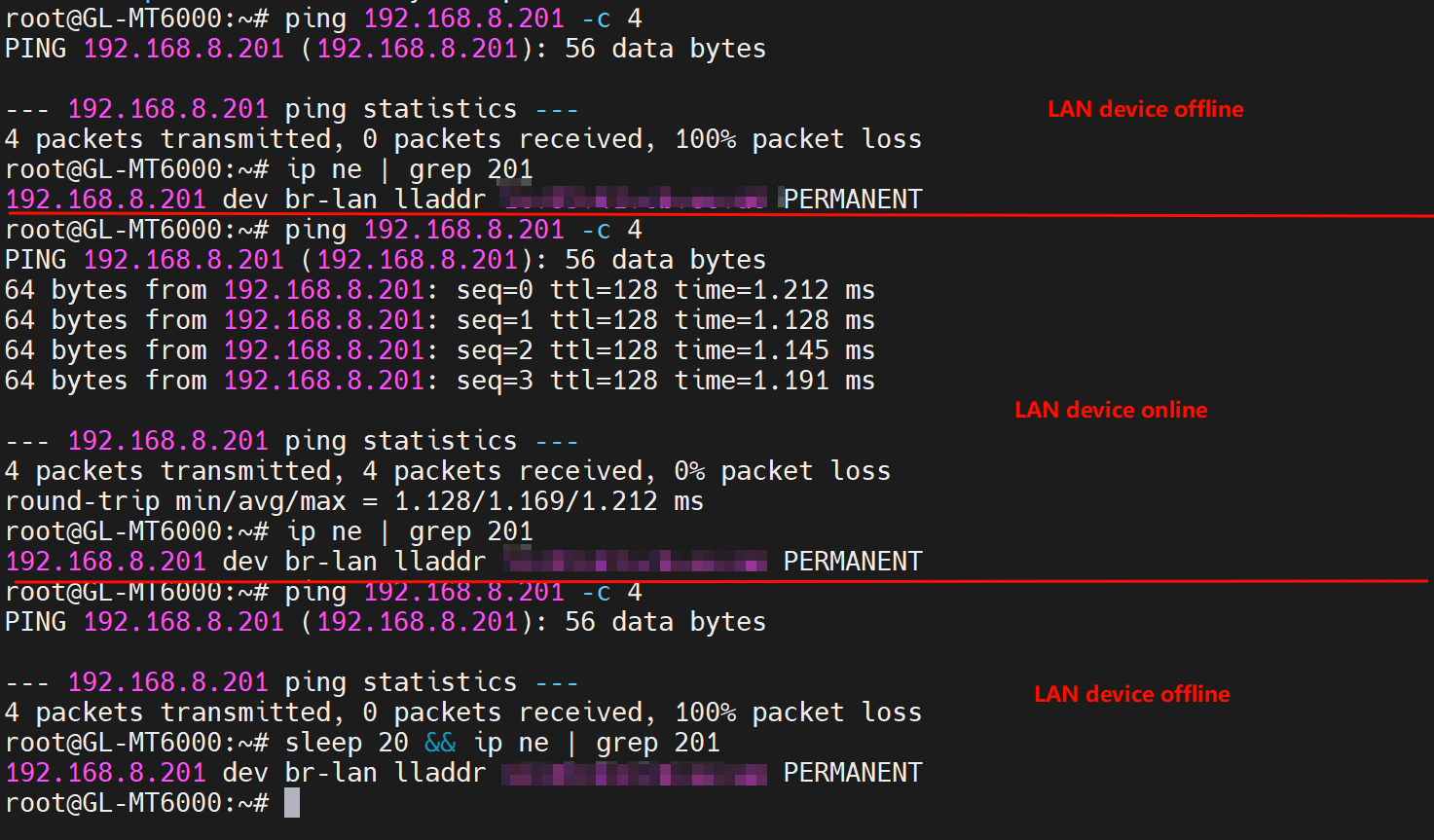
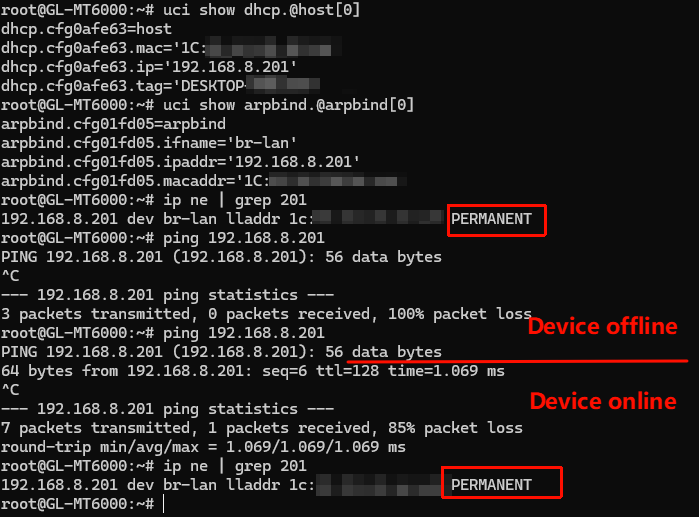
My local tests show that the corresponding ARP entry remains in PERMANENT state regardless of whether the device is connected or disconnected, or whether the router is rebooted again.
After restarting the router state is PERMANENT. Shutting down the machine still has it permanent, but after starting it back up with WoL, it goes to DELAY and REACHABLE, at which point it doesn’t change back to PERMANENT.
It’s a bit strange, because no matter how we test here, it’s always PERMANENT.
This includes repeatedly connecting/disconnecting LAN devices like what you do.
It hasn’t been to long since last post, so I’ll just add here because I had the exact same problem and the exact same use case.
If OP had the same problem as me, I suspect that the issue was with DHCP, specifically the default reserved IP option and the associated lease.
When using a non-reserved IP, the arp/ip neigh entry remains permanent (regardless of how it was added), as expected.
I can only assume that there’s some overwrite that happens in the table for reserved entries whenever the DHCP lease is distributed, which is consistent with the issue only occuring once the target device is turned on.
One resolution is to set the target device with a static IP, otherwise if you want to use DHCP, you’ll have to live with the non-reserved IP and just hope no one IP squats it (this should only really be relevant in a heavily congested environment), otherwise the target device should generally receive the same IP anyway.
Other than setting a static IP on the target device, is there any other way to reserve an IP other than through DHCP leases? Or is there a way to change the reserved leases so they don’t overwrite entries?
I’m not entirely sure why it isn’t working on your end. May need to seek support from the OpenWrt community or the original author of arpbind, since this plugin isn’t maintained by us.
Alternatively, you could try using the script shared by the OP as a workaround?
I followed methods described in this post, but after some minutes ip is not binded to mac address and command to wake the pc from outside (WOL android app mobile) is not working.